GitHub and requirements traceability — code, work and requirements in one place
Products and tasks that carry software link to their GitHub source; commits, pull requests, release notes, builds and the SBOM show in PORTWARE; an unbroken trace from requirement to task to code.
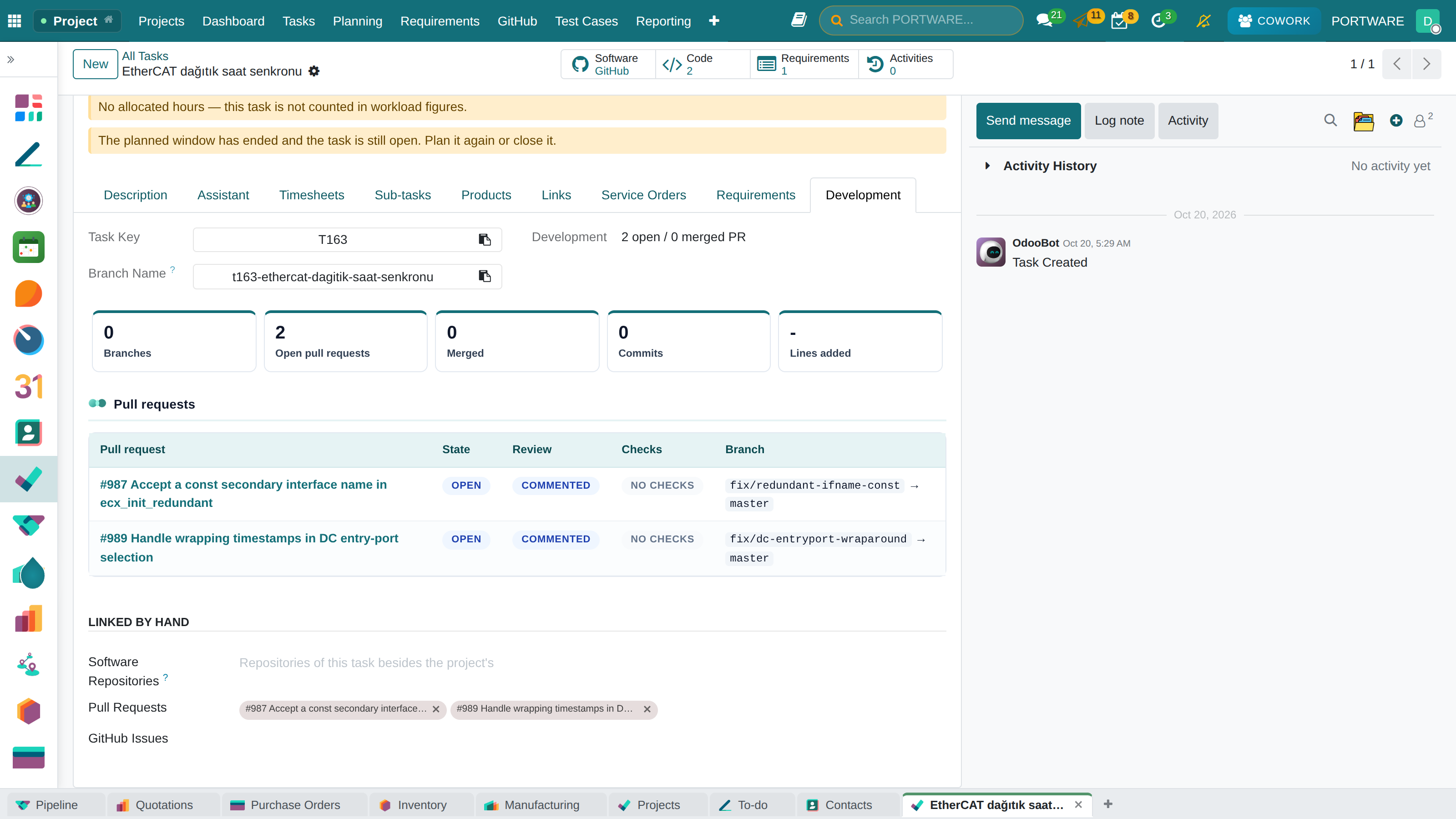
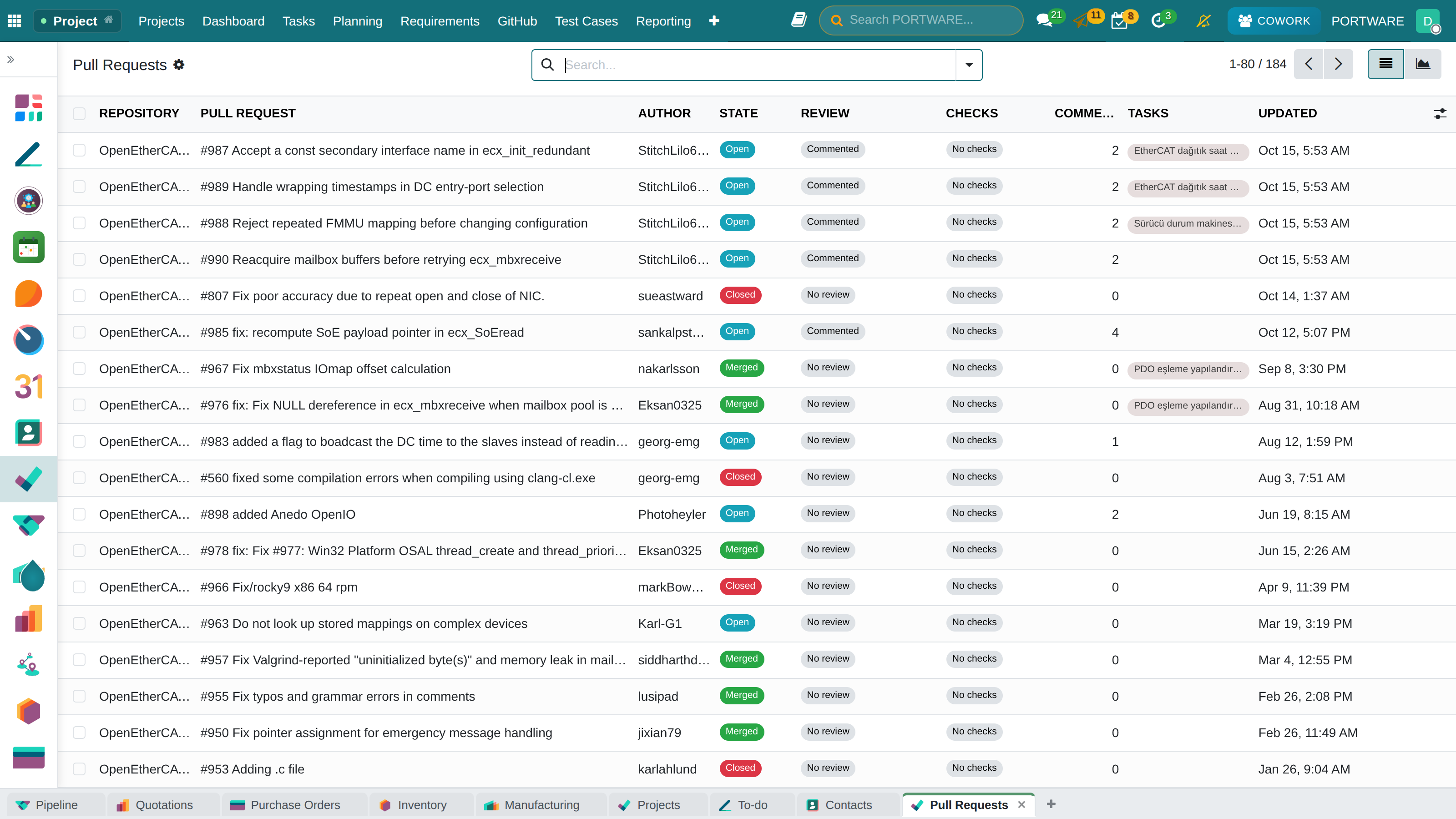
- Development panel on the taskBranches, commits, PR state, review and checks at a glance.
- Linked by keyT428 in a branch, commit or PR links it by itself.
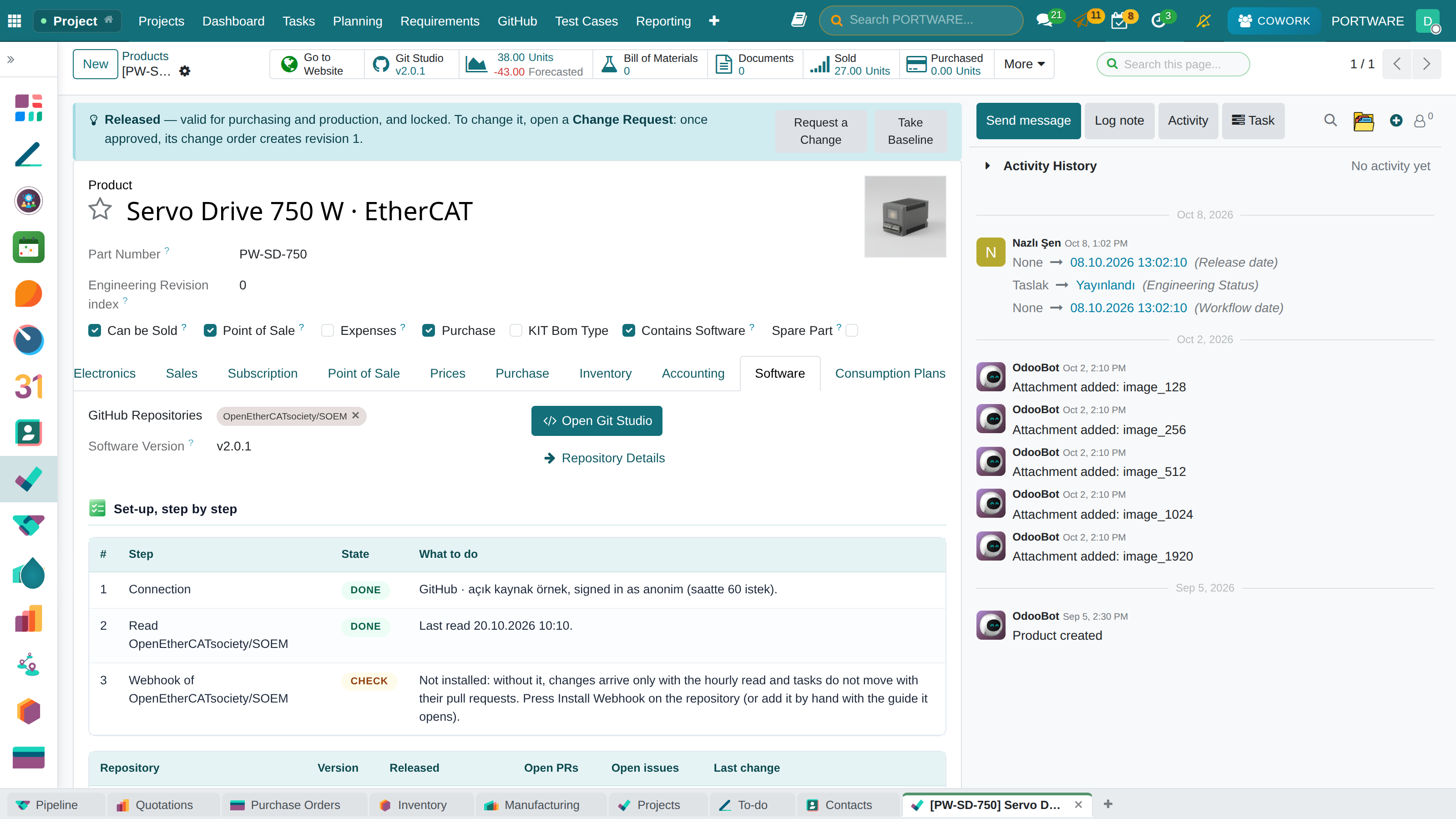
- Product version in sightA software product's GitHub button shows the latest release and its notes.
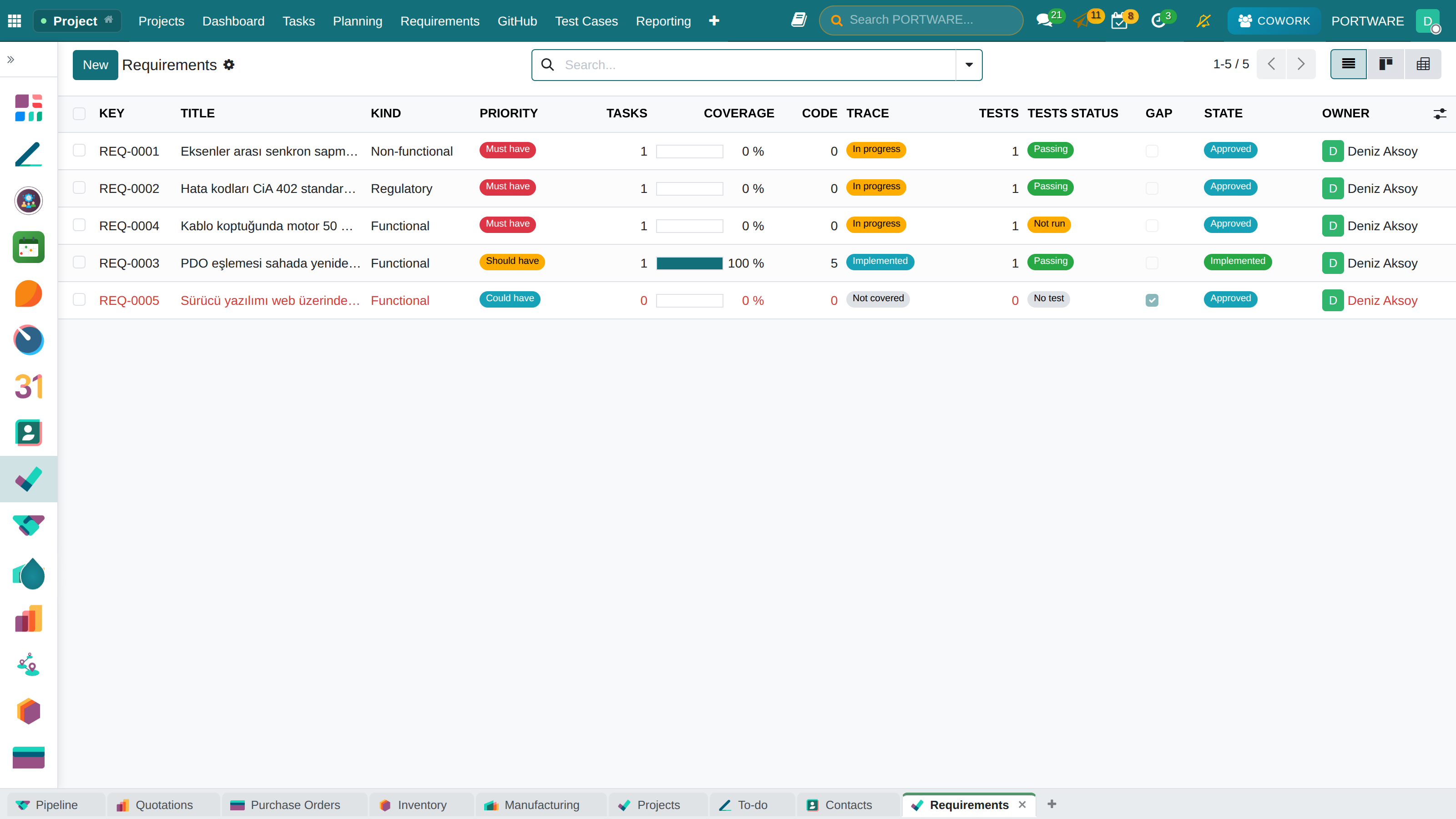
- Requirement to codeThe matrix shows, with evidence, what is covered and what is still a gap.
Where it appears: Project · GitHub menu, task form Development tab, project GitHub tab · Product form Software tab · Project · Requirements
Why it was needed
For a product with software, three questions were answered in separate tools: where is the code, which change closed which task, which requirement is really met. Sales and support could not open GitHub; developers updated task status by hand. The gap Jira, Linear and Polarion close is now closed inside PORTWARE.
Connection
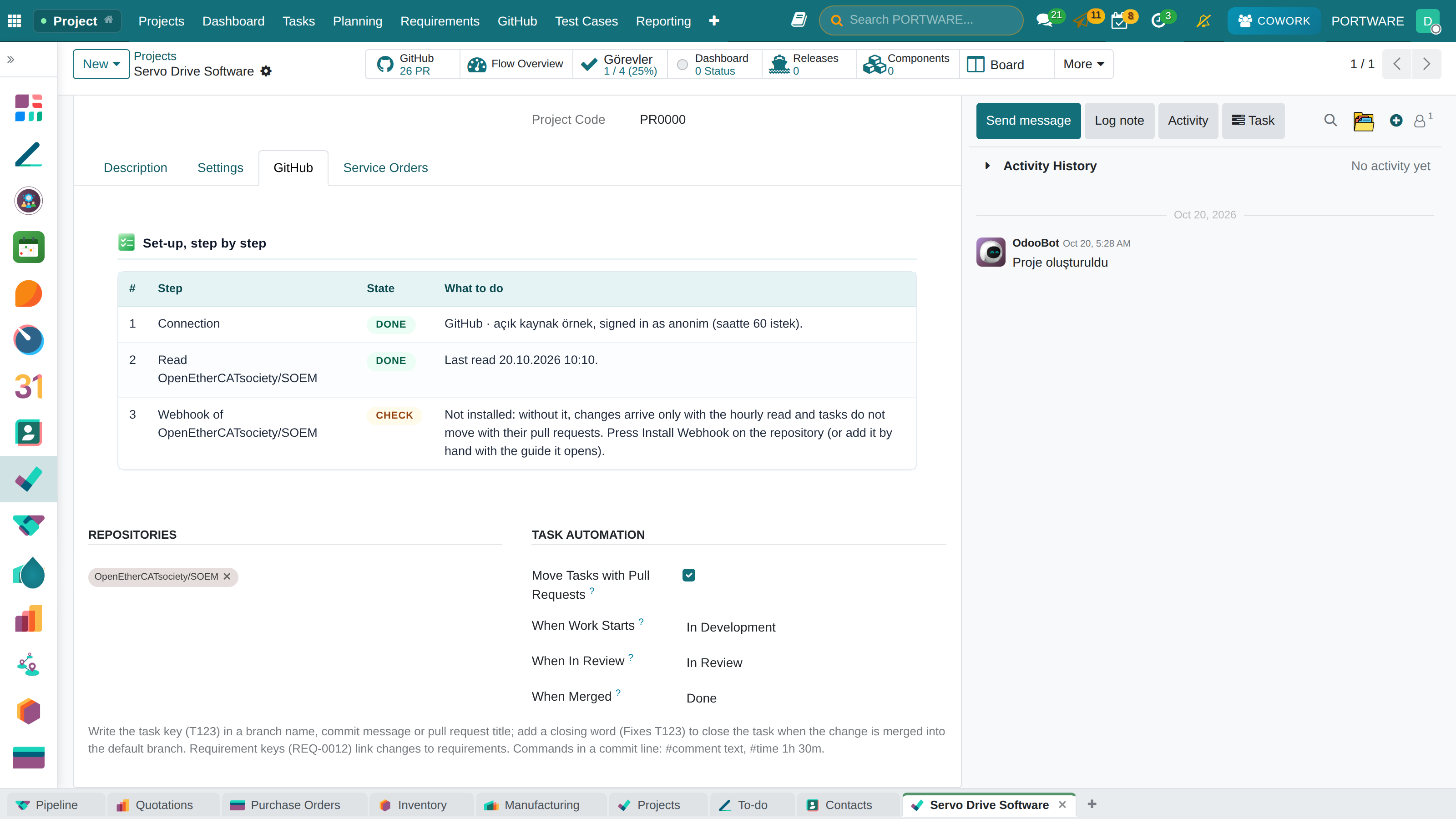
- Two ways in: a fine-grained access token (small team) or a GitHub App (organisation; 15,000 requests an hour, not tied to a person). A GitHub Enterprise Server URL works too.
- Secrets are write-only: a token is typed once and never shown again.
- Live updates: one click installs the repository webhook; its signature (HMAC-SHA256) is verified and a delivery is processed once. Without a webhook a 30-minute sync runs; unchanged data costs nothing from GitHub's request budget.
The development panel on a task
The task form's Development tab: the task key and a suggested branch name (with a copy button), branches, commits, pull requests with state, review and checks. Create Branch on GitHub opens the branch from the head of the default branch.
Links form by themselves; developers learn nothing new:
T428,T-428,TASK-428or the task's PORTWARE URL in a branch name, commit message, PR title or description.Fixes T428(GitHub's nine closing words): closes the task when the change is merged into the default branch.T428 #comment text #time 1h 30m: the commit writes the task comment and logs time, only for an author whose e-mail matches a PORTWARE user.
Project automation
The project's GitHub tab: repositories and optional automation. A task moves to "work started" when its branch or draft PR appears, to "in review" when the PR is opened for review, to "done" when it is merged into the default branch. Tasks only move forward.
Products with software
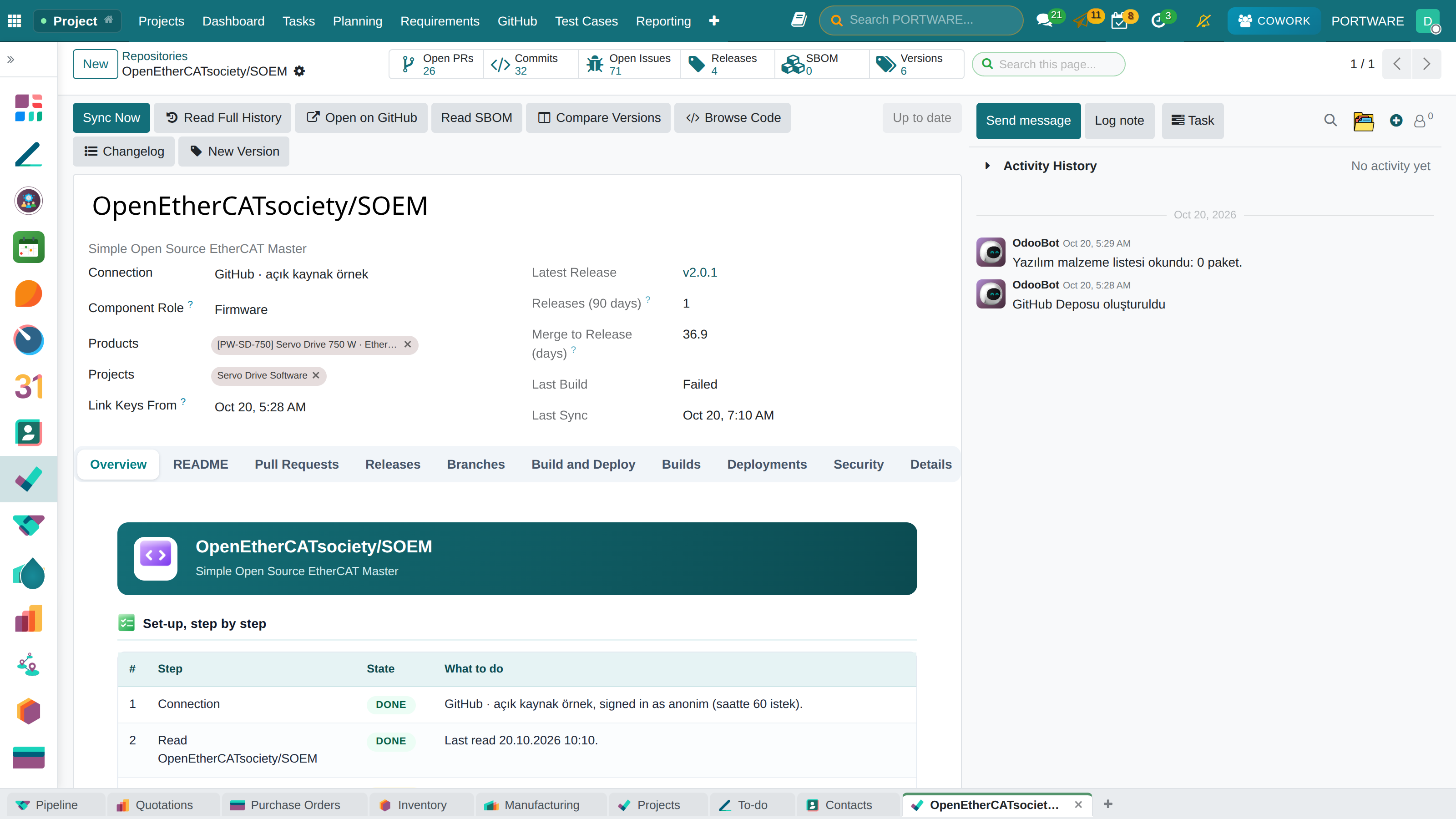
Contains Software on the product form is a product type and behaves the same in every installation. On such a product the GitHub button shows the latest release tag and opens the repository; the Software tab lists the repositories, latest release, open PRs and issues and the last change. A new release posts a note on the product. Read SBOM brings the dependencies with versions and licences (software bill of materials; EU Cyber Resilience Act evidence).
Requirements traceability
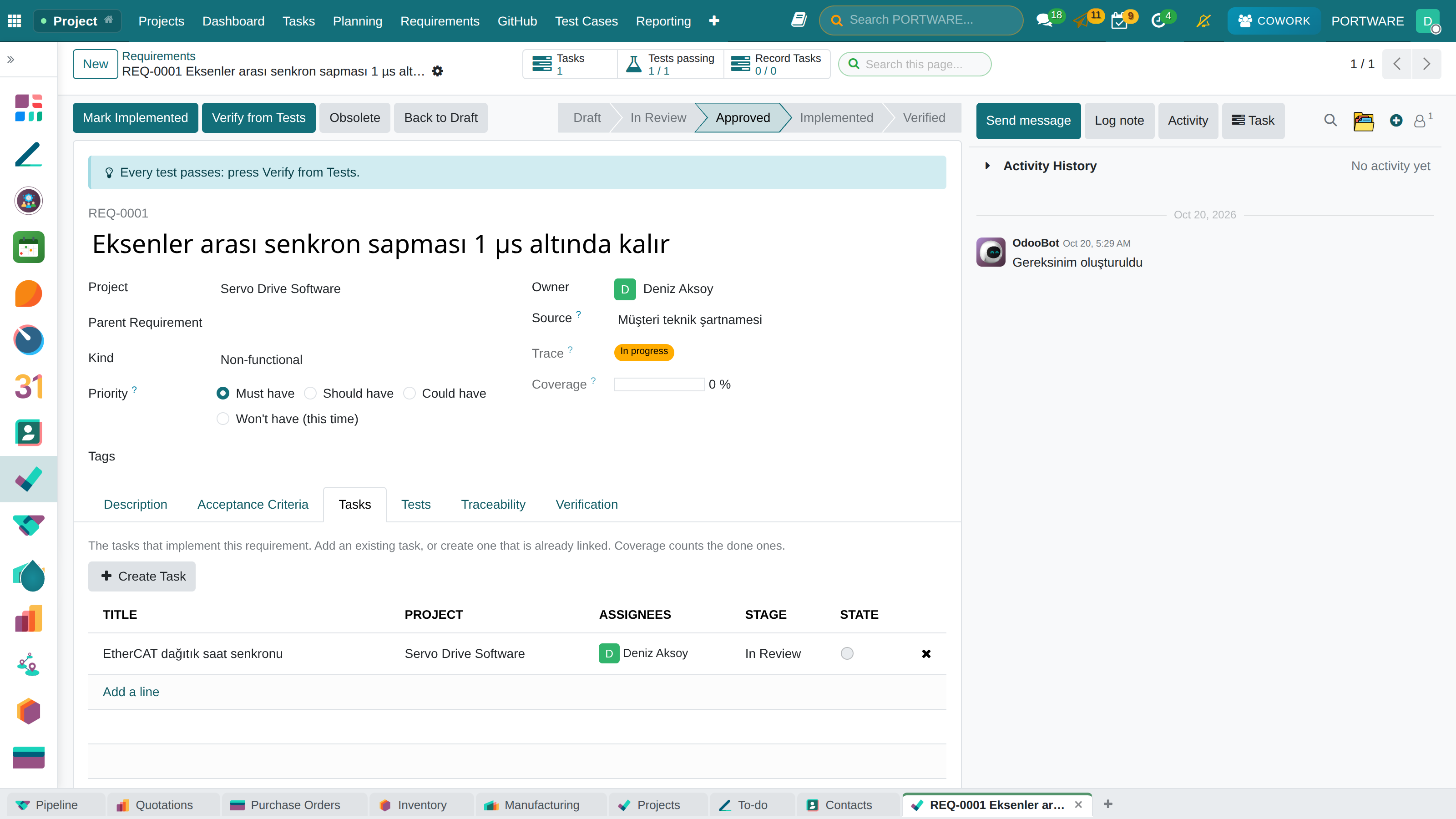
Project · Requirements: every requirement has a key (REQ-0001), a kind, a MoSCoW priority, acceptance criteria and a verification method. The list is the traceability matrix: tasks, coverage, code changes and the trace status — not covered, in progress, implemented, verified. When the state claims more than the evidence shows, the row is flagged as a Gap. REQ-0012 in a PR makes that change evidence for the requirement.
Verification (V-model). On a requirement's Tasks tab pick the tasks that implement it, or open one with Create Task. The Tests tab holds the test cases (TC-0001) that prove the acceptance criteria: level (unit, integration, system, acceptance), manual or automated (a test method or a CI job), preconditions, steps, expected result. Every test run records the result (passed, failed, blocked, skipped), the version tried (software version, part revision), the environment and the evidence; a failed run opens a defect task linked to the requirement in one click. The line on the form says the next step; when every test passes Verify from Tests notes which test passed on which version. With the PLM installed the change order's Verification tab shows the requirements it affects and the runs that prove them.
PORTWARE Git Studio
The product's GitHub button no longer jumps to GitHub; it opens the product's software studio. Opening GitHub is one button inside it. A separate Git Studio app brings software products, versions, baselines, reviews, builds and security alerts together.
| Tab | What it shows |
|---|---|
| Overview | Software version, current baseline, every repository (with its role: firmware, application, library, hardware design…), open work, failing builds |
| Versions | Tags and releases; each version's change level (major/minor/patch) and commit count |
| Changes | Recent commits with their type (feat, fix, docs…), contributors; a coloured line-by-line diff on the commit form |
| Reviews | Pull requests, review and check state, comment count; the conversation and Comment on GitHub on the PR form |
| Baselines | Product versions: which version of each repository, for which hardware revision |
| Customers | Which baseline runs at which customer, on which serial numbers |
| Pipelines | GitHub Actions runs and deployments per environment |
| Security | Dependabot alerts and the software bill of materials |
| Requirements | The product's requirements; the tasks that implement them, the tests that prove them and their last results |
The overview opens with Insights: a failing build, open security alerts, approved requirements without evidence, failing tests, customers on an older version, pull requests waiting for a week, changes piled up since the last version. Every tab starts with one line on what it shows and how to use it.
Versions and changelog. A release's Build Changelog compares it with the previous version, groups the commits by Conventional Commits type (features, fixes, breaking changes…), lists the pull requests and requirements in the range and suggests the Semantic Versioning level. Compare Versions shows everything between two versions with file diffs; New Version creates a tag, or a release with generated notes, on GitHub.
Software baseline (configuration management). As EIA-649 / ISO 10007 put it: which version of every repository makes up one version of the product? A baseline holds the product, the version and the hardware revision it is valid for; each line pins a repository to a tag. Release Baseline freezes every line to its exact commit and records the product's requirements with that day's trace status. Compare with Previous reports, repository by repository, what changed between two product versions and whose trace moved.
Code browser and issues from tasks. Browse Code reads folders and files at any version. Open as GitHub Issue on a task opens it in the repository as an issue, linked both ways.
Who does what. Reading is open to everyone and changes nothing on GitHub. The actions that write to GitHub (New Version, Comment on GitHub, Open as GitHub Issue) use the company's credential, so they are open only to the GitHub manager role. A released baseline cannot be changed or deleted; only a project manager may reopen it as a draft. A version, branch or file path typed into PORTWARE cannot leave the repository: paths such as .. are refused.
Workbench. A light development environment: an explorer on the left, editor tabs in the middle, a status bar below. Browse opens every file of a version; Compare compares two versions the way WinMerge does: the whole tree is listed (changed, added, removed, renamed, identical), a file opens with both versions side by side or inline, whitespace can be ignored, unchanged parts fold and the arrows jump to the next difference. The editor is VS Code's (Monaco, open source): Notepad++ colours or a dark Monokai theme, block folding, coloured brackets and the enclosing function kept in view while scrolling. Images compare side by side, by swipe or by onion skin; PDFs preview; binary files show their size, fingerprint and first bytes, and both versions download. Any file also opens on GitHub or in VS Code for the web (github.dev). Versions are picked from a list: tag, branch, baseline or commit.
A task's software. A task's GitHub button sums up its software before any code: did the task cause development (commits, pull requests, branches, lines), which version holds all of its code, the released baselines with that version and the customers running them, the requirements it meets and their tests. Show the Task's Changes opens the Workbench. The product's Requirements tab is a clickable list: tasks, tests passing, code changes. In very large repositories (when GitHub cannot return the tree in one answer) the explorer reads each folder as it is opened, and a comparison walks only the folders whose content changed.
Workbench tools. <kbd>Ctrl</kbd>+<kbd>P</kbd> finds a file from a few letters of its name; Outline lists the open file's functions, classes and headings (C/C++, Python, JavaScript, QML, Markdown, XML); History shows the commits that changed the file and compares each with the one before; breadcrumbs, zoom and a minimap sit on top; <kbd>?</kbd> opens the shortcuts. The welcome screen shows where, what kind and by whom the selected range changed. Ask Cowork prepares the question that explains the open file or the difference in the Cowork panel; sending it is up to the user.
Build and deploy. Builds and deployments run where the code lives, on GitHub Actions. A repository's Build and Deploy tab reads its workflows; each gets a role (build, test, deploy, release). A workflow with the workflow_dispatch trigger starts from Build or Deploy on the repository header, on a branch or a tag, with its inputs (a GitHub manager; the credential needs "Actions: Read and write"). Runs appear under Builds.
Settings. Project › Configuration › Settings › Git Studio: tag prefixes that are not versions (default backup/, archive/, tmp/, wip/) and whether a comparison opens with the last two releases or the last two tags.
Customer configurations. A released software baseline is pinned to a customer, serial numbers and a site. A device runs one software at a time; a serial number's form shows that device's software. When the product releases a newer baseline, customers behind it show in yellow; Propose Upgrade creates a planned configuration and a report of what would change. Customer-specific software is a customer variant baseline.
With the PLM. With the PLM installed (PORTWARE Git Studio · PLM installs by itself) a software baseline carries the change order that released it, the hardware baselines it is valid with and the compatible part revisions; the change order and the hardware baseline have a Software tab.
Cowork and MCP. Cowork and AI clients connected through MCP (Claude, ChatGPT, Cursor) list versions, compare two, read a file at any version, give the diff of a file, list a product's baselines, tell which customer runs which software and explain an upgrade's impact. Creating and releasing baselines, pinning versions for customers and proposing upgrades happen with the user's approval. Source code is never written.
Adding the webhook by hand. When the credential lacks "Webhooks: Read and write", Install Webhook does not fail: a guide gives the address, the secret and the events to add it on GitHub by hand; then Mark as Installed.
Delivery figures
The repository overview carries a Delivery row: releases published in the last 90 days, the median days from a change merged into the default branch to the first release containing it (DORA lead time, measured to the release rather than to a deployment) and a pull request's open-to-merge time.
With Cowork
The Cowork assistant answers from the same records and spends no GitHub request:
- "What is the code status of T428?" — branches, pull requests (review, checks), commits.
- "The drive's latest software release and its notes?" — the product's repositories, latest release, open work.
- "Is REQ-0012 met?" or "Any gaps in the Firmware project's requirements?"
- "What happened in the repository this week?" — commits, merged PRs, releases, failing builds.
With an approval card it writes: links a pull request or commit to a task, and creates the task's branch on GitHub.
Releases
With the project tracker installed, a PORTWARE release (1.4) links itself to the GitHub release tagged with the same name (v1.4); the release notes show on the PORTWARE release, which can close itself when GitHub publishes.
Limits
- The first sync reads the latest 300 commits of the default branch; older history stays on GitHub.
- Keys are read from commits, PRs, issues and releases written after the repository was connected (Link Keys From on the repository form): "T17" in an old message is not a PORTWARE task. Older work is linked by hand or by Cowork.
- Review and check details of open PRs are read for the first 10 per sync; the webhook updates every PR as it changes.
- A connection without a token (public repositories only) has 60 requests an hour.
- A section the credential cannot read (pull requests, say) is named on the repository form in a yellow notice with the GitHub permission to add; the other sections keep synchronising. Once the permission is added, that section's history arrives too.
| Module | What it does | Version |
|---|---|---|
| PORTWARE GitHub | GitHub inside PORTWARE: repositories on products and projects, a development panel on every task, requirements traced to code | 19.0.1.6.1 |
| PORTWARE Git Studio | The software lifecycle of a product inside PORTWARE: versions, changes, reviews, pipelines, security, baselines and requirements | 19.0.3.2.4 |
| PORTWARE Requirements | Requirements with acceptance criteria and a traceability matrix from requirement to task, product and verification | 19.0.1.1.0 |
| PORTWARE GitHub Releases for Project Tracker | A PORTWARE release (fix version) shows its GitHub release: tag, date and release notes | 19.0.1.0.0 |
| PORTWARE GitHub for Cowork | Cowork answers from GitHub: a task's code status, a product's software release, a requirement's evidence, a repository's week | 19.0.1.0.0 |