VIII · Communication · Chapter 30
Mail, notifications and everything that goes out
The approval gate for outgoing mail, signatures, calendar invitations, notification channels and not leaking information outside.
When the system sends e-mail
More often than you notice:
- To followers, when you write a message on a record.
- To the customer, when you send a quotation, order confirmation or invoice.
- To participants, in meeting invitations.
- In activity and message notifications, depending on the notification preference.
- In portal invitations and password resets.
That is why "what goes out" is a management matter, not a technical detail.
The approval gate
E-mails leaving the company pass through an approval layer: no mail goes out until a person approves it. The gate stops an internal note going to the wrong recipient or a mail containing test data.
The gate recognises what must pass: system mails such as portal invitations and password resets are not held in the approval queue.
Sender address
The sender address of outgoing mail must match the addresses the server allows. When it does not, the system changes the sender address itself and your mail does not leave from the address you expect. When a mail is reported as "coming from the wrong address", this is where to look.
Signature
Every member of staff has a single, consistent signature in their mailbox. The signature can be edited personally, but the company identity is shared — an organisation where everyone designs a different signature does not look like one organisation from outside.
Calendar invitations
An invitation is a document that leaves the system. Two points matter:
- Links must work. The link inside the invitation lets the participant see the meeting without logging into the system.
- Two note fields, two readers. A meeting has a description (goes into the invitation) and an internal note (does not). Pay attention to which box you write in; this is said for the second time in the book because saying it once is not enough.
Notification channels
Every user can receive notifications through two channels: the in-system inbox or e-mail. The preference is personal. On mobile, push notifications can be received as well (chapter 2).
Read notifications are reached through the history (chapter 5).
Permanent notification history
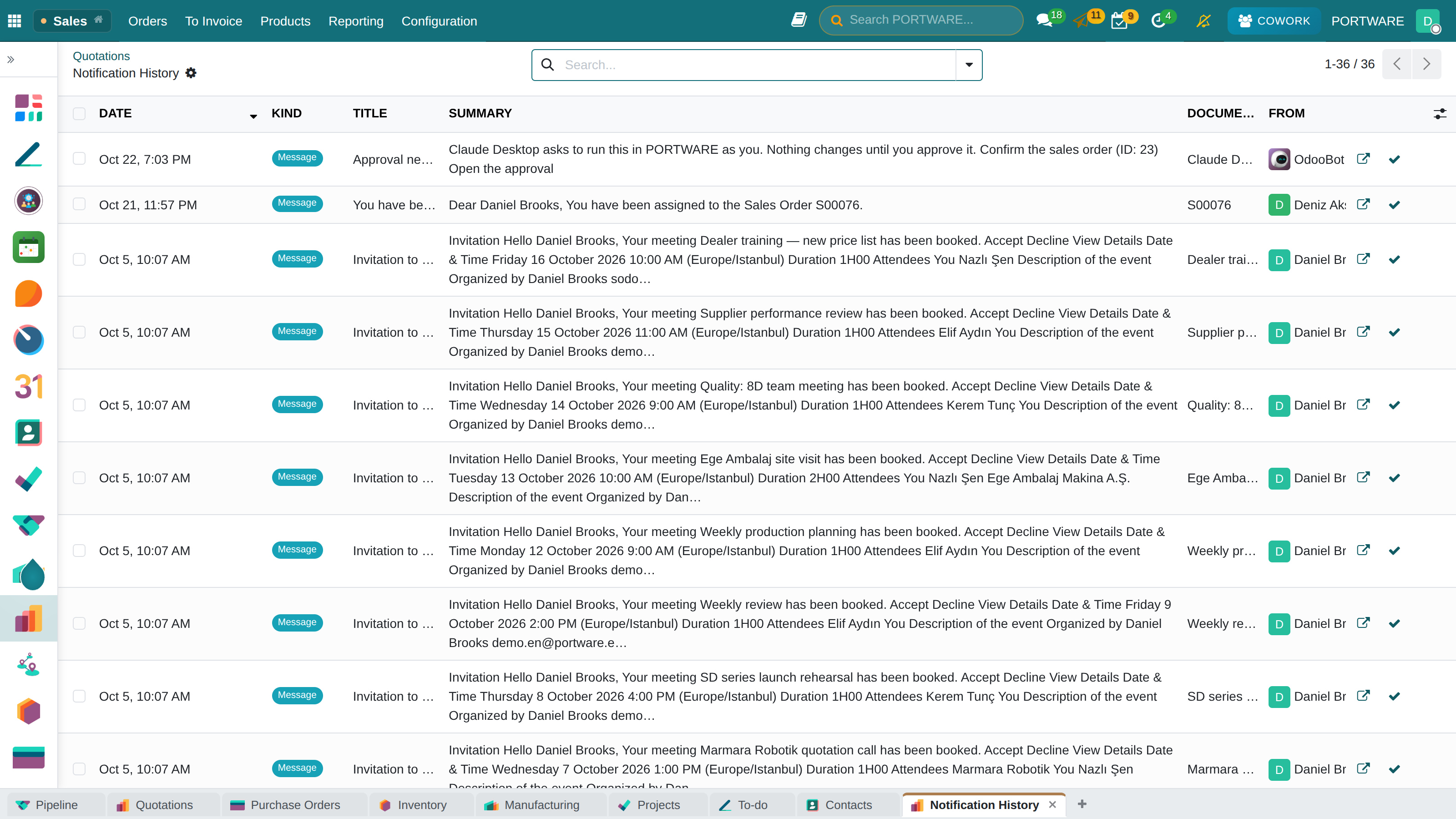
The core's "History" box is not a history, and it is worth knowing:
- the standard maintenance job deletes internal users' read notifications after 180 days;
- the instant alerts that pop up in the corner of the screen (agenda reminders, short info boxes) are not written anywhere at all — they are gone once they leave the screen.
That is why PORTWARE keeps a permanent, per-user copy of every notification. The copy is written the moment the notification is born; it stays even if its source is deleted, it can be searched and it leads to the record it came from. When the feature is switched on, existing notifications are moved into the history too; the history starts from the system's own beginning.
An invalid recipient does not affect the other recipients: the notification reports the address it could not reach and carries on to the rest.
Mind what is published outside
When a mail does not go out
Look at the approval queue — the mail may be waiting there.
Check the sender address — is it an address the server allows?
Check the recipient addresses — is there an invalid address in the list?
Look at the record's followers — a message goes only to followers; if nobody is following, it goes to nobody.
Check the user's notification preference — if the inbox is selected, do not expect an e-mail.