IV · Cowork AI · Chapter 12
Cowork — what it is and how it thinks
The artificial intelligence assistant inside the system: providers, tiers, pinning a model, the thinking budget and cost.
Cowork is more than a chat box. It can read the system's data, search records, read the contents of attachments, produce documents and — when you allow it — create and update records. That is the difference between asking a language model a question and giving Cowork a job.
The panel
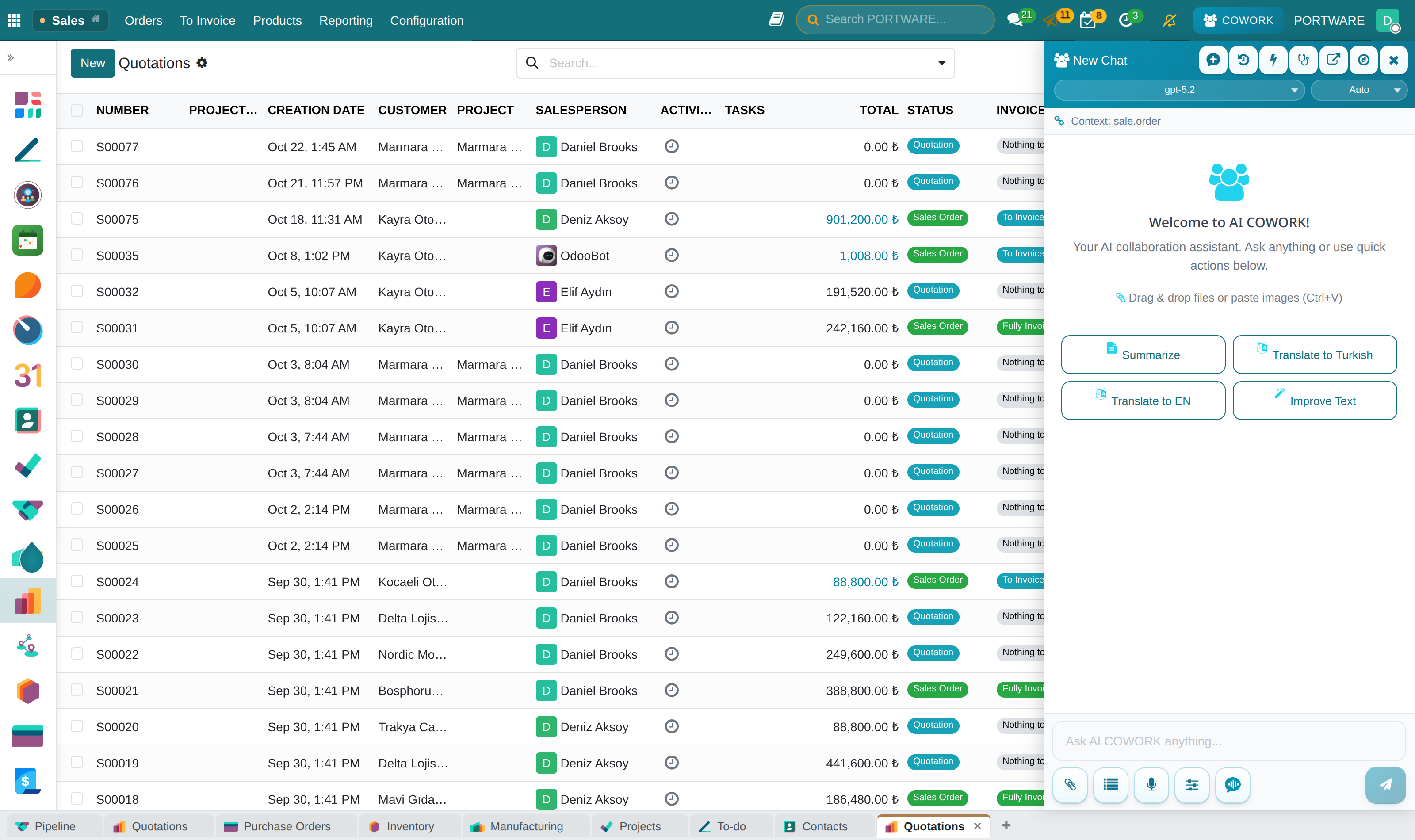
Cowork is a panel that opens from the right. It knows the screen you are on: when you say "summarise this" on a quotation, it does not ask which quotation.
Under every answer the panel shows which model answered. This is not decoration: since the system works with several models, knowing who gave the answer is part of judging it.
Hands-free: talking by voice
Your hands stay on your work; PORTWARE works with your voice. The panel's microphone button opens live conversation mode: the microphone stays open, every sentence you say becomes a turn, and the answer is both written and read aloud. The transcript is not a by-product of the mode but half of it: an assistant that only speaks cannot show you a number, cannot be scrolled back and leaves no record of what it heard. Everything you say stays in the panel as an ordinary user message, and every answer as an ordinary answer (charts included). The voice is the summary; the screen is the record.
It works like talking to a person:
- Interrupting stops the reading — but only if what you said was said to Cowork (see It understands who you are talking to below). Short commands (stop, continue, repeat, summarise…) work in the middle of an answer too; the full list is in the table below.
- While you talk the transcript is shown live; if the answer does not start within 1.6 seconds, a short "let me look" sentence naming the topic comes — once per turn.
- Depth follows the request: "explain / tell me" is spoken in paragraphs; a question about what was just said is answered from the conversation, without a new search.
- The conversation can be shrunk to a pill in the corner: the sidebar gives its width back, listening and speaking continue; it is reopened or ended from the pill.
- The assistant's voice passes through the browser's echo cancellation loop — on the desktop and on phones too — so it does not hear its own voice through the microphone and interrupt itself. When you start speaking, the transcript decides before the sentence is over: echo, an "uh-huh", or a real interruption. A real interruption pauses the voice at once; if the sentence turns out not to be yours, the answer continues from where it was cut. The next turn knows what you heard and what you did not.
- A pause while thinking is not a turn: a sentence left hanging with "and…" or "well…" keeps the silence window open.
It understands who you are talking to
Not everything said while an answer is being read is a command. Saying "we are going to my parents' tonight" to someone next to you should not cut the answer. Cowork decides whether something was said to it:
- Counted as said to Cowork: a work request or question ("show me the late quotations", "assign this task to Elif", "how many are there?"), addressing it in the second person ("you, to you, to me") or its name ("Cowork, …").
- Ignored: your own side talk, other people in the room, greetings to others. The answer continues where it was.
- When unsure, it does not interrupt; a quick classifier re-evaluates the finished sentence.
Voice commands
Commands are handled on the device, never sent to the AI, and work in the middle of an answer. Adding "Cowork", "okay" or "please" in front is fine.
| What happens | Turkish | English |
|---|---|---|
| Pause (the rest is kept) | dur, durdur, bekle, bir saniye, bir dakika | hold on, wait |
| Silence and drop | sus, yeter, tamam yeter, kes, bırak, iptal, boş ver, vazgeç | stop, enough, cancel, never mind |
| Resume after a pause | devam, devam et, sürdür, kaldığın yerden devam | continue, go on |
| Repeat the last answer | tekrar et, tekrarla, baştan al, bir daha söyle | repeat, say that again |
| Speed (without stopping) | daha yavaş, yavaş konuş · daha hızlı | slower, slow down · faster, speed up |
| Volume (without stopping) | sesini aç, sesini yükselt · sesini kıs, daha alçak | louder, speak up · quieter |
| Short version | özetle, kısaca, kısa kes | summarize, briefly |
| Long version | detaylı anlat, ayrıntılı anlat | in detail, tell me more |
| Undo the last change | geri al, son değişikliği geri al (asks for confirmation on screen) | undo |
| Approve / reject | "evet onaylıyorum" (or the ✓ on the pill) · hayır, iptal | yes, I approve · no |
| Stand by | beklemede kal, bekleme moduna geç, sessiz moda geç | stand by, go quiet |
| Come back from standby (the name is required) | Cowork devam et, Cowork geri gel | Cowork, resume · come back · I'm here |
| End the conversation | sohbeti bitir, bu kadar yeter | end the conversation |
Stand by. When you say "Cowork, stand by" (or "stand by", "go quiet", "standby"), Cowork says one sentence — "I'm standing by. Say 'Cowork, resume' when you need me." — and then answers nothing. To call it back you use its name: "Cowork, resume", "Cowork, come back / wake up / listen" or "leave standby"; the Wake button on the live bar and on the pill does the same. A request said together with the name is answered at once ("Cowork, show the orders"). In a conversation that stays on standby for 30 minutes the microphone is closed to save cost. Do not confuse this with "wait / one minute": that only pauses the sentence being read, and "continue" resumes it.
It listens only to you. The conversation belongs to the first person who speaks: their voice is learnt from the first answered turns. A clearly different voice in the room cannot interrupt the answer, open a question or give an approval — unless it calls the assistant by name ("Cowork, …"). The honest limit: the check relies on voice pitch; it is strong for clear differences such as a woman's and a man's voice, weak for two very similar voices. Calling it by name always works.
On phones: as loud as a video. Phones are in Loud mode by default: the answer plays as media, like a video, and the assistant recognises its own voice by its words. On iPhone (iOS 16.4+) the microphone pauses while the answer plays; there you interrupt by tapping (the live bar or the pill). On Android interrupting by voice continues. A personal choice in the voice menu: Phone speaker: Loud (recommended) / Echo-cancelled (quieter, better at interrupting); the default is set by the system administrator. There is one live conversation per browser: starting one in a second tab ends the first. Tapping the live bar or the pill anywhere cuts the answer with a short vibration. Switching tabs or locking the screen does not end the conversation: if the microphone is muted it pauses and continues when it comes back; if the browser wants a tap (iOS) a single Continue button appears. The lock screen has pause / stop controls; if the page is reloaded the conversation is offered back for 10 minutes.
Choice of voice. The default voice is "Jarvis" (Cassius — strong and deep; it counts Turkish among its verified languages); next to it Michael, Russell and James. Speed goes up to 2×. Voice, speed and form of address ("Mr Smith") are kept on the user record and follow you from device to device.
It sees what you see. Every turn carries the screen you are on: the breadcrumb, the filters, the rows in the list (with their identifiers), the rows you have ticked, unsaved changes on the form, an open dialog; the text of a screen without a model, such as a dashboard. "Which of these are late?" is enough. It also knows the screens you opened last (in the browser session, without writing them to the server); when you say "the record from a moment ago" it does not ask which one you mean.
It opens the screen for you. When you say "show me Kayra's open quotations", Cowork opens the filtered list, calendar or chart at that moment — even while the conversation is shrunk to the pill in the corner. An answer that contains a table, chart or file enlarges the pill by itself; if you are in another tab a browser notification comes.
It reads codes and brands correctly. Product codes are read piece by piece ("SM08-DBS17-075B0"), and names such as Leadshine, Beckhoff, EtherCAT and CANopen are pronounced correctly. It does not wait when your question is over: the turn ends when the words stop, and the "let me look" sentence comes in half a second. Approval is given by voice as "yes, I approve"; there are also small approve/reject buttons on the pill.
Eight providers, four tiers
Cowork is not tied to a single model. The models of eight providers can be used — one of them a local model running on the company's own server (Ollama).
You give the job not to a model but to a tier:
| Tier | For | Expectation |
|---|---|---|
| Fast | Short questions, summaries, formatting | Seconds |
| Balanced | Most daily work | Tens of seconds, high accuracy |
| Strong | Multi-step work that uses tools | Longer, more capable |
| Reasoning | Hard analysis, resolving contradictions | Longest |
Which model runs in which tier is decided by measurement, not by guesswork. A bake-off is run regularly: the same six real questions, several candidate models, two repetitions. Accuracy, time and cost are measured; the tiers are reassigned according to the result.
Measurement dropped a model from a tier
- Situation
- A model that had been in the balanced tier for a long time started to feel slow to users.
- What was done
- A bake-off was run with seven candidates, six golden questions and two repetitions. The model was 100% accurate but its median time had risen to 69.9 seconds — accurate but unusable.
- Result
- The tier moved to the model that answered with 100% accuracy in 7.2 seconds. The decision was not a preference but the result of a measurement, and the measurement is on record.
Choosing the model yourself
Instead of a tier you can pin a specific model. Pinning is strict: if the model you chose cannot answer, the system does not silently switch to another model; it gives an error with the model's name and tells you that you can go back to automatic selection if you like. Message bubbles always name the model that answered, not the one that was selected.
The thinking budget
Some modern models "think" before answering, and that thinking takes room in the budget too. Cowork sets this per provider and according to what the model supports; the setting is never sent to a model that does not support it.
Cost
The cost of every turn is recorded: which model, how many tokens, how much it came to. When a model with no price defined is used, the system reports it as "unpriced"; it does not show zero. Showing zero would give the impression that it was free.
Working in the background
Long jobs can be sent to the background; they continue while the panel is closed, and when they finish the answer appears in the panel.
PORTWARE from Claude, ChatGPT and Cursor
Cowork's tools are open to AI clients outside PORTWARE too. Claude, ChatGPT, Cursor and every tool that speaks the Model Context Protocol (MCP) connect to https://<your-portware>/mcp and read and write PORTWARE with the rights of the person who connected them.
| Request | What happens |
|---|---|
| Read | Runs at once |
| Write | The client asks you, then it runs; it appears in the Cowork panel with an undo button |
| Critical operation (invoice, payment, approval) | Waits for your approval in PORTWARE |
To connect, add the address as a custom connector in Claude or ChatGPT and sign in to PORTWARE in the browser; for tools like Cursor, My Profile → Security → Connect an AI client issues a key. Details on the module page: PORTWARE from Claude, ChatGPT and Cursor.
When Cowork, when you
Cowork is very good where it is good, and persistent where it is not. A rough division:
| Give it to Cowork | Do it yourself |
|---|---|
| Extracting information from a long document | Checking a critical amount by hand |
| Suggesting a repeated edit across many records | Price and discount decisions |
| Draft text, translation, summary | Approving the final text going to a customer |
| "Where do I find this?" questions | Permission and access decisions |
Chapter 13 describes which tools Cowork works with and what it is prevented from making up; that is where the real trust comes from.