Lesson 4 · Working with code on a task
Task key, branch name, closing words, #comment and #time, the development panel.
Goal of this lessonTo tie a task to its code: the key, the branch name, the commit rules and the development panel.
Writing rules
| Write | Effect |
|---|---|
T163 · TASK-163 · #T163 | Links the task (branch name, commit, PR title or body). |
| The task's PORTWARE URL | A pasted URL links too. |
Fixes T163 · Closes T163 · Resolves T163 | Closes the task when it reaches the default branch (GitHub's nine closing words). |
REQ-0012 | Links the change to a requirement; merged, it becomes evidence. |
T163 #comment text | Writes a comment on the task (in your name). |
T163 #time 1h 30m | Logs 1.5 hours on the timesheet. |
Step by step
Open the Development tab
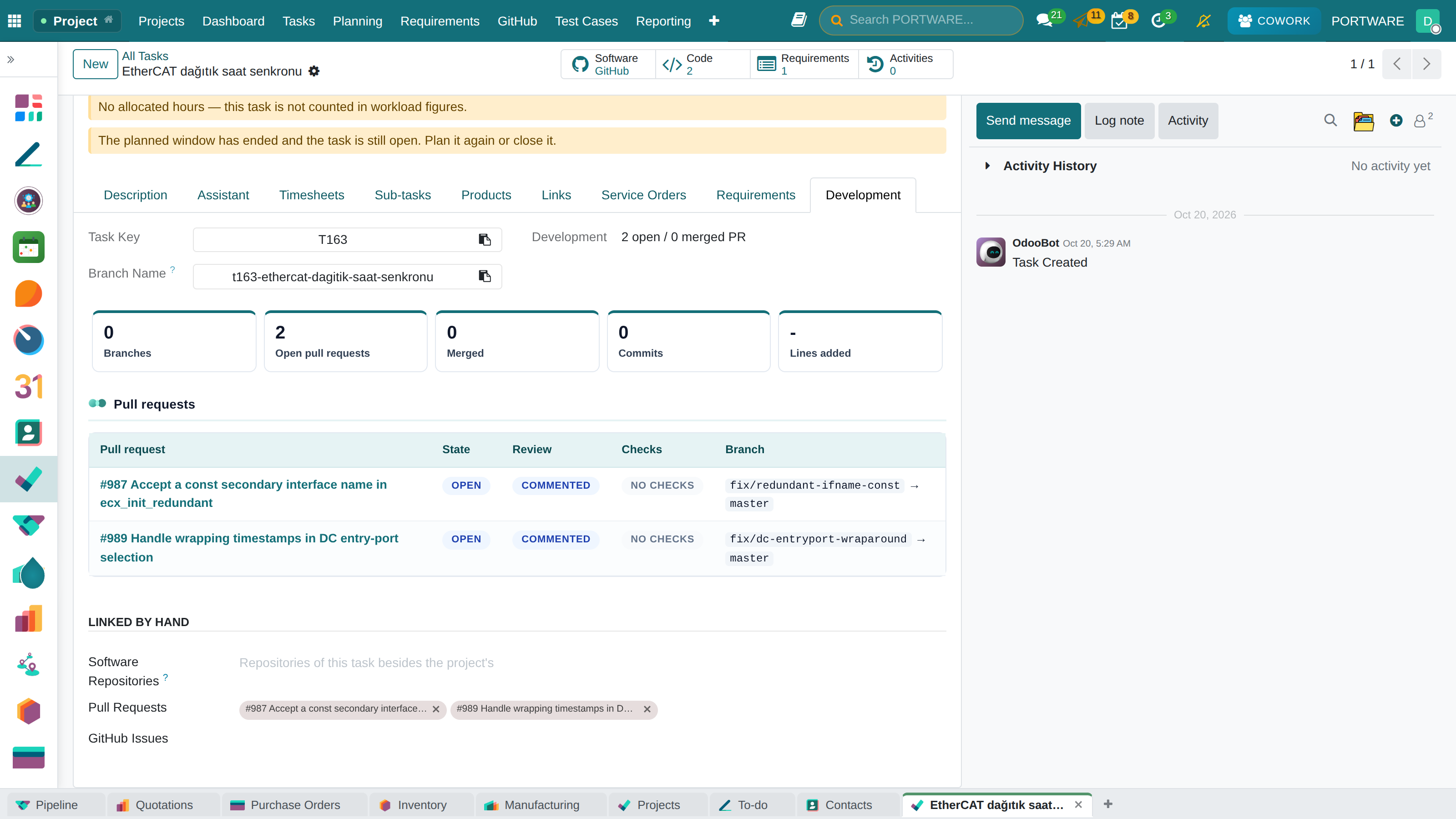
On the task form the Development tab gives the task's key and a suggested branch name. Copy it, or open the branch from PORTWARE with Create Branch on GitHub.
 12345
12345- Task key: write it in commits and PRs.
- Suggested branch name: it carries the key, so everything on the branch links.
- Code counter: linked PRs, commits and branches.
- Pull request table: state, review, checks and branches.
- The one-line summary.
Enter your GitHub account on your profile
User menu at the top right › Preferences › GitHub Account.
#commentand#timeact in your name only for commits GitHub attributes to that account.
Why the e-mail is not enough
Anyone can type any author e-mail in git. So that nobody comments or logs time in somebody else's name, PORTWARE compares the GitHub-verified account with the one on your profile.
Case: one day of a task
- 09:10
- Deniz opened the branch
t163-ethercat-dagitik-saat-senkronu. The task moved to 'In Development'. - 14:30
- Commit:
T163 drift measurement #time 2h. Two hours were logged. - 16:05
- PR opened, checks passed. The task is 'In Review'.
- Next day
- The PR was merged; the task is 'Done'.
Check yourself
Does 'see T163' in a PR body close the task?
No, it only links. Closing needs a closing word, or the key in the branch name or title.
A 'Fixes T163' commit on a feature branch?
The task is linked but not closed; it closes when the change reaches the default branch.
Why did #time not work?
The GitHub account on the profile differs from the commit's, or the task is not in the repository's project.