Lesson 2 · Adding and synchronising a repository
Linking it to a product and project, syncing, the webhook; old history and quiet linking.
Goal of this lessonTo link a repository to a product and a project, synchronise it and install the webhook for live updates.
Step by step
Add the repository
In Project › GitHub › Repositories press New and paste the repository's GitHub URL (
https://github.com/owner/repoorowner/repo). Find Repositories on the connection also creates them, archived; you activate the ones you use.Link it to a product and a project, then sync
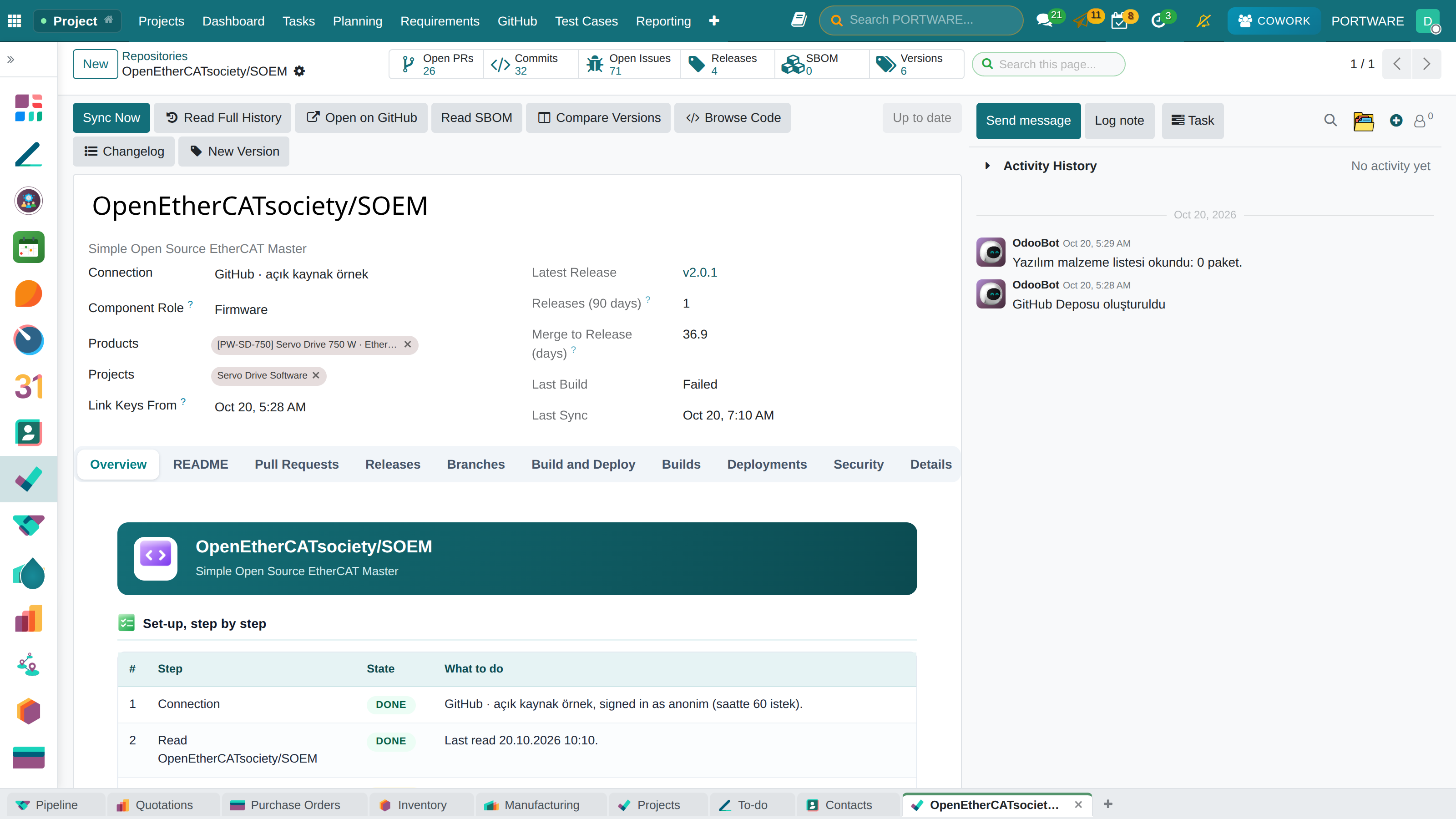
On the repository form fill Products and Projects and press Sync Now. The first sync reads the last 90 days; the overview shows the README, open work, the latest release and the delivery figures.
 123456
- Sync Now: reads the repository now; it also runs by itself every 30 minutes.
- Counters: open PRs, commits, open issues, releases and SBOM; a click opens the list.
- Products: the products that ship the software.
- Projects: the projects that build it; task links are made within them.
- Link keys from: keys in messages older than the connection are not read.
- Overview: open PRs, open issues, latest release, days to merge and stars.
Install the webhook
Install Webhook adds the webhook to the repository on GitHub (the token needs Webhooks write). From then on pushes, pull requests, releases and builds arrive at once; deliveries are listed in GitHub › Webhook Deliveries.