Lesson 1 · Setting up the connection
Access token, GitHub App or no token; the permissions needed and write-only secrets.
Goal of this lessonTo connect PORTWARE to your GitHub account or organisation safely.
Three ways to connect
| Way | When | Limit |
|---|---|---|
| Fine-grained access token | A small team, one account; the quickest set-up. | 5,000 requests an hour; tied to the person who made it. |
| GitHub App | An organisation; an identity independent of any person. | 15,000 requests an hour; per-repository permissions. |
| Public repositories only (no token) | Following open-source dependencies. | 60 requests an hour; private repositories cannot be read. |
Create the access token on GitHub
On GitHub go to Settings › Developer settings › Fine-grained tokens › Generate new token. Limit repository access to the repositories you will connect and grant:
| Permission | Access | What it enables in PORTWARE |
|---|---|---|
| Metadata | read (required) | Repository details |
| Contents | read | Branches, commits, releases, README |
| Pull requests | read | PR state and review |
| Issues | read | GitHub issues |
| Actions · Checks | read | Builds and check results |
| Webhooks | read and write | Installing the webhook from PORTWARE |
| Contents | write (optional) | Creating a branch from a task |
A missing permission breaks nothing
A section the token cannot read is named on the repository screen in a yellow notice with the permission to add; the other sections keep synchronising. When you add it later, that section's history arrives too.
Set up the connection in PORTWARE
Open the connection form
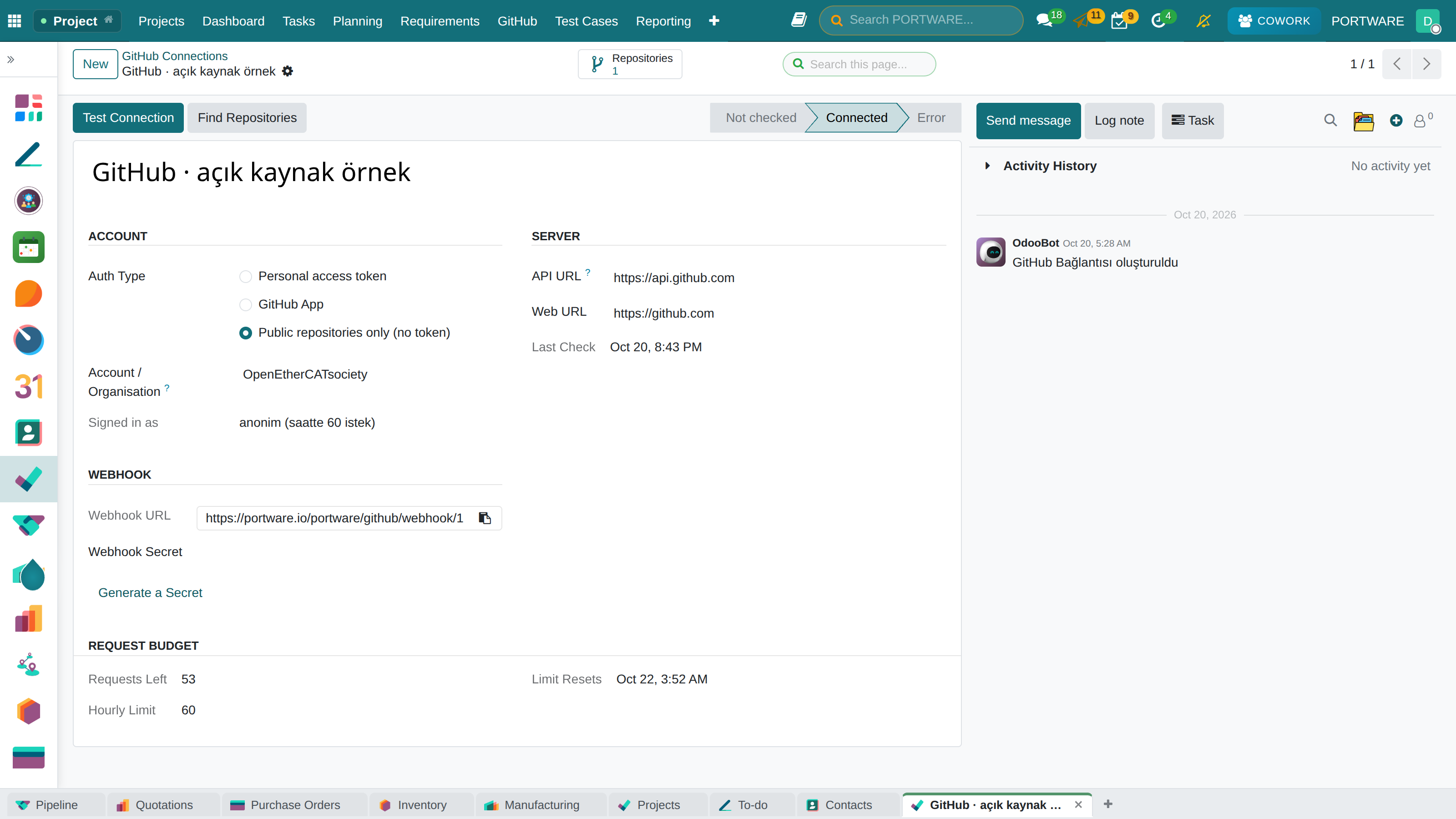
From Project › GitHub › Connections press New, name the connection, choose the authentication and type the account or organisation login.
 12345
12345- Authentication: access token, GitHub App or public repositories only.
- Test Connection: reaches GitHub and records the signed-in account.
- Find Repositories: lists the repositories the credential can read, archived; activate the ones you use.
- Webhook URL: GitHub's webhook posts here; take it with the copy button.
- Requests left: what remains of GitHub's hourly budget.
Enter the token and test it
With an access token, paste it into Access Token and press Test Connection. The state becomes Connected.
Generate the webhook secret
Press Generate a Secret once; when you install the webhook from PORTWARE it is handed to GitHub by itself.
Secrets are write-only
A token or secret is typed once and never shown again; the form shows only its last four characters. To change it, type the new value. Only system administrators see these fields.
Case: from a personal token to a GitHub App
- Situation
- The developer who created the token is leaving the company.
- Done
- A GitHub App was installed on the organisation; the connection's authentication was switched to GitHub App with its App ID, installation ID and private key.
- Result
- The connection no longer depends on a person; repositories and history stayed.
Check yourself
Without which permission can no connection be made?
Metadata: read.
What happens without the Pull requests permission?
Commits, branches and releases arrive; the PR section is named in a yellow notice.
How do you see a stored token?
You cannot; only its last four characters show. A new value can be typed.