Lesson 3 · Project and automation
The project's GitHub tab and tasks moving with their pull requests.
Goal of this lessonTo link the project to its repository and let tasks move with their pull requests.
Step by step
Open the project's GitHub tab
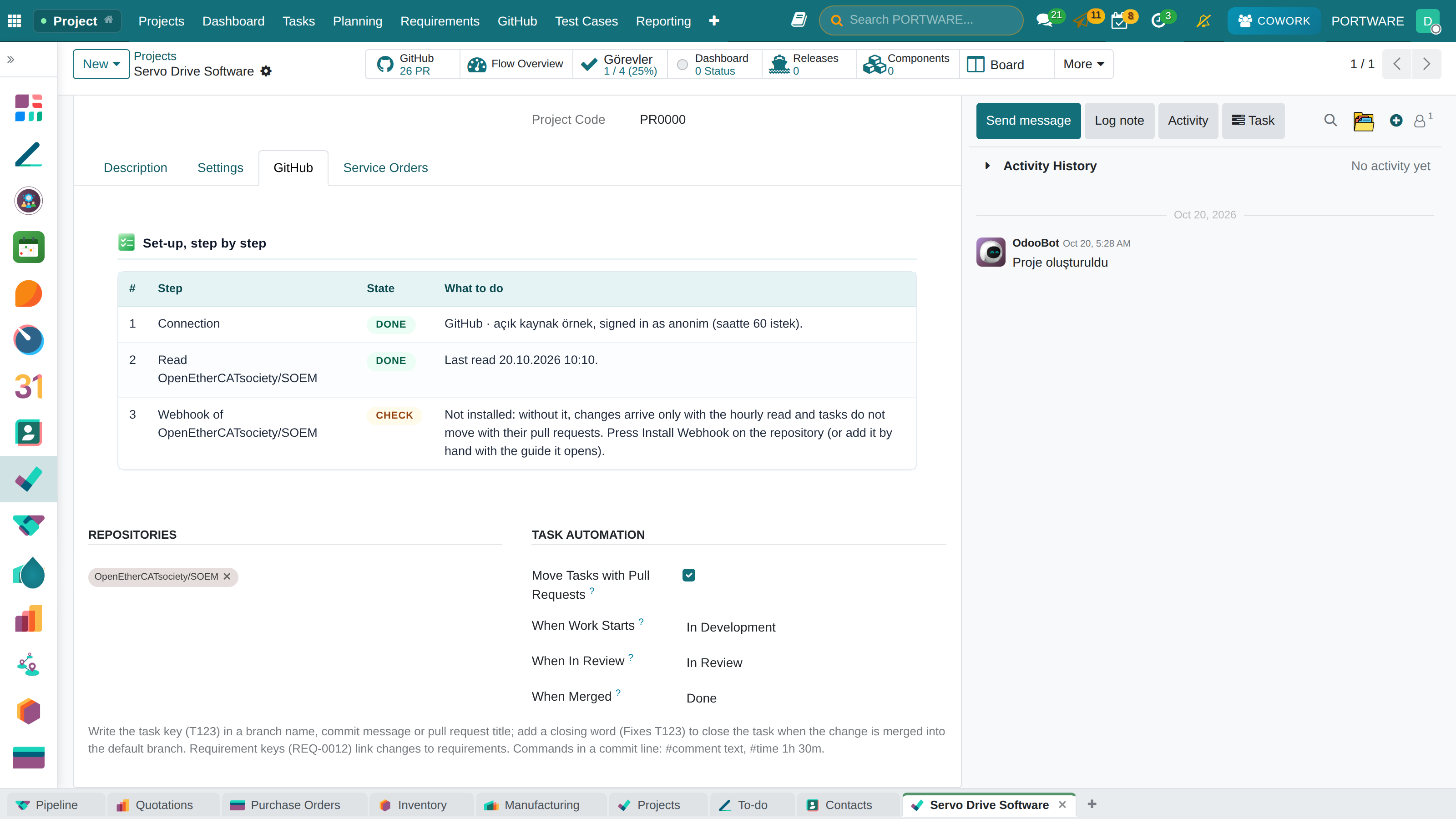
On the project form's GitHub tab choose the repositories. With Move Tasks with Pull Requests on, three stages are asked; an empty 'When Merged' marks the task Done instead.
 123456
- The project's repositories.
- The automation switch: off, links are made but no task moves.
- When work starts: a branch or a draft PR appears.
- When in review: the PR is opened for review.
- When merged: the PR that closes the task is merged into the default branch.
- Set-up step by step: connection, read, permissions and webhook; what is missing and what to do.
Forward only
Automation never pulls a task back to an earlier stage. A task your team moved forward by hand stays there; a reopened task is not closed by an old PR event.
Check yourself
What if 'When Merged' is empty?
When the closing PR is merged the task is marked Done.
Which PR closes a task?
One that names the task in its branch or title, or says 'Fixes T163' in its body, merged into the default branch.