PORTWARE AI COWORK
PORTWARE AI COWORK is an advanced AI business assistant that lets you run PORTWARE with natural-language commands. From simple questions such as "What are my total sales this month?"…
- Use the ERP without knowing the ERPYou say what you want; the assistant knows which field on which screen that is.
- An approval gateIt shows what it will do before it creates or changes a record.
- Inside the record and the documentThe same assistant on the screen, in a PORTWARE Office document and in the morning briefing.
Overview
PORTWARE AI COWORK is an advanced AI business assistant that lets you run PORTWARE with natural-language commands. From simple questions such as "What are my total sales this month?" to complex workflows such as "Create purchase quotations automatically for the products that are out of stock", you can do everything through a chat interface.
The module works with 7 AI providers (Anthropic Claude, OpenAI GPT, Google Gemini, DeepSeek, Mistral, LLaMA and Groq) and offers more than 120 ERP actions, automating your ERP work from CRM to accounting and from inventory to human resources.
How It Works
AI COWORK uses a three-stage agentic loop:
- Understand (Gather): the AI analyses your request and reads the data it needs from the ERP (read-only actions run automatically).
- Act (Action): it asks for approval before anything that writes, and runs it once approved.
- Verify: it checks the change it made and confirms it was done correctly.
- Report: it summarises what was done in your language.
Why AI COWORK?
Traditional ERP Use
- ✗ Getting lost in menus
- ✗ Building complex filters
- ✗ Long training times
- ✗ Multi-step manual work
With AI COWORK
- Asking in plain language is enough
- Results in moments
- Zero training time
- Complex workflows run automatically
Key Advantages
A Natural-Language Interface
Run the ERP by chatting, as if you were writing to a colleague, instead of navigating menus and filling in forms.
Smart Learning
It remembers how you work and learns across sessions. It understands references such as "do it the way you always do".
Cost Optimisation
In auto mode, simple questions go to cheaper models and complex analyses to stronger ones, keeping cost to a minimum.
Speed
With Groq it streams 500 tokens a second, and streaming replies give the user real-time feedback.
Module Statistics
Requirements
System Requirements
- PORTWARE, current release
- Python 3.10+ (ships with the server)
- An active internet connection (for AI API calls)
- A valid API key for at least one AI provider
Core Module Dependencies
base
and web are needed.
Setting Up API Keys
Go to Settings > AI COWORK > API Keys and enter the API keys for the providers you want to use. One provider is enough.
| Provider | Example Models | Where to Get the API Key | Free Tier |
|---|---|---|---|
| Anthropic Claude | claude-opus-4-6, claude-sonnet-4-6 |
console.anthropic.com | No |
| OpenAI GPT | gpt-4o, gpt-4o-mini |
platform.openai.com | No |
| Google Gemini | gemini-1.5-pro, gemini-1.5-flash |
aistudio.google.com | Yes |
| DeepSeek | deepseek-chat, deepseek-reasoner |
platform.deepseek.com | Yes (limited) |
| Mistral AI | mistral-large, mistral-small |
console.mistral.ai | Yes |
| LLaMA (Together.ai) | llama-3.3-70b, llama-3.1-405b |
api.together.ai | Yes |
| Groq | llama-3.3-70b-versatile, llama-3.1-8b-instant |
console.groq.com | Yes (limited) |
Model Selection and Settings
You can configure the following parameters in Settings > AI COWORK > Model Settings:
| Setting | Description | Default |
|---|---|---|
| Provider Mode | Which AI provider to use (auto / a specific provider) | auto |
| Max Tokens | The maximum number of tokens per reply | 8192 |
| Temperature | How creative replies are (0 = precise, 1 = creative) | 0.5 |
| Streaming | Real-time token streaming (on supported providers) | On |
| Pipeline Enabled | A multi-model pipeline for Turkish content (saves cost) | On |
| Memory System | Learning and memory across sessions | On |
AI Providers
PORTWARE AI COWORK works with 7 AI providers. Each has different strengths, speed profiles and pricing.
Anthropic Claude
The most capable model. Ideal for complex analysis and Turkish.
Medium SpeedOpenAI GPT-4o
Strong multilingual support, a large context window.
Medium SpeedGoogle Gemini
Economical, good enough quality. A free tier is available.
FastDeepSeek
A 10x cheaper alternative. Strong reasoning with the R1 model.
Medium SpeedMistral AI
A European provider, GDPR compliant. A 128K context window.
FastLLaMA (Together.ai)
An open-source model. 70B and 405B versions are available.
FastGroq
Ultra-fast inference. 500 tokens a second - the fastest provider!
Ultra FastAuto Mode
Auto Mode lets the AI choose the best provider automatically according to the complexity of the task. You get the most efficient result by balancing cost and speed.
Smart Provider Selection Logic
| Task Type | Preferred Model | Why? |
|---|---|---|
| Simple queries, short answers | Groq (LLaMA 8B) |
Fastest, cheapest |
| Reading ERP data, list queries | Gemini Flash / DeepSeek |
Economical, good enough |
| Multi-step workflows | GPT-4o / Claude Sonnet |
Strong, reliable |
| Complex analyses, reports | Claude Opus |
The most capable |
| Maths / reasoning | DeepSeek R1 |
Reasoning specialist |
| Turkish content detected | Claude / GPT-4o |
Turkish language quality |
Provider Comparison
| Provider | Speed | Cost (per M tokens) | Turkish Quality | Streaming | Best Use |
|---|---|---|---|---|---|
| Anthropic Claude Opus | Medium | $15-75 | Excellent | Yes | Complex analyses, creative tasks |
| Claude Sonnet | Fast | $3-15 | Excellent | Yes | Optimal for general use |
| OpenAI GPT-4o | Fast | $2.5-10 | Very Good | Yes | Multilingual work, tool calls |
| Google Gemini Pro | Fast | $1.25-5 | Good | No | Economical ERP queries |
| DeepSeek Chat | Fast | $0.14-0.28 | Medium | Yes | Budget-friendly high-volume work |
| DeepSeek R1 | Medium | $0.55-2.19 | Medium | Yes | Maths, logic, reasoning |
| Mistral Large | Fast | $2-6 | Good | Yes | European projects that require GDPR compliance |
| LLaMA 70B (Together) | Fast | $0.88 | Medium | Yes | When open source is preferred |
| Groq (LLaMA 70B) | Ultra Fast | ~$0.05-0.59 | Medium | Yes | Fast answers, simple queries, a free start |
Hands-free: live voice and new capabilities
Your hands stay on your work; PORTWARE works by your voice. The panel's microphone button opens live voice mode: the microphone stays open, every sentence is a turn, and the answer is both written and read aloud. The voice is the summary; the screen is the record — everything said and every answer (charts included) stays in the panel.
- Talking over it pauses the reading at once; room noise does not. "One moment / wait" pauses, "continue" resumes from the sentence that was cut, "end the conversation" closes it
- The assistant's voice goes through the echo-cancelling loop — on desktop and on the phone — so it never interrupts itself
- The conversation shrinks to the pill in the corner; listening and speaking carry on
- On the phone tapping the bar or the pill interrupts with a vibration; switching tabs or locking the screen does not end the conversation, and the lock screen has pause/stop
- Voice, speed and form of address live on the user record and follow you from device to device; the default voice is "Jarvis"
- The professional voice has a daily one-dollar cap; beyond it the same sentence is spoken with the browser's voice. API keys never reach the browser
Stand by, wake by name; it listens only to you
When you say "Cowork, stand by", it steps back with a single sentence and answers nothing until you call it by name ("Cowork, continue", "Cowork, come back"); the Wake button on the pill calls it too. The conversation belongs to the first person who speaks: a clearly different voice in the room cannot interrupt the answer, open a question or give an approval — unless it addresses the assistant by name. On the phone the voice is boosted through a limiter and is not turned down when the microphone hears something.
It knows who you are talking to
A sentence you say to someone next to you while the answer is being read does not interrupt it. Cowork decides whether something was said to it: a work request or question ("show me the overdue quotations"), being addressed as "you" or by name ("Cowork, …") counts as said to it; your own side remarks, other people in the room and greetings to others are ignored. When it is not sure, it does not cut in.
Voice commands
Commands are handled on the device, never sent to the AI, and work in the middle of an answer; "Cowork", "okay" or "please" can go in front.
| What happens | Say |
|---|---|
| Pause | stop, hold on, wait, one second, one moment |
| Silence and drop it | quiet, enough, cut it, drop it, cancel, never mind, forget it |
| Resume | continue, go on, carry on, pick up where you left off |
| Repeat | repeat that, start over, say it again |
| Speed | slower · faster |
| Volume | louder · quieter |
| Short / long | summarise, in short · tell me in detail |
| Undo | undo, undo the last change |
| Approve / refuse | yes, I approve · no |
| Go to standby | stand by, go quiet |
| Call back | Cowork continue, Cowork come back |
| Finish | end the conversation, that's enough |
As loud as a video on the phone: phones use Loud mode by default and play the voice as media. On an iPhone you interrupt an answer that is playing by tapping; on Android your voice interrupts it too. You can switch to Echo-cancelled mode from the voice menu.
It sees what you see and opens the screen for you
Every turn carries the screen you are on: filters, the rows in the list, the records you have ticked, unsaved changes. Say "show Kayra's open quotations" and the filtered list, calendar or chart opens at once — even while the conversation sits in the corner pill. Product codes are read out piece by piece, brand names with the right pronunciation.
Page Review
It reviews the open record — an empty required field, a broken e-mail, a tax or ID number or IBAN whose checksum fails, conflicting dates — and applies the fixes you choose with a single approval.
A plan is one approval
A multi-step job arrives as a single plan card; each step uses the result of the one before, and a step whose reference it cannot fill is skipped with the reason. "Book annual leave for Ali and Ayşe next week" runs on one card: type, number of days, missing allocation and approval — all or nothing.
Access doctor, Cowork Health, the learning loop
- A permission error says which record, which group and who can grant it, in plain language
- Cowork Health: one line a day — turns, answer time, failed actions, interruptions, voice clips, cost
- An undone action is a negative signal; proposed rules do not become rules until a reviewer approves them
- The morning briefing runs on its own on weekdays only; the compass button produces it on request any day
Cowork in the Office
The window in the PORTWARE Office editor is the same Cowork panel as in the back office — live voice, spoken approval and single-approval plans included. The "Go" command marks the change in yellow in Word and PowerPoint; Cowork reads, compares and restores document versions.
PORTWARE from Claude, ChatGPT and Cursor (MCP)
PORTWARE is open to every AI client that speaks the Model Context Protocol, at one
address: https://<your-portware>/mcp. Claude (claude.ai, Desktop, Code), ChatGPT,
Cursor and the like read and write PORTWARE with the rights of the person who connected
them: the same access rights, the same record rules, nothing more. The tools are
Cowork's own catalogue; a tool improved for Cowork is improved for every MCP client.
Connecting
| Client | How |
|---|---|
| Claude (claude.ai, Desktop) and ChatGPT | Settings → Connectors → Add custom connector; paste the endpoint. The browser opens PORTWARE: sign in, choose Read only or Read and write, press Allow. No key needed. |
| Claude Code | claude mcp add --transport http portware https://<your-portware>/mcp, then /mcp → portware → Authenticate inside Claude Code. |
| Cursor, VS Code, Windsurf | My Profile → Security → AI clients (MCP) → Connect an AI client. PORTWARE shows the key once, with the configuration to paste. |
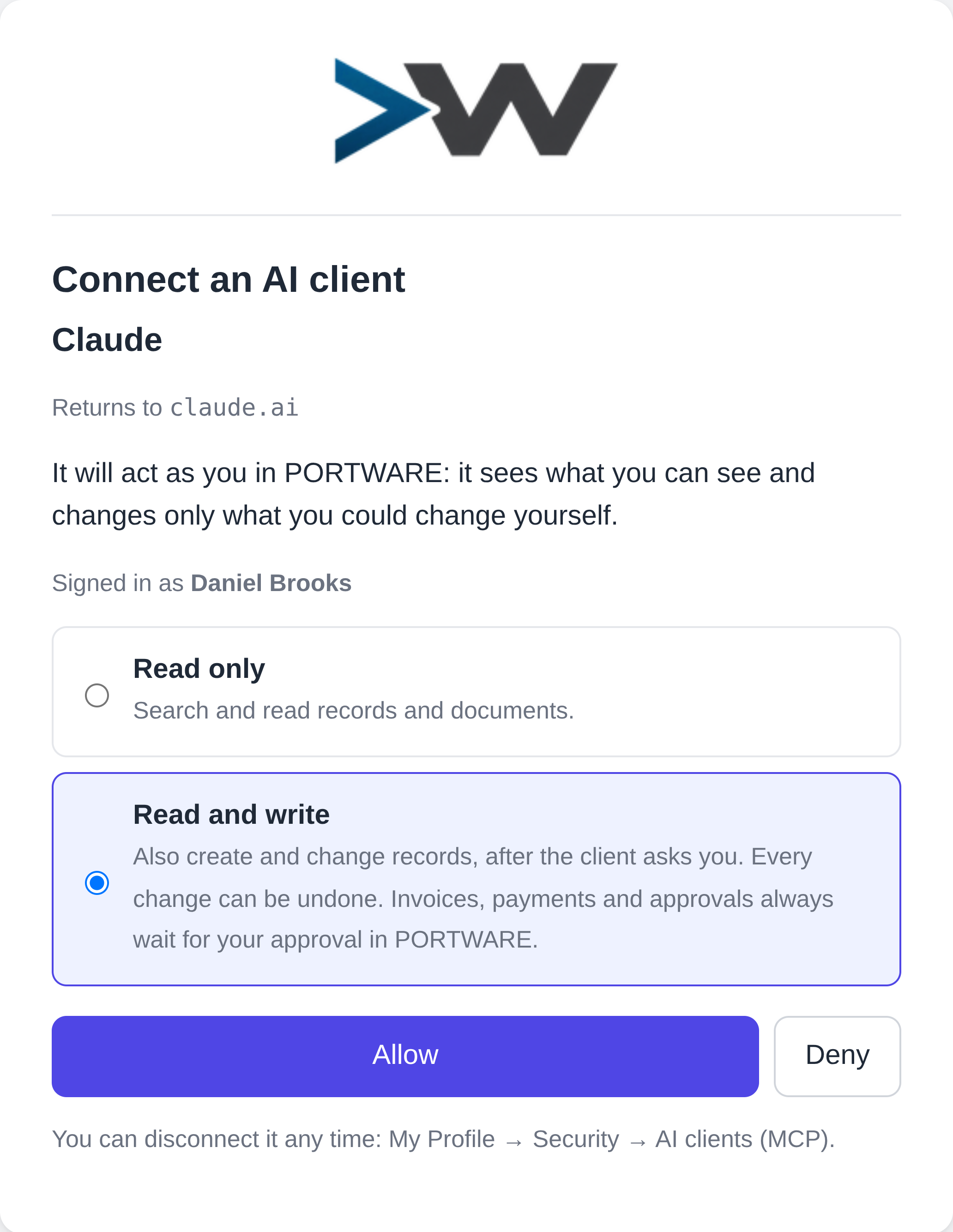
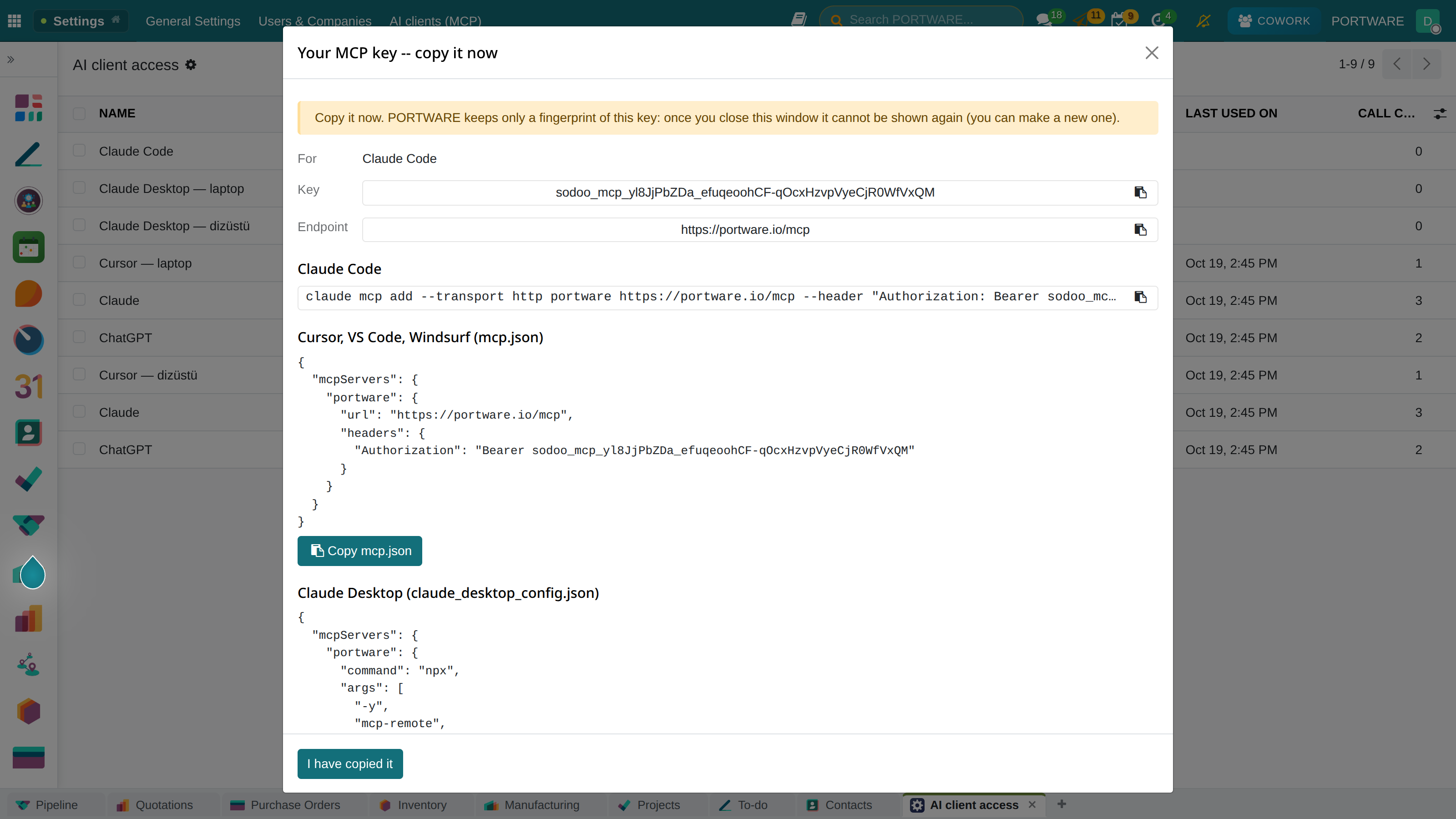
What a client may do, and when
| The tool | Runs |
|---|---|
| Reads (search, records, document text, agenda) | At once |
| Writes, Approved in the AI client (default) | After the client asked you. The change lands in your Cowork panel as the conversation
MCP · <client> with an undo button; undo_last_change reverts it from the client too. |
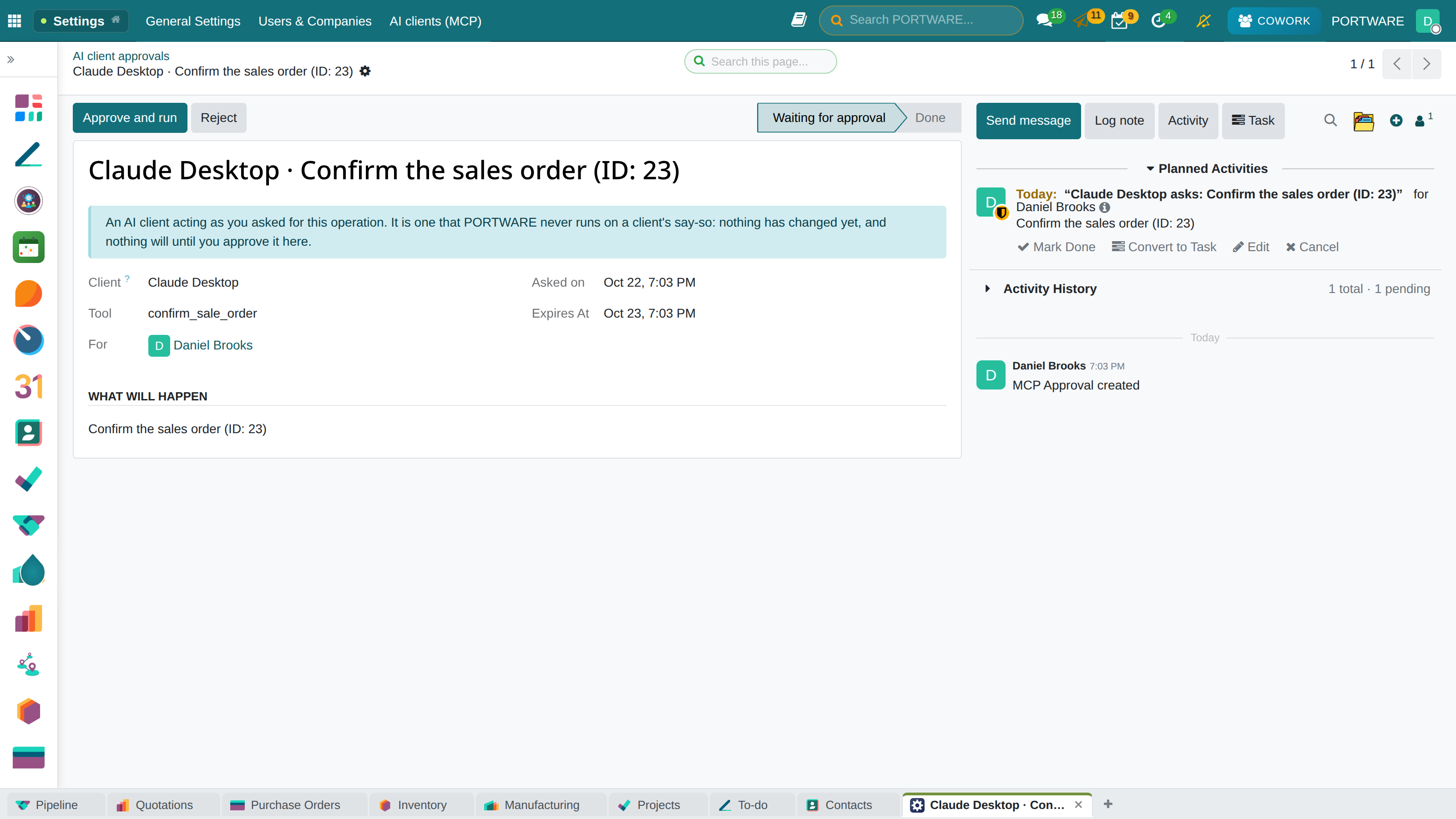
| Writes, Every write approved in PORTWARE | Only after you press Approve and run in PORTWARE. |
| Critical operations: invoices and payments, approvals, e-invoicing, stock validation, outbound e-mail | Always approved in PORTWARE, whatever the access says.
You get an activity; the client follows the outcome (an MCP task, or portware_approval_status). |
| Tools that drive a screen or an open Office document | Not offered |
Resources: portware://company, portware://me, portware://me/agenda,
portware://record/<model>/<id>, portware://attachment/<id> (PDF and Office text).
Prompts: prepare a quotation, find stock shortages, summarise a task, my day. Protocol: MCP 2026-07-28
(and the earlier initialize revisions), OAuth 2.1 with PKCE.
Natural-Language Queries
With AI COWORK you query your ERP as if you were talking, in Turkish or any other language. You do not need to find menus or know SQL.
Data Query Examples
- Total Orders: 47
- Total Revenue: 284,500 TL
- Average Order Value: 6,053 TL
- Best-Selling Product: Product A (12 units)
- Largest Customer: ABC Company (45,000 TL)
1. Product X - On hand: 3 | Min stock: 20 [CRITICAL]
2. Product Y - On hand: 7 | Min stock: 15 [WARNING]
3. Product Z - On hand: 0 | Min stock: 10 [OUT OF STOCK]
Shall I create purchase quotations for these products automatically?
1. INV/2026/00023 - ABC Ltd. - 15,000 TL - 45 days overdue
2. INV/2026/00031 - XYZ Inc. - 28,500 TL - 37 days overdue
3. INV/2026/00044 - DEF Company - 12,800 TL - 22 days overdue
4. INV/2026/00051 - GHI Corp. - 18,000 TL - 15 days overdue
5. INV/2026/00067 - JKL Ltd. - 9,500 TL - 8 days overdue
6. INV/2026/00078 - MNO Inc. - 5,500 TL - 3 days overdue
Web Research
Besides querying the ERP, AI COWORK can search the internet for real-time information. With the DuckDuckGo search engine and Wikipedia integration you reach up-to-date information.
Supported Search Sources
- DuckDuckGo: general web searches, company information, news
- Wikipedia TR/EN: encyclopaedic information, company history
- DuckDuckGo Infobox: basic facts such as a company's logo, founding date and sector
Nordwind Otomasyon A.Ş.
- Sector: Technology / industrial automation
- Headquarters: Bremen, Germany (TR branch: Istanbul)
- Website: nordwind-otomasyon.example
- Employees: ~4,000 (~250 in Turkey)
Added to CRM as a customer with this information. ID: RES.PARTNER/1547.
Category set to “Industry > Technology”.
Weather
AI COWORK provides real-time weather information through the wttr.in API. It is useful for logistics planning, field service work and event organisation.
- Temperature: 8°C (feels like 5°C)
- Conditions: cloudy, light rain expected
- Humidity: 75%
- Wind: 18 km/h (NNE)
3-Day Forecast:
- Tomorrow: 6°C, heavy rain (take care with deliveries!)
- The day after: 10°C, sunny
Heavy rain is expected tomorrow, so I would suggest making your Anatolian-side deliveries the day before. Shall I update the delivery plan?
Keywords that trigger weather queries:
Smart Operations
For write operations that need approval, AI COWORK presents the user with a summary plan. It can plan and carry out multi-step workflows automatically.
The Approval Flow
1. Product X (Stock: 2) → RFQ for 50 units - Vendor: ABC Ltd.
2. Product Y (Stock: 0) → RFQ for 100 units - Vendor: XYZ Inc.
3. Product Z (Stock: 4) → RFQ for 30 units - Vendor: DEF Corp.
Total order value: ~45,000 TL
Do you approve creating these 3 quotations? [Yes / No]
- PO/2026/00156 (Product X - ABC Ltd.)
- PO/2026/00157 (Product Y - XYZ Inc.)
- PO/2026/00158 (Product Z - DEF Corp.)
All are in the "RFQ" state. Shall I e-mail them to the vendors?
The Morning Briefing and System Audit
Everything described so far works when you ask. The briefing is the reverse: every morning the assistant scans your CRM, activities, tasks, quotations, meetings and shipments without being asked, finds what has been forgotten and writes down what needs to be done.
How Does It Work?
- Every morning at 08:00 (Istanbul): a scheduled job runs once a day and prepares each user's own briefing.
- A star badge in the systray: when the briefing is ready the COWORK icon in the top bar carries a badge; opening the panel opens the briefing.
- No findings, no briefing: no empty notification is sent. If you see a badge, there really is something to look at.
- Personal scope: everyone sees only the records they are responsible for.
- A company view for managers: an authorised user also sees company-wide findings: unowned leads, unassigned tasks, late shipments, missing product data.
- Whenever you want, in one click: you do not have to wait for the morning; the briefing button in the panel runs the same audit on the spot.
22 Things Checked Every Morning
These are not “the AI found something”. Each finding is a named, countable query defined in code that gives the same result every time. 16 findings are personal and 6 are company-wide.
| Area | Finding | What it looks for |
|---|---|---|
| Opportunities and leads | No next step | Opportunities with no next activity planned |
| Stalled opportunity | Opportunities that have not moved for a long time | |
| No expected revenue | Opportunities that make the pipeline total look smaller than it is | |
| Missing contact details | Leads with no e-mail or phone — records nobody can work | |
| Never-touched lead | Leads nobody has opened since they arrived | |
| Unowned lead company | Leads with no salesperson - nobody's job | |
| Activities | Overdue activity | Activities past their date that nobody has closed |
| Correspondence | Unanswered message | Conversations where the customer wrote and nobody replied |
| Stalled conversation | Threads left open with nothing written on them | |
| Meetings | No next step planned | Meetings held with nothing planned afterwards |
| No notes written | Meetings where the decision was not recorded | |
| Quotations and orders | Sent, unanswered quotation | Quotations with no reply from the other side and no follow-up |
| Unsent draft | Quotations prepared but never sent | |
| Order with incomplete lines | Orders with lines whose product or description is empty | |
| Tasks | Overdue task | Tasks past their deadline and still open |
| Task with no date | Tasks that appear on nobody's day | |
| Unassigned task company | Tasks with no owner | |
| Shipments | Late transfer | Shipments past their scheduled date |
| Late transfer company | The same, company-wide | |
| Product data | No sales description company | The text the customer reads on quotations and invoices is empty |
| No stock code company | No reference for purchasing, the warehouse or the customer to quote back | |
| No sales price company | Products quoted at zero and not noticed until the order is confirmed |
Not a Number, but What to Do
“259 records need fixing” is a report, and it moves nobody. The briefing writes a one-sentence remedy next to each finding, and that sentence is written by the server, not the model. The reason is simple: whoever wrote the query knows which field was checked; the model does not, and would make it up.
| An ordinary report | The PORTWARE briefing | |
|---|---|---|
| What it says | A number | The number, sample records and a one-sentence remedy |
| Who writes the remedy | Nobody | The server — written in code for each finding |
| Going to the record | You search for it | Its address is in the finding; one click |
| Drilling down | None | A breakdown of up to 50 records for the same finding |
| Asking questions | None | The briefing is a conversation; you can ask about it |
| Starting the work | You switch to another screen | From the same panel an activity is opened or a quotation is followed up |
1. Unanswered quotation — 6
Sent, no reply and no follow-up.
What to do: follow up or close the quotation. An unanswered quotation is a decision waiting on you, not on them.
→ S00412 · S00418 · S00421 …
2. Opportunity with no next step — 11
What to do: plan a dated next activity for each opportunity - a call, a meeting or a to-do. An opportunity with no next step is an opportunity going quiet.
3. Overdue activity — 3
4. Meeting with no notes — 2
CRM Actions
Natural-language commands and actions for customer relationship management:
Customer Management
- Create a new customer/prospect
- Update customer details
- Segment customers
- Show a customer's purchase history
- List the records linked to a customer
Opportunity Management
- Create a new opportunity
- Update the opportunity stage (new → quotation → won)
- Calculate the pipeline value
- List the opportunities about to close
- Change the opportunity owner
Activity Planning
- Plan a customer visit
- Create a call activity
- Set an e-mail reminder
- Record a meeting
- List today's activities
Sales Reports
- Salesperson performance report
- Win/loss ratio analysis
- This month's pipeline value
- The most profitable customer segment
- Forecast vs actual
- Name: Ahmet Yılmaz
- Sector: Textile
- E-mail: ahmet@örnek.com
- ID: RES.PARTNER/2341
Shall I add an opportunity or an activity too?
Sales Actions
Quotations & Orders
- Create a sales quotation
- Turn a quotation into an order
- Add/remove an order line
- Update the price / apply a discount
- Check the order status
- Confirm / cancel an order
Invoicing
- Create an invoice from an order
- Check the invoice status
- List unpaid invoices
- Send an invoice by e-mail
- Cancel an invoice / issue a credit note
- Quotation No: SO/2026/00892
- Customer: ABC Company
- Product: Desk Lamp × 50 units
- Unit Price: 450.00 TL
- Total: 22,500.00 TL
- Status: Quotation (Draft)
Shall I confirm the quotation and e-mail it to the customer, or keep editing?
Stock & Inventory Actions
Stock Queries
- Check a product's stock quantity
- List products at a critical stock level
- Stock by warehouse
- Product move history
- Last in/out dates
- Run an ABC analysis
Transfer Management
- Create a stock transfer
- Validate a transfer
- Create a return transfer
- List pending transfers
- Lot/serial number tracking
Inventory
- Create a stock count adjustment
- Update the real stock count
- Create a scrap record
- Check the replenishment rules
- Get a stock forecast report
Human Resources Actions
Employee Management
- Look up employee information
- Add a new employee
- Change an employee's department
- Show the employee list
- Show the organisation chart
Time Off Management
- Check the leave balance
- Create a leave request
- Approve/refuse a leave request
- Show employees on leave this week
- Annual leave usage
Attendance
- Check today's check-ins/check-outs
- Get an absenteeism report
- Overtime tracking
- Lateness report
Accounting Actions
Invoice Management
- Create a customer invoice
- Record a vendor bill
- Check an invoice's status
- Show the VAT amounts
- Cancel an invoice
Payment Tracking
- Register a payment
- Check a payment's status
- Overdue payments
- Update the bank reconciliation
- Cash flow forecast
Financial Reports
- Income/expense summary
- Payable/receivable balances
- Foreign currency transactions
- VAT summary report
Project Actions
Project Management
- Create a new project
- Check a project's status
- List the project members
- Show project progress %
- Filter finished/ongoing projects
Task Management
- Create and assign a task
- Update a task's status
- List the tasks assigned to me
- Prioritise tasks
- Task time tracking
Purchase Actions
Requests for Quotation (RFQ)
- Create a purchase quotation (RFQ)
- Turn a quotation into a confirmed order
- Compare several quotations
- Create a blanket order agreement
- Look up a vendor's price history
Vendor Management
- Add a new vendor
- Look up a vendor's history
- Find the cheapest vendor
- Vendor lead time analysis
The Memory System
With its cross-session memory system, AI COWORK remembers what it learned across sessions. It records a user's preferences, frequently used query types and the operations they carry out.
How Does the Memory System Work?
- Automatic learning: user behaviour is analysed in each session and important information is saved
- Decay: old, unused information loses importance over time; current information stays in front
- Context extraction: the query types a user asks often, their preferred format and abbreviations are learned
- Cross-session: the memory survives even when the browser is closed; a week later, "do it like last time" is still understood
- 38 orders in total, 185,400 TL revenue
- Best day: Thursday (12 orders)
- Best salesperson: Mehmet Kaya
- Filter applied: domestic deliveries (note: exports excluded)
[The AI remembered your earlier reporting preferences and applied them automatically]
Workflow Engine
The State Machine Workflow Engine, inspired by LangGraph, manages complex multi-step workflows. The state of each stage is tracked, and recovery is automatic when an error occurs.
Workflow States
Features
- Automatic state transitions: allowed transitions are validated and invalid ones blocked
- Error recovery: automatic recovery with up to 3 retries
- Progress tracking: a visual progress indicator from current_step / total_steps
- Database persistence: the workflow state is stored in the database; it continues even after a page refresh
- Cross-module workflows: ready-made flows such as Quote-to-Cash, Order-to-Delivery and HR Onboarding
Subagent Orchestration
Complex tasks can be distributed in parallel to specialised subagents. Large tasks are split into smaller parallel parts, and the time shrinks.
Subagent Types
| Subagent Type | Speciality | Example Use |
|---|---|---|
researcher |
Data search and analysis | Querying stock data, customer history |
executor |
Running ERP actions | Creating, updating, deleting records |
analyzer |
Data analysis and evaluation | Sales trends, performance analysis |
planner |
Workflow planning | Breaking complex tasks into sub-steps |
writer |
Producing text and reports | Writing reports, drafting e-mails |
Parallel Execution
Several subagents can run at once (ThreadPoolExecutor, max. 4 workers). Tasks with dependencies start when their dependency chain completes.
[Researcher-2]: valuing stock...
[Researcher-3]: gathering accounting data...
[Researcher-4]: processing customer data...
4 subagents finished in parallel in 8 seconds; the Writer is now preparing the report...
The Plugin System
AI COWORK can be customised through an extensible hook system (plugin architecture). Development teams can add their own business logic and change the default behaviour.
Hook Types
| Hook | When It Fires | Use |
|---|---|---|
pre_message |
Before the message is sent to the AI | Pre-processing the message, masking sensitive data |
post_message |
After the AI reply arrives | Formatting the reply, logging |
pre_action |
Before an ERP action starts | Permission checks, context validation |
post_action |
When an ERP action completes | Audit log, sending notifications |
on_error |
When an error occurs | Error notification, fallback logic |
on_workflow_start/end |
At the start/end of a workflow | Workflow logging, time tracking |
Built-in Plugins
- LoggingPlugin: records every action automatically
- ValidationPlugin: validates input parameters
- MetricsPlugin: tracks performance metrics
- CachingPlugin: caches the results of repeated queries
Real-Time Token Streaming
For 5 providers, the reply streams into the interface token by token, in real time. Instead of waiting for long replies, you watch them being written.
Providers That Support Streaming
Technical Details
- Built on the core bus: the core's bus polling mechanism is used, not standard SSE (Server-Sent Events)
- Batching: sent in batches every 30 characters or 300ms (less DB commit load)
- No streaming during tool calls: only text replies stream; ERP actions run synchronously
- Live cursor: a blinking cursor shows in the interface while the reply arrives
- Fallback: if streaming fails, it falls back to non-streaming mode automatically
Multi-Model Pipeline
A cost-optimising multi-model pipeline for Turkish queries. Turkish content is translated into English by a cheap translator model, processed, then translated back into Turkish. That way economical models can be used instead of expensive language models.
Cost Comparison
| Method | Cost (1M tokens) | Speed | Quality |
|---|---|---|---|
| Claude Opus directly (TR) | $15-75 | Medium | Excellent |
| Pipeline (Groq + DeepSeek) | $0.19-0.83 | Fast | Very Good |
Usage Metrics
See detailed metrics for every AI request in PORTWARE AI > Configuration > Analytics.
Metrics Tracked
Provider Usage
How much each provider is used, the average response time per provider and the cost breakdown.
Tokens & Cost
Total tokens, cost and token efficiency (result per token) by user/model.
Action Metrics
The most used ERP actions, success/error rates, average run time.
Response Time
The P50/P95/P99 response time distribution, slow queries and performance bottlenecks.
Cost Analysis and Optimisation
Cost Reduction Strategies
- Auto mode: simple tasks go to cheap models, complex tasks to strong models
- Multi-model pipeline: 60x cost savings for Turkish processing
- Caching: repeated query results come back from the cache (zero cost)
- Tool filtering: only the tools needed are sent to the model (saves tokens)
- Prefer Groq: 500 tokens a second + low cost for simple queries
Example Use Scenarios
Scenario 1: Onboarding a New Customer
✓ Customer created: Tasarım Atolyesi Ltd. (ID: 2847)
✓ Contact added: Ayşe Demir (e-mail and phone saved)
✓ Sector: set to Decoration
✓ Activity: "First Contact" - tomorrow 10:00 - assigned to you
Shall I add an opportunity too?
Scenario 2: Weekly Tracking of Orders Due
1. SO/2026/00834 - Alfa Inc. - Delivery: yesterday [LATE!]
2. SO/2026/00841 - Beta Ltd. - Delivery: today
3. SO/2026/00856 - Gama Corp. - Delivery: tomorrow
4. SO/2026/00871 - Delta Inc. - Delivery: 28 February
Shall I send Alfa Inc. a delay notice e-mail for SO/00834?
Scenario 3: Critical Stock Alert and Automatic Supply
1. Product A: 50 units → ABC Supply (last price: 45 TL/unit)
2. Product B: 200 units → XYZ Industries (last price: 12 TL/unit)
3. Product C: 25 units → DEF Ltd. (last price: 180 TL/unit)
Estimated total: 6,850 TL
Do you approve creating these 3 RFQs?
Scenario 4: Monthly Financial Summary
Income:
- Invoiced: 485,000 TL
- Collected: 412,000 TL
- Outstanding collections: 73,000 TL
Expenses:
- Purchasing: 198,000 TL
- Overheads: 45,000 TL
- Personnel: 87,000 TL
- Total expenses: 330,000 TL
Net profit: 155,000 TL (profit margin: 32%)
Scenario 5: Approving an Employee's Leave
1. Mehmet Kaya - Annual Leave - 3-7 March (5 days)
2. Ayşe Ozturk - Compassionate Leave - 1 March (1 day)
3. Ali Demir - Sick Leave - 28-29 February (2 days)
Mehmet Kaya's leave request was approved. He was e-mailed automatically.
Frequently Asked Questions
Troubleshooting
Common Problems and Solutions
- Check that the API key is entered correctly in Settings > AI COWORK
- Confirm in the provider console that the API key is still valid
- Check that the provider's API service is running (status page)
- Make sure the server has internet access
/var/log/odoo/odoo.log
or journalctl -u odoo -f. AI COWORK errors are on the
ERROR lines of the log.