VI · Projects and planning · Chapter 25
Projects in PORTWARE: methodology, sprints, backlog and releases
A project choosing its own method, the sprint and backlog board, the burndown chart, releases, components and typed links.
Chapter 24 explained the methods. This chapter shows their equivalent in PORTWARE.
First the architectural decision, because it explains why the screens are where they are: these are not a separate application. None of them opens a top-level application icon; they all live inside the Project application. The reason fits in one sentence — a separate product would have to copy, or constantly synchronise, the employee, the working calendar, leave and timesheets. The load calculation already stands on the employee, working calendar and leave records.
A project choosing its own method
The project form has a Methodology field: Scrum, Kanban, Waterfall, Stage-Gate.
When a choice is made, what opens up is read from the method:
| Method | Sprint | WIP limit | Stages and gates |
|---|---|---|---|
| Scrum | ✓ | ||
| Kanban | ✓ | ||
| Stage-Gate | ✓ | ||
| Waterfall |
Waterfall opens none of them; its tool is the Timeline in chapter 26.
Work item type
Tasks have a Work Item Type field: Initiative, Epic, Story, Task, Sub-task.
This field depends not on Scrum but on any methodology having been chosen. A project running Kanban or Waterfall can have epics and stories too; the hierarchy is not a Scrum privilege.
Status category
In the standard core a stage has a name but no meaning: the system does not know which of "In review" and "Test" counts as finished work. That is why every stage falls into one of three categories — To do, In progress, Done — and every task carries the category it is in.
Two things follow from this:
- These are the bands of the charts. The cumulative flow and burndown charts read a stage's category, not its name; so when a team renames its stages the charts do not lose their meaning.
- Cycle time becomes computable. Every task carries its started and resolved moments separately; the question "how many days did it take" is no longer an estimate but a subtraction.
Sprints
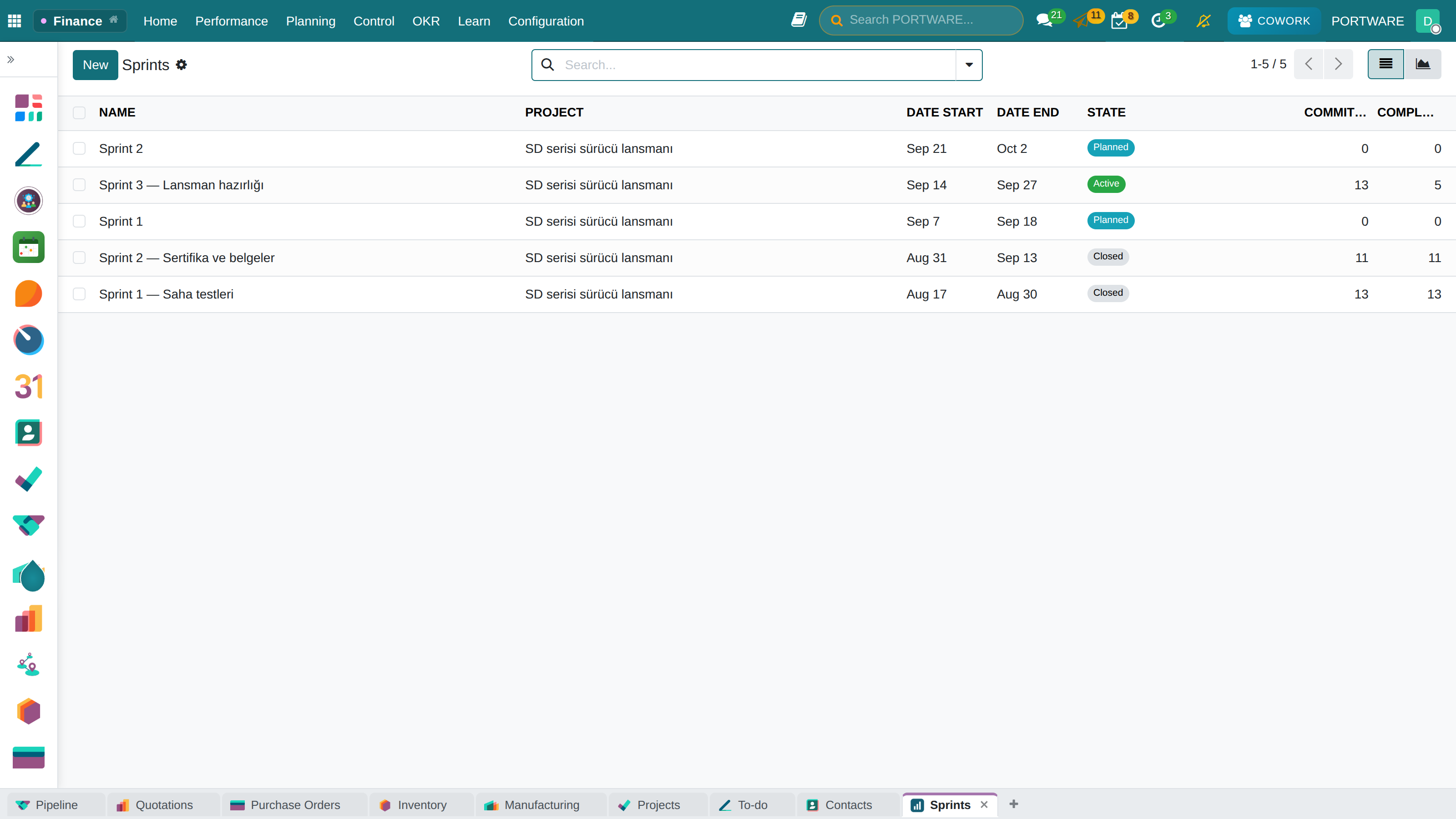
In a project that chooses Scrum, sprint records open up. A sprint has a start, an end, committed points and completed points.
Burndown chart
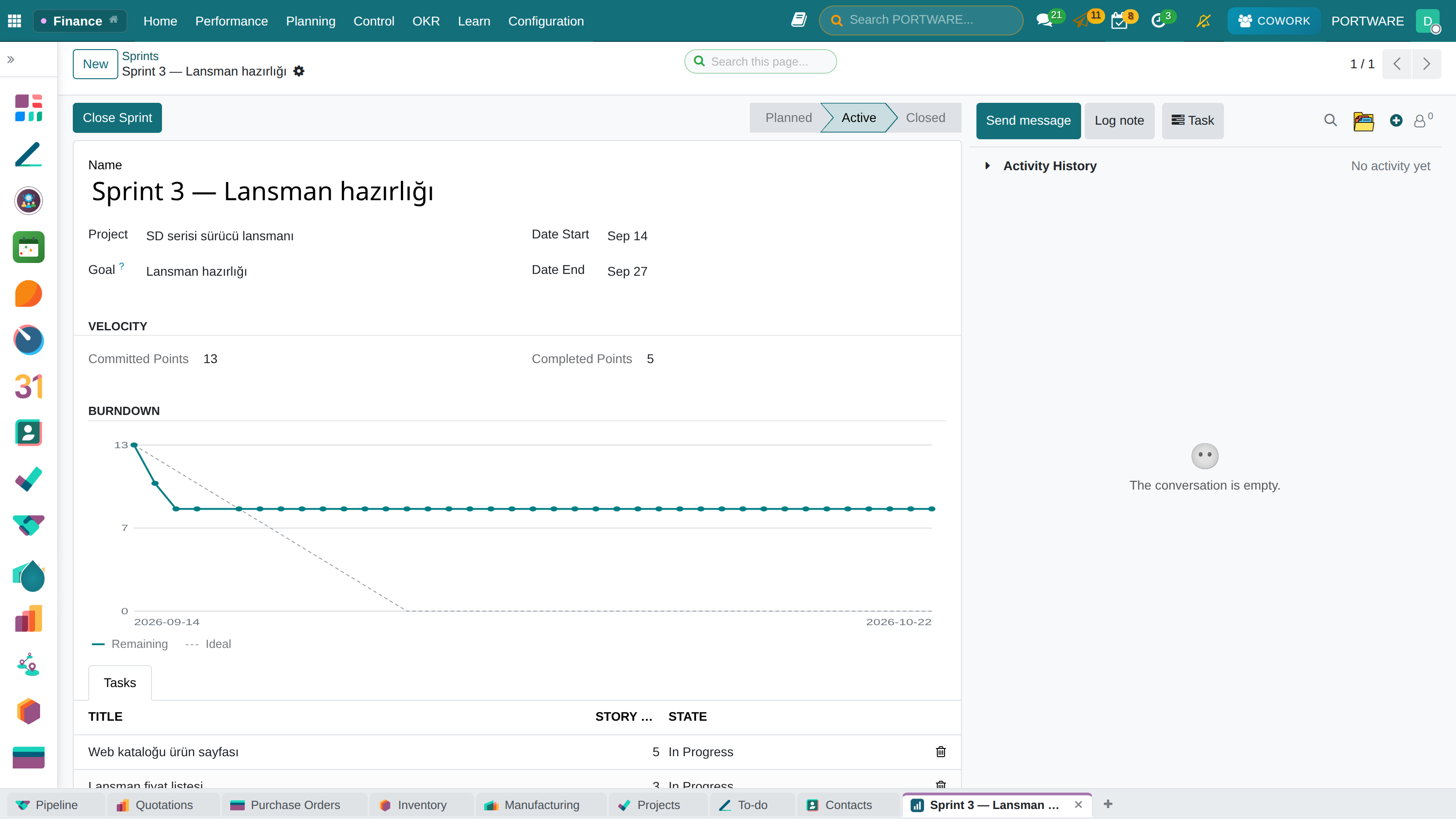
The sprint form holds the Burndown Chart. It is drawn from snapshots taken every day and shows three edge cases honestly:
- A day whose snapshot was missed leaves a gap in the line — not a drop.
- If scope grows in the middle of the sprint, the scale rises; the chart does not hide that scope grew.
- If there are no records at all yet, this is said in words. An axis drawn at zero reads as "the work is done", when it means exactly the opposite.
Velocity chart
The completed points of closed sprints are gathered in one chart. This is the equivalent of the velocity concept in chapter 24: the reference for a realistic commitment in the next sprint.
Backlog board
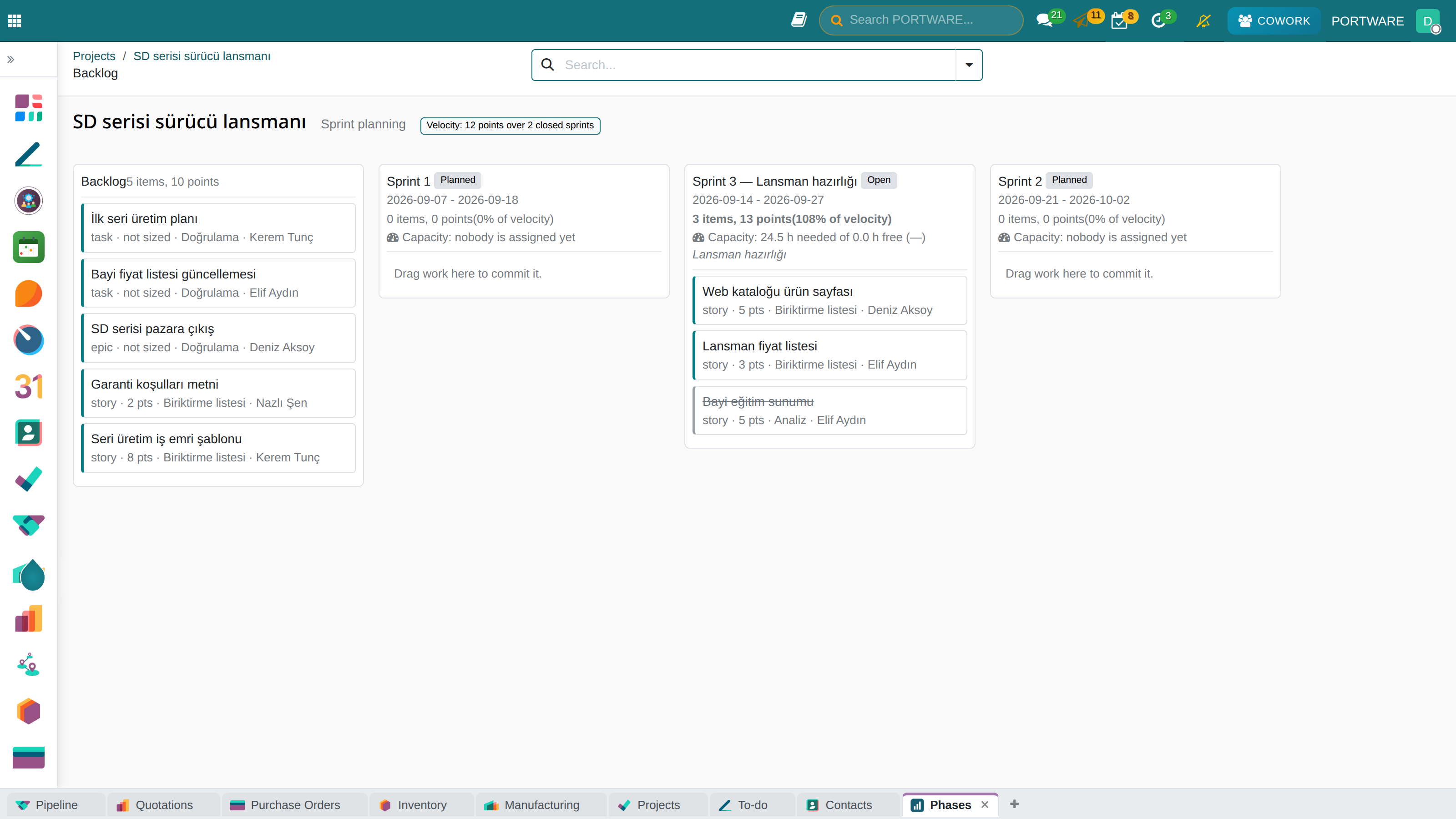
A board opened from the project form: the backlog on the left, sprints on the right. Cards are moved into sprints by drag and drop.
The board itself holds no rules. What counts as backlog, which sprints a card may be dropped into, what the velocity reference is and whether this user may move the card at all — all of it sits in the model on the server.
The practical consequence: someone without write access to the task cannot create a commitment by dragging a card. A move is an ordinary write and is subject to the ordinary access rules.
After every move the board is not patched but read again. The totals on the screen are the server's arithmetic, not the browser's.
Swimlane board
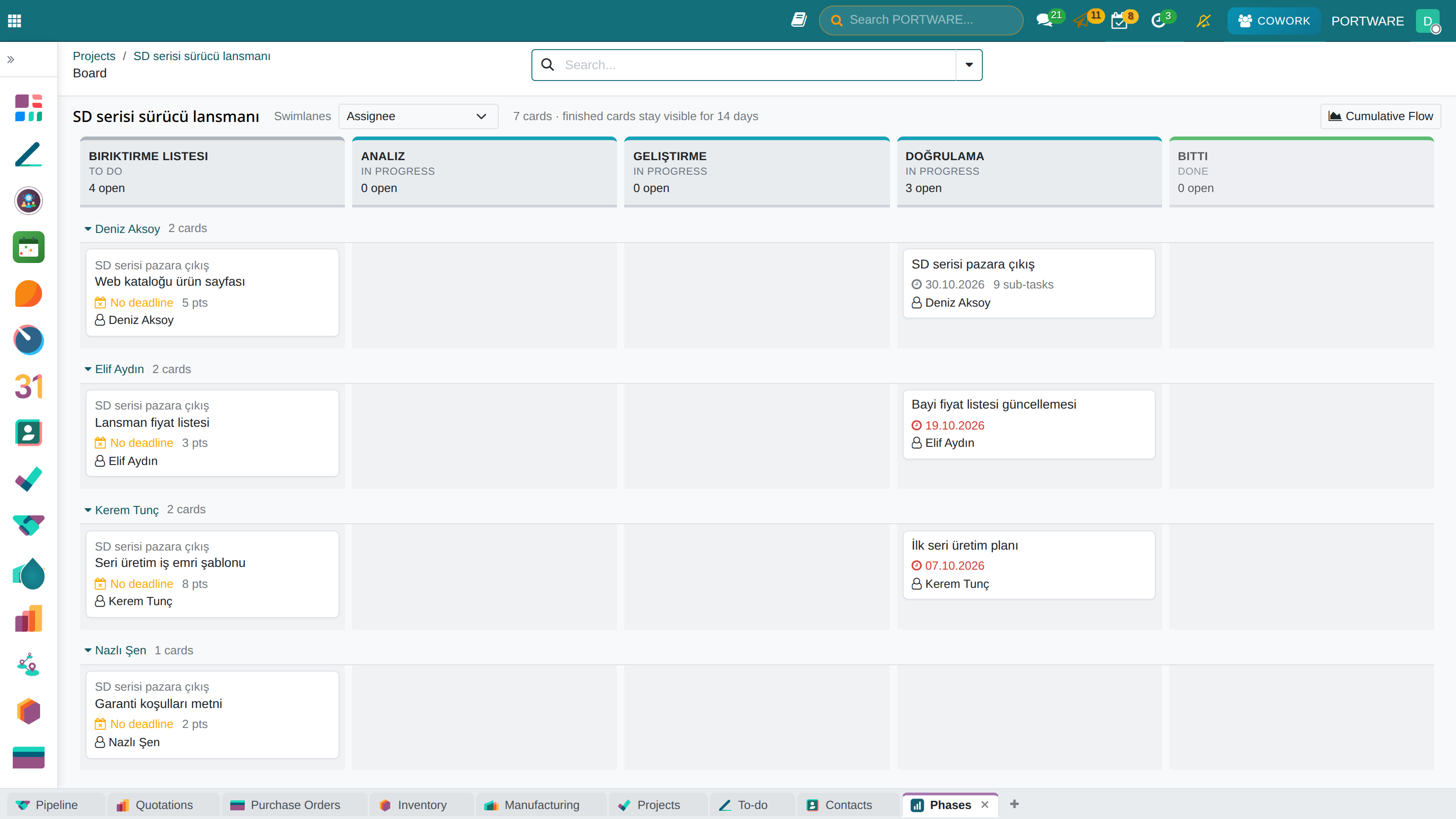
Kanban groups by a single field: the stages sit side by side and that is it. The swimlane board adds a second dimension — stages across, the grouping you choose down.
You choose what to split the lanes by: assignee, epic, work item type, priority or none. Turning the same board towards "who is doing what" or "where is which epic stuck" is a matter of one selection box.
The standard kanban view stays as it is; the swimlane board lives beside it as a separate screen.
Cumulative flow
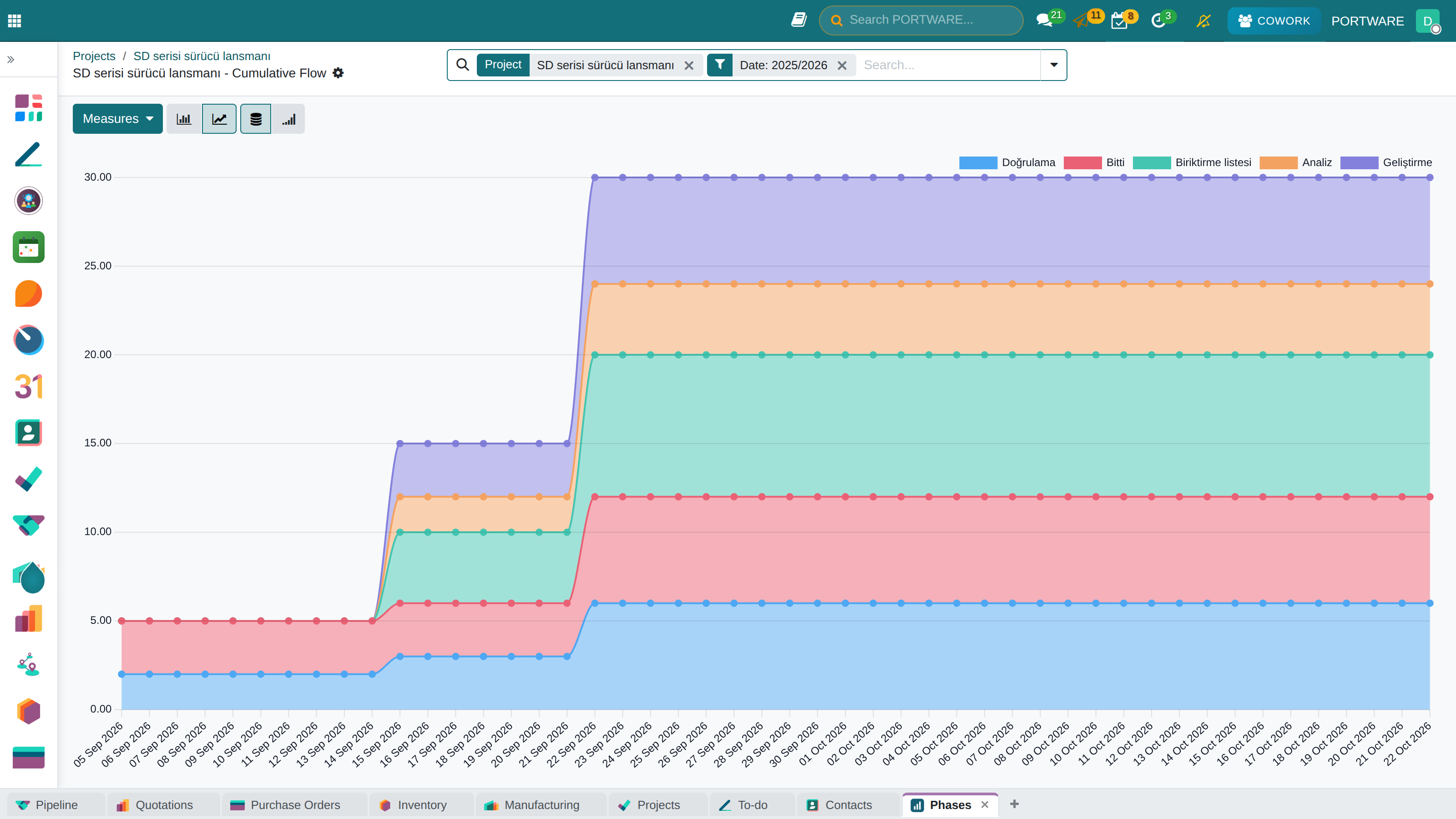
Cumulative flow shows the amount of work accumulating in each stage over time. If a stage's band gets thicker, work is entering it but not leaving; the bottleneck is not guessed, it is seen.
The chart's data is read from the stage-change history. In a project with no history the screen says so ("No stage history yet") instead of drawing an empty chart — an empty chart shows missing data as if it were a zero value.
Stages and gates
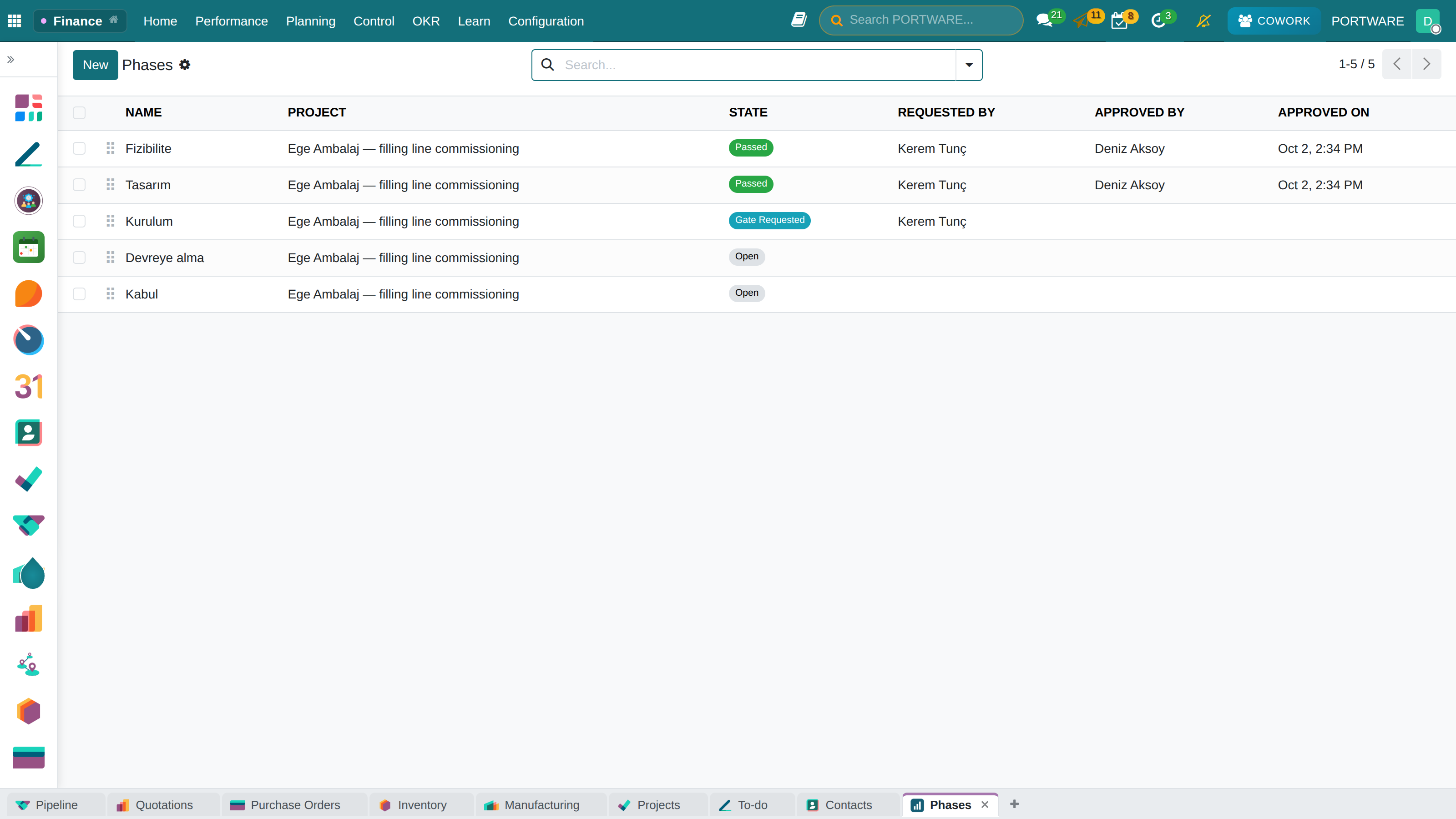
A project running Stage-Gate has stages and their gates. A gate is in one of three states: open, Gate Requested, Passed.
The rules are there for auditability:
- The person who requested a gate cannot approve it. A gate is the approval of a request; the same person playing both roles makes the approval meaningless.
- A gate that has not been requested cannot be passed.
- A stage cannot pass before the stage before it has passed.
- Passing a gate is written to the record's own log; the answer to "who approved it" stays on the screen afterwards.
Releases, components and typed links
These are independent of methodology — which is why they sit in a separate module. A project that chooses no method can have releases and components too.
The same restraint continues here: these fields on the task form appear only if the project really has a release or a component.
Release
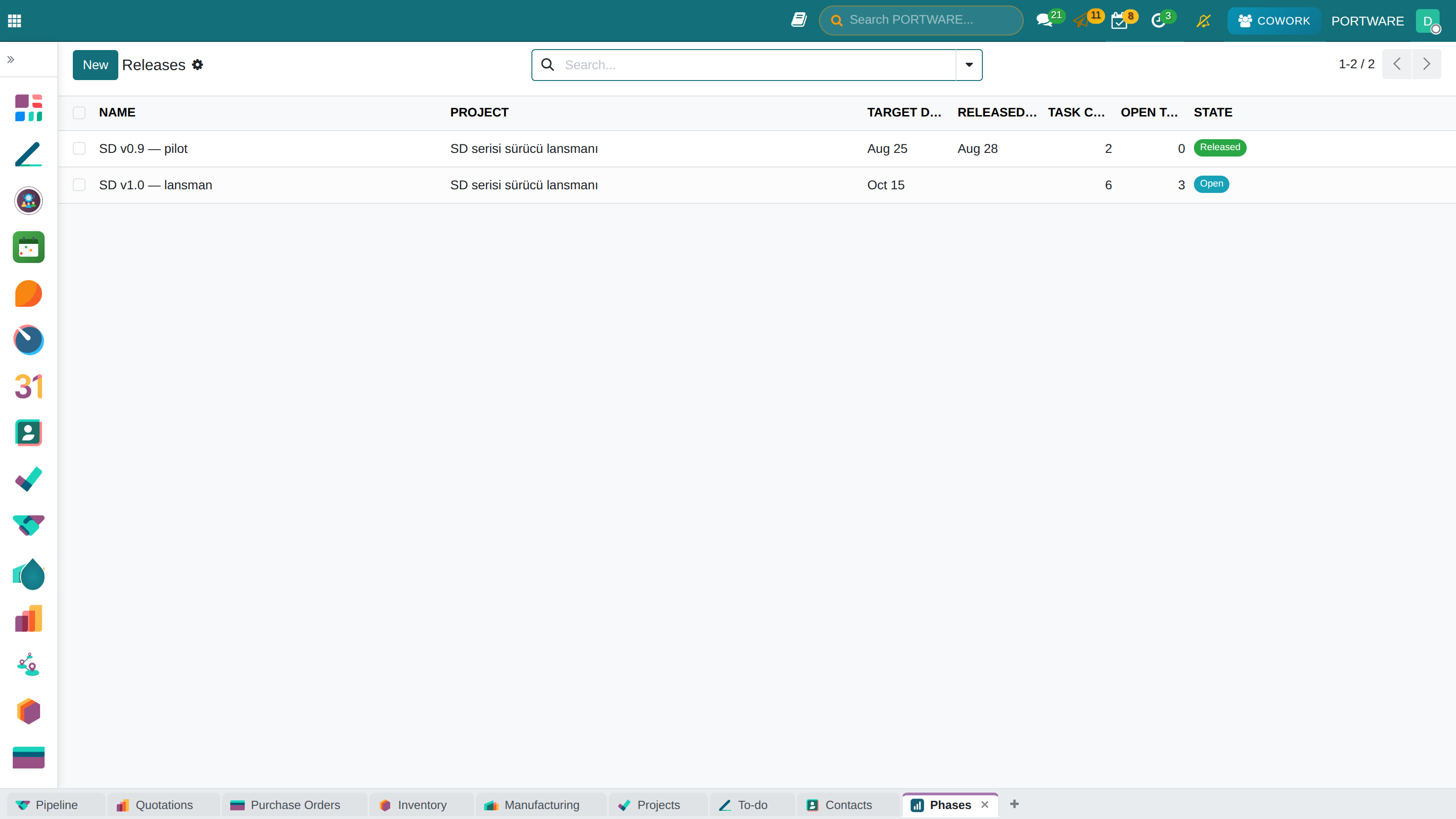
A published deliverable. Its difference from a milestone was explained in chapter 24: a milestone is a date, whereas a release has its own status and the target date and the release date are separate fields. With a single field the question "are we late?" would go unanswered.
A project cannot have two releases with the same name.
Component
A named part of the product that has an owner. That is its difference from a tag: anyone can add a tag to anything, and a tag has no owner or scope. A component answers the question "who looks after this part".
A project cannot have two components with the same name, and a task cannot be linked to another project's component.
Typed links
In the standard core there is a single relation between tasks: "blocks". The critical path calculation reads it. Everything else — this relates to that, this is a duplicate of that, this caused that — ends up in the description text because it has nowhere else to go, and no search can find it there.
Typed links fill this gap:
| Type | Forward label | Reverse label |
|---|---|---|
| Relates | relates to | relates to |
| Duplicate | duplicates | is duplicated by |
| Cause | causes | is caused by |
| Clone | clones | is cloned by |
A link is stored as a single record; it appears on the other task with the reverse label. That is why the two ends can never drift apart.
Summary of this chapter
- The project modules are not a separate application; they live inside Project.
- Methodology has no default; a project that does not choose sees no change.
- A closed sprint accepts no writes; nothing is silently cleared.
- The burndown chart shows a missing day as a gap and missing records in words.
- The board has no rules; rules and totals are on the server.
- The swimlane board adds a second grouping dimension; kanban stays as it is.
- A release is a deliverable, not a date; typed links do not move the schedule.
The next chapter is about fitting work into time and people: the timeline, planning and load.