
SODOO uygulama simgesi

SOOO

BEYOND SUPERUSER

SODOO : ODOO + SODOOC +++ from PORTWARE

A Complete Introduction

odooThe core it is built onsudoUbuntu’s command for authorityso, do!“Let’s get it done”beyondPast the superuser

v19.0 · Odoo 19 Community + SODOOC · 2026

SMB TECHNICS (A-GRUP)

Introduction

THE NAME

SODOO and “BEYOND SUPERUSER”

Both the name and the tagline carry one claim: a familiar core, with an unfamiliar layer on top of it.

SODOO : ODOO + SODOOC +++ from PORTWARE

odooThe core it is built on: Odoo 19 Community, LGPL-3. Open schema, your data, no lock-in.
sudoUbuntu’s command for taking authority. The spelling of SODOO nods to it: a system that hands the power to the person using it.
so, do!Read aloud in English: “let’s get it done”. Work done rather than discussed — the whole deck rests on that.
+++SODOOC, SOTION, SODRAW, Cowork AI and 54 custom modules — the layer the core either lacks or charges for.

SMB TECHNICS (A-GRUP) · v19.0 · Odoo 19 Community + SODOOC

Introduction

AGENDA

What we will cover

Seven sections. We start with what the system is and end with the reports that feed decisions.

What you gain: By the end you will have seen, part by part, which piece of your work SODOO makes easier and how.

1 · The SODOO layerSODOOC, SOTION, SODRAW and Cowork AI.
2 · Commercial processesCRM, sales, purchasing and inventory.
3 · ManufacturingMRP, bills of materials, work centres and quality.
4 · Projects and serviceMethods, timeline, workload, field service.
5 · Finance and peopleAccounting, budgets, KPIs, OKRs, e-invoicing and HR.
6 · Sales channelsWeb, e-commerce, marketing and point of sale.

7 · Governance and decisions: reporting, permissions, deployment and the roadmap

Introduction

SODOO

What is it?

A business management system that keeps a company’s entire operation in one database (BRP — Business Resource Planning).

What you gain: Sales, stock, production, accounting and people live in one system instead of separate programs: you enter a fact once and everyone sees the same one.

Built on Odoo 19 CommunityThe core is LGPL-3 licensed; the database schema is open and the data is yours.
392+ installed applicationsCRM, sales, inventory, manufacturing, accounting, HR, projects and more — all on the same record.
Turkish and e-invoicingInterface, reports and customer-facing documents in Turkish; e-Invoice and tax-authority integration come built in.
A layer Odoo does not haveSODOOC, SOTION, SODRAW and Cowork AI — capabilities that are paid for, or simply absent, in commercial editions.

Introduction

THE SODOO VISION

Why SODOO?

What you gain: Less manual work, fewer mistakes, and the history of every job at your fingertips.

SimplicityMake complex work simple.
IntegrationEvery system talks to the others.
EfficiencyAutomate repetitive work.
TraceabilityEvery action keeps its history.
ScalabilityIt works at any size.
FocusFocus on your business and leave the rest to the system.

Introduction

SCOPE

Who it is designed for

SODOO is not built for one industry but for one problem: business knowledge scattered across separate programs.

What you gain: For any company whose knowledge is scattered across spreadsheets, emails and separate programs.

Companies that manufactureBOMs, work orders, quality and stock in one chain — including PLM and CAD files.
Trade and distributionPurchasing, multi-warehouse, shipping and the dealer channel on one catalogue.
Projects and servicesQuotes, tasks, timesheets and invoicing; field service on mobile.
Corporate managementMulti-company, consolidated reporting, separation of duties and an audit trail.

Introduction

COMPARISON

How we differ from Odoo Community

What you gain: Capabilities that cost extra elsewhere, or do not exist at all, come installed here.

CapabilityOdoo CommunitySODOO
Office documentsNoneSODOOC — Word, Excel, slides; in the browser and versioned
Knowledge managementLimitedSOTION — hierarchical wiki with a variable system
DiagramsNoneSODRAW — Draw.io inside the record, still editable
Artificial intelligenceNoneCOWORK AI — on every screen, about that record
PLMPaidInstalled — with CAD files and revision history
HR dashboardsPaidInstalled
e-Invoicing (Türkiye)Incompletee-Invoice, e-Archive, e-Waybill, tax-authority integration
Budgets and KPIsNoneVersioned, approved budgets, blocking control, scorecard and OKR
Gantt and capacityNoneTimeline, sprints, methodologies and team workload

Introduction

ARCHITECTURE

Technical foundation

Four layers. Every one of them replaceable, none of them a black box.

What you gain: Your data sits in an open database that you own; you are not locked to one vendor.

User layerWeb · Mobile · API
Application layer392+ installed applications and 180 custom modules
CoreOdoo 19.0 Community — Python and JavaScript
Data layerPostgreSQL — open schema, your data

Introduction

USER INTERFACE

The anatomy of a screen

What you gain: Learn one screen and you know them all: buttons and information sit in the same place in every app.
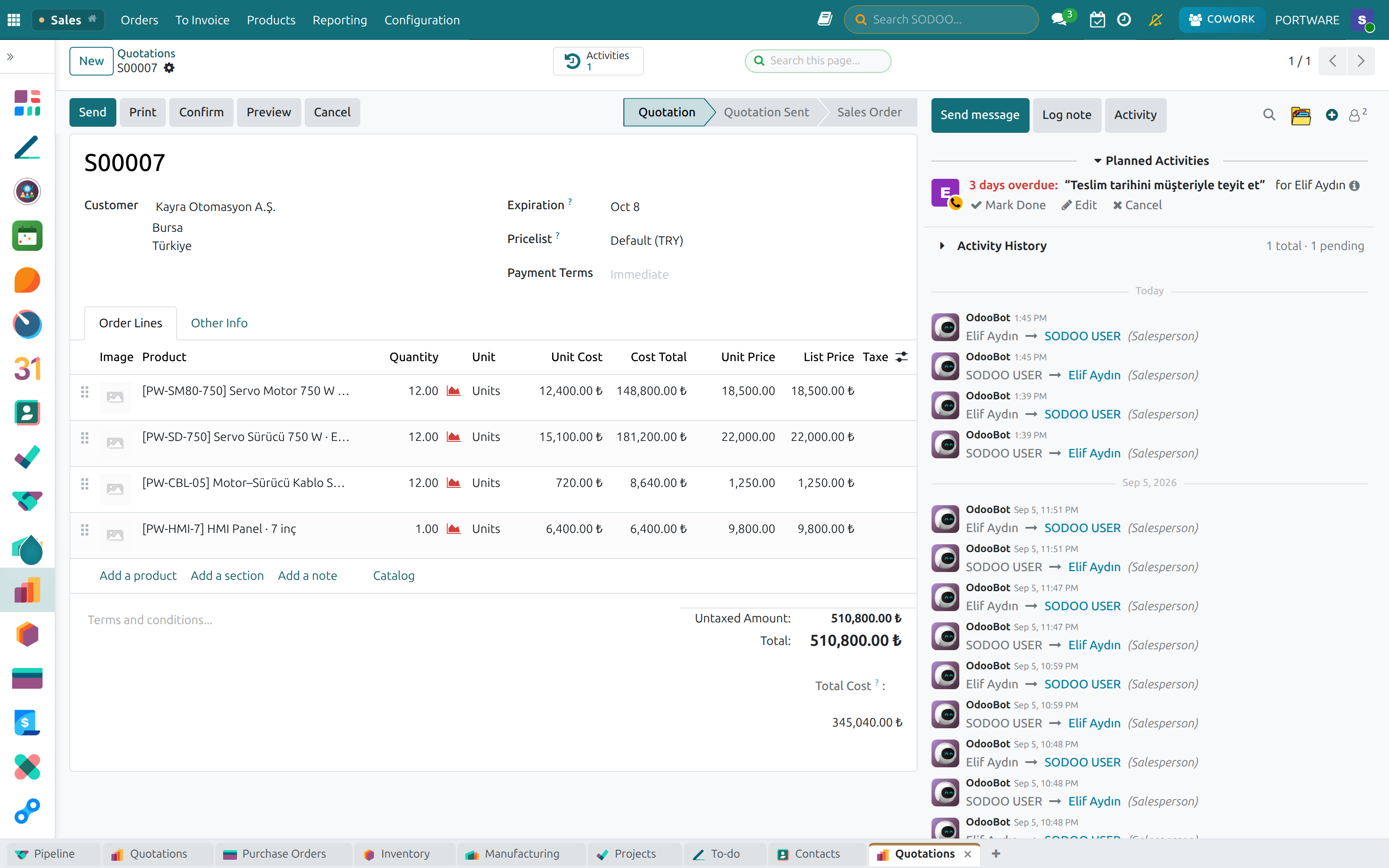
A quotation record — the same shell on every screen.12345
A quotation record — the same shell on every screen.
1
Application railAlways open on the left. Installed apps as icons; clicking one reopens the screen you last had in it.
2
Tab stripOpen screens along the bottom. Jump from a quote to stock and back without losing your place; the tabs belong to you and persist.Not in Odoo · in SODOO
3
Smart buttonsCounting shortcuts above the record: how many quotes, deliveries, invoices — click the number and that list opens.
4
The chatterThe record’s own history on the right: messages, internal notes, activities and the audit trail. No archive apart from the record.
5
Attachment foldersFiles in the chatter get folders, archiving and versions, and the chatter refreshes live for everyone looking at it.Not in Odoo · in SODOO

The same data in six views: List · Kanban · Calendar · Gantt · Pivot · Chart

SECTION 1

The SODOO layer

SODOOC · SOTION · SODRAW · COWORK AI

The SODOO layer

OdooSODOO

SODOOC

Office documents inside the system

Word, Excel and presentation files open in the browser, are edited together, and every save leaves a version behind.

What you gain: Word and Excel files stop travelling by email; everyone works on the latest version of the same file.

WordTemplates, mail merge, full editing.
ExcelFormulas, pivot tables, charts.
PresentationsProfessional slide decks and animations.
Simultaneous editingSeveral people at once, with live cursors.
Version historyEvery save is a revision, and every revision is restorable.
ChatterDiscussion, comments and approval on the document itself.

In practice: quote and contract templates · Excel reporting · project documentation · HR forms

The SODOO layer

OdooSODOO

SODOOC

Not ONLYOFFICE — its levelled-up form, made for SODOO

The base is an open-source office server. SODOO did not merely put it inside the ERP — it added a layer that works on the document itself.

What you gain: Quotes, contracts and specifications never leave the system: the file on the record lives beside the record’s data, versioned and discussed in place.

Cowork AI on the documentIt reads the open document, summarises it, drafts sections and fills tables — and asks before it writes.
Editable diagramsA SODRAW drawing stays inside the document and stays editable — it is not a pasted screenshot.
Versions and coloured differencesEvery save is a revision, and any two are compared with a coloured diff across text, cell values and formatting.
A visible Ctrl+SLeaves a checkpoint: the way to say “keep this state” without disturbing the live session.
Attachment foldersDocuments are foldered and archived on the record, in the same place as the conversation.
Together, at onceMultiple users, live cursors and comments on the document — no file goes round by email.

Word · Excel · Slides · PDF viewing · generation from templates · downloadable output

The SODOO layer

OdooSODOO

SODOOC

A full office suite — on the record

This is not a preview: formulas, pivot tables, protection, co-editing and plugins sit on the same ribbon as a desktop suite.

What you gain: No separate office program to install and no download needed to edit a document.
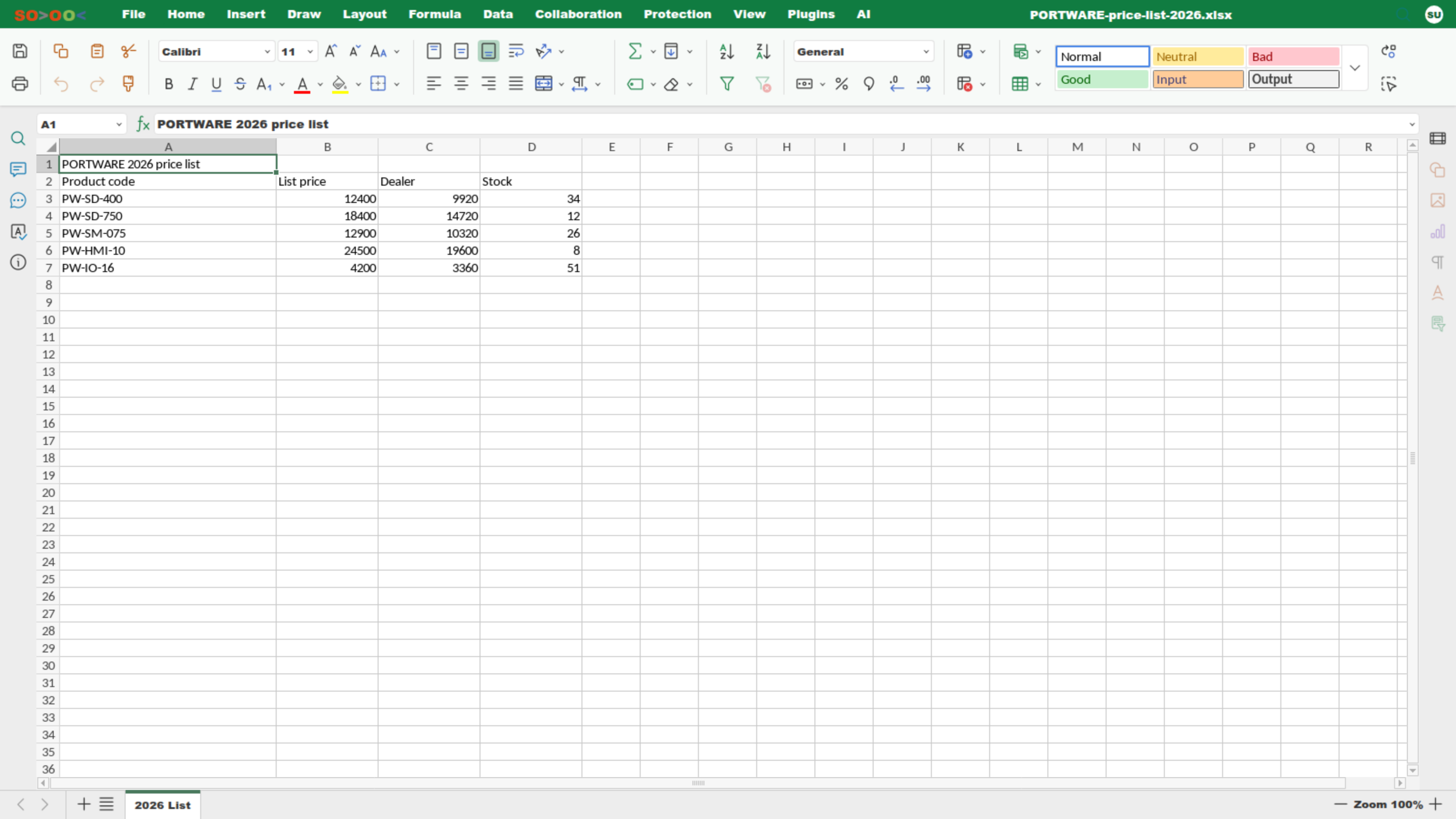
WordExcelSlidesPluginsAI tab
The spreadsheet editor — the PORTWARE price list, Home tab.

The SODOO layer

OdooSODOO

SODOOC · AI

The assistant inside the document

What you gain: Copying a document into a chat website ends: the assistant reads the open file and asks before it writes.
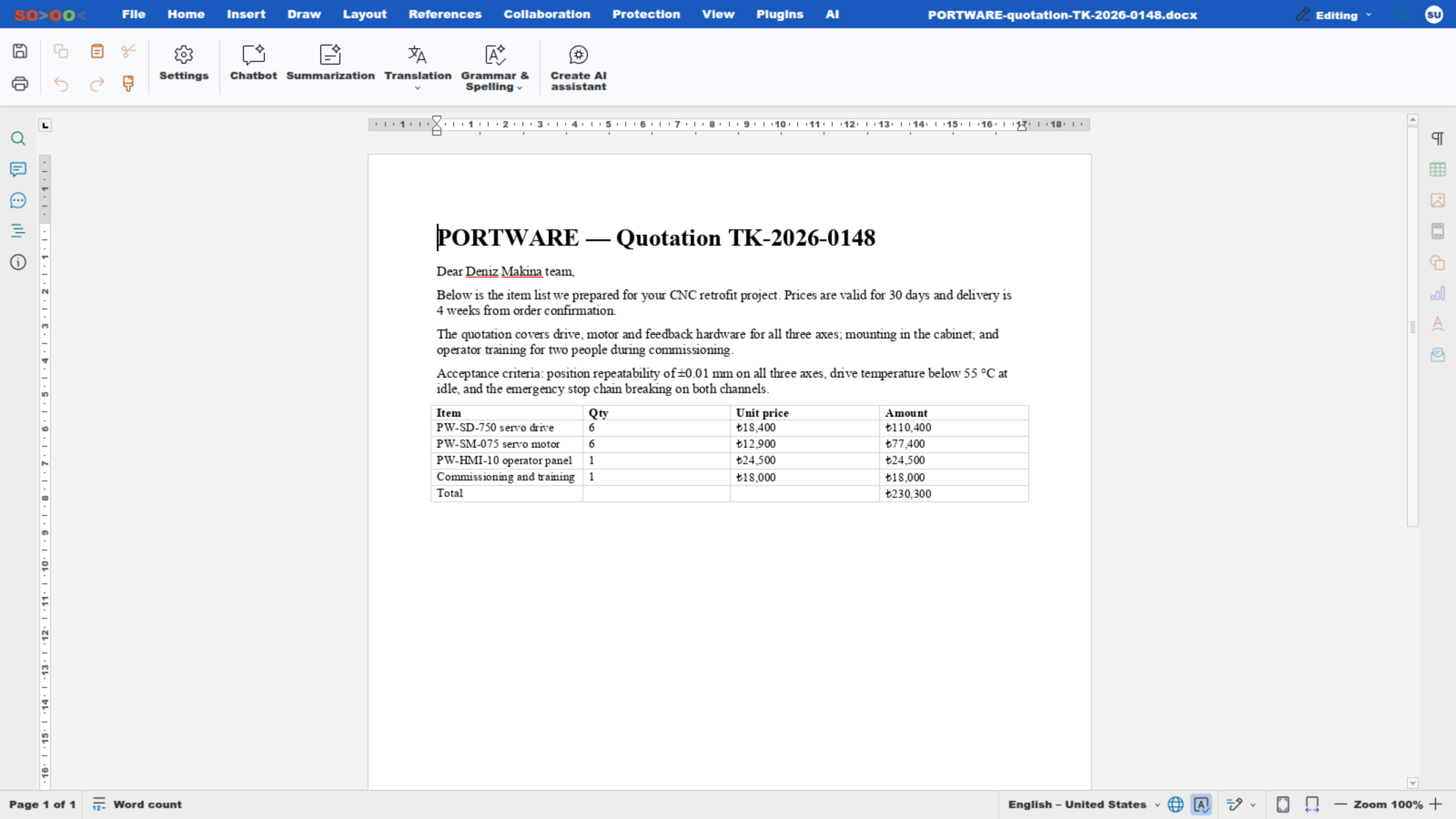
The word processor — the AI tab.
Summarise and rewriteA selection or the whole document.
Fill the tableIn a spreadsheet, with data, without breaking formulas.
Approval gateEvery change is shown before it is written.
Version safety netEvery save is a revision — what the AI wrote can be rolled back too.

The SODOO layer

OdooSODOO

SOTION

Everything the company knows, in one place

A Notion-style knowledge base: nested pages, a variable system and status labels. Change a fact once and it changes on every page that uses it.

What you gain: Company know-how lives in one place anyone can find, not in people’s heads — change a fact once and every page updates.

  • Hierarchical page structure
  • {{variable}} system
  • [[property]] labels
  • Markdown and rich text
  • Template pages
  • Version control
Where it earns its place
  • Product documentation
  • Standard operating procedures
  • New-hire onboarding
  • Technical specifications
  • Best practices
  • Frequently asked questions

The SODOO layer

OdooSODOO

SODRAW

The shortest way to explain a process

The Draw.io editor lives inside the document or the record. The drawing stays editable — it is not a screenshot.

What you gain: Explain a process with a diagram instead of a long text — and fix the diagram later if things change.

FlowchartsWorkflows and decision diagrams (BPMN 2.0).
Organisation chartsHierarchy, departments, reporting lines.
Software diagrams (UML)Class, sequence and use-case drawings.
Mind mapsBrainstorming and idea mapping.
Network diagramsIT infrastructure with Cisco/AWS/Azure icons.
UI/UX wireframesWireframes and mobile/web components.

Export: SVG (vector) · PNG · PDF · XML (still editable)

The SODOO layer

OdooSODOO

COWORK AI

An assistant that knows the screen you are on

It opens on every screen and talks about the record in front of you. It asks for confirmation before it changes anything.

What you gain: You no longer need to know the ERP to use the ERP: you say what you want, and the system knows which field on which screen that is.

Multiple providersOpenAI, Gemini, Claude and others — behind one interface.
In-screen conversationAsk about the record on the page, immediately.
Data analysisProject summaries, customer reports, table interpretation.
Updating recordsChanges in plain language — behind a confirmation step.
Finding what is missingIt finds empty fields across records and ranks them.
Session historyEvery conversation is kept and can be filtered by model.

The SODOO layer

OdooSODOO

THE MORNING BRIEFING

Every morning at 08:00, before you ask

The assistant does not only speak when spoken to. Every morning it reviews your CRM, activities, tasks, quotations and deliveries.

What you gain: The day starts with the list, not with the search for what was forgotten.

A badge on the top barWhen it is ready the COWORK icon carries a badge.
Scoped to the personEach person sees their own work; no findings means no briefing.
A company view for supervisorsUnassigned leads, unassigned tasks, late transfers.
On demandThe panel’s button runs the same audit right away.
Links to the recordExamples arrive by address: you click, not search.
Examples, not a flood8 examples and the real total; listed up to 50.

The SODOO layer

OdooSODOO

THE SYSTEM AUDIT

The 22 things it looks at every morning

This is not “the AI found something”: each one is a named, countable query defined in code.

What you gain: Forgotten quotes, unanswered messages and late deliveries come to you without anyone searching.

Pipeline and leads — 6No next step, stalled, no revenue, no contact, untouched, unassigned.
Activities — 1Past their date and closed by nobody.
Threads — 2A customer message with no reply; a thread that has not moved.
Meetings — 2No next step; no notes written.
Quotes and orders — 3An unanswered quote, an unsent draft, an incomplete line.
Tasks — 3Overdue, undated, unassigned.
Deliveries — 2Transfers past their scheduled date.
Product data — 3No description, no internal reference, or no price.

16 findings belong to the person; 6 are company-wide and shown only to a supervisor.

The SODOO layer

OdooSODOO

THE DIFFERENCE

Not a number — what to do about it

“259 records need fixing” is a report, and it moves nobody. The briefing writes the remedy next to every finding.

What you gain: It does not just say “there is a problem”; it tells you what to do and on which record.

An ordinary reportThe SODOO briefing
What it saysA numberThe number, example records and a one-sentence remedy
Who writes the remedyNobodyThe server — written in code per finding; the model does not invent it
Getting to the recordYou go and find itThe address is inside the finding, and it is clickable
Going deeperNot possibleThe same finding listed up to 50 records, from the panel
Asking a questionNot possibleThe briefing is a conversation — “why does this matter?”
Starting the workYou switch to another screenFrom the same panel: schedule the activity, follow the quotation up

The SODOO layer

OdooSODOO

ACTION

216 tools, one confirmation gate

The assistant does not only write text; it calls the system’s own operations. A tool that reads runs directly; a tool that WRITES waits for your approval.

What you gain: Authority stays with you: the AI says what it will change, you approve it, and if you dislike the result it is undone.

In every moduleCRM, sales, purchasing, inventory, manufacturing, PLM, quality, accounting, HR, projects, field service and e-invoicing.
Approval before writingThe proposed change sits on screen; no record changes until you approve it.
UndoChanges the assistant made are kept for the session and can be rolled back.
Background workLong jobs are queued; the panel tells you itself when they finish — no page refresh needed.
Memory across sessionsWhat it learns is stored; you do not explain it again in every conversation.
The limits are in codeQueries, sources and outbound calls are each guarded — the assistant cannot step outside its permissions.

The SODOO layer

OdooSODOO

PROVIDERS

Eight providers — one of them on your own server

OpenAI, Gemini, Claude, DeepSeek, GLM, Mistral, Groq and Ollama on your own server — behind one interface.

What you gain: You are not locked to a single AI vendor: the provider changes, your workflow does not.

Automatic selectionSimple questions go to a fast model, heavy analysis to a strong one.
A backup providerIf one provider cannot answer, the turn falls to the next.
Inside the companyWith Ollama the data never leaves the server.
A spend ledgerWhat each question cost is recorded per provider.
A measured choiceThe default model is chosen by a comparative run, not a guess.
Pinning by handPin a chat to one model; the bubble names who answered.

The SODOO layer

OdooSODOO

REACH

Where the work happens

Cowork AI is not a chat website: the same assistant lives in the ERP screen, the editor, the office document and the attachment.

What you gain: Copy-paste ends: the assistant already sees the data.

In the ERP screenIt knows the open record; it does not ask which customer.
In the editorIn every HTML field it writes, corrects and translates.
In a SODOOC documentOn the Word, Excel and slide file — asking first.
On images and scansIt reads photographs, drawings and scanned PDFs.
By voiceIt transcribes dictation and separates speakers.
Its output is a fileReports, slides, diagrams — in a downloadable file.

The same assistant, permissions and confirmation gate.

The SODOO layer

COMMANDS

True to the name: type it, and it happens

These are not examples — they are the actual commands.

What you gain: Open what you need by typing a few letters instead of getting lost in menus.

In the rich-text editor — type “/”Works in every HTML field.
/SODRAWA Draw.io diagram — stays editable
/exTableAn Excel-like spreadsheet table
/Status TrackingA timeline element
/Hero BannerA hero heading block
/BadgeA coloured, sized badge
/Format PainterCopy and paste formatting
On a SOTION pageA fact changed once changes on every page.
{{değişken}}A value shared across pages
[[özellik]]A status label with coloured options
In the address bar — every screen has a name235 routes; open a screen by name instead of hunting the menu.
/sodoo/crmThe sales pipeline
/sodoo/manufacturingManufacturing orders
/sodoo/vendor-billsVendor bills
/sodoo/docThis documentation

Ctrl+K command palette · Ctrl+S versions the document

The SODOO layer

OdooSODOO

WHAT ODOO DOES NOT HAVE

54 modules written for SODOO

These are code, not configuration: 330.319 lines. None ship with Odoo Community, and most are absent even from the commercial editions.

What you gain: Capabilities missing from the standard system, built to speed up daily work, come ready to use.

Cowork AIEight providers behind one interface; it knows the record on screen and asks before it writes.
CAD viewerSTEP, DXF, DWG, STL — opens from the attachment, measures and sections.
Tabs and sessionSeveral screens open at once, and every app reopens where you left it.
Attachment foldersA record’s files get folders and archiving, and the chatter refreshes live.
Outbound guardNo email leaves the company without a human approving it.
Meeting notesA Discuss call is recorded per participant and becomes a list of decisions.

Also: SODOOC · SOTION · SODRAW · exTable · the dealer portal · the activity ledger · the agenda · report layouts

The SODOO layer

THIRD PARTY

126 packages installed and maintained

We do not rewrite everything: mature community packages are installed, ported to Odoo 19 and translated.

What you gain: Proven ready-made solutions are used, and their upkeep and translation are not your burden.

42Cybrosys / Open HRMSPayroll, attendance, leave, recruitment and HR dashboards.
32OmniaSolutions PLMCAD integration, engineering BOMs, revisions, a 3D viewer.
36The OCA communityField service, multi-level MRP, server tools.
10Kıta / Quanimo e-invoicinge-Invoice, e-Archive, inbound invoices and integrator connectivity.
1SODOOC — levelled upThe ONLYOFFICE base was rebuilt for SODOO: editable diagrams, Cowork AI working on the document itself, versions and diffs.
6Other vendorsAccounting add-ons, report templates, dashboards.

All are versioned in one repository and share one upgrade chain.

The SODOO layer

DISTRIBUTION

Where the 180 custom modules come from

These bars are not hand-drawn: they are counted from the author field of each module’s manifest, and recomputed every time the documentation is built.

What you gain: It is clear which part comes from whom — no hidden dependencies.

SMB TECHNICS — SODOO’s own54
Cybrosys / Open HRMS42
The OCA community36
OmniaSolutions PLM32
Kıta / Quanimo e-invoicing10
Other vendors6

Third-party packages are not installed and abandoned: Odoo 19 compatibility, Turkish translation and bug fixes are on us.

The SODOO layer

OdooSODOO

IMPROVEMENTS

What makes the out-of-the-box product usable

Not big features — the removal of the small obstacles you hit forty times a day.

What you gain: The small time losses you hit many times a day disappear.

The tab stripOpen screens stay along the bottom; jumping from a quote to stock and back does not lose your place.
Where you left offEvery app reopens on the screen you were last looking at.
Live chatterEveryone with the record open sees a new message without refreshing.
The activity ledgerA completed activity is not erased: a permanent history, with the time it took.
The agendaOne always-visible surface and reminders that need no setup.
Actual TurkishInterface, reports and customer-facing documents — term by term, not machine-translated.

Down to the measured floor: 6.457 automated tests run on every release.

The SODOO layer

CHATTER

Every record carries its own conversation

Who did what and when — on the record itself, not in a separate archive.

What you gain: Everything said about a customer or order sits on the record — nobody has to ask for an email to be forwarded.

Outbound communicationEmail, customer correspondence, CC/BCC.
Internal notesNotes only the team can see.
File sharingDocuments, images and video, with previews.
Activity planningTasks, meetings and calls, synchronised with the calendar.
NotificationsEmail, mobile push and browser notifications.
HistoryAn automatic audit trail of every change.

Active on every record · @mentions · automatic logging · email gateway

The SODOO layer

OdooSODOO

VERSIONS AND DIFFS

Nothing you write is ever lost

Version history is not wired into one place but into every place a document lives: office files, in-system documents, record attachments.

What you gain: The question “which one was the latest?” disappears: every save leaves a revision, and any two revisions can be put side by side with the changes coloured in.

SODOOC — office filesEvery save is a revision in Word, Excel and slides; Ctrl+S leaves a checkpoint whenever you want one.
What changed, in colourTwo revisions are compared and the difference is coloured: text, cell values and formatting, each on its own.
In-system documentsA SODOO HTML document is versioned too: the previous state survives even when the body is rewritten.
Record attachmentsAttachment folders keep a file’s earlier versions, and an archived file is not deleted.
Who, and whenEvery revision carries its author and time, shown in the reader’s own timezone.
RestoreGoing back to an older revision does not erase history: it is restored by appending, so the chain stays whole.

The SODOO layer

OdooSODOO

HTML DOCUMENT

A document that lives beside the record

Contents on the left, the page in the middle, design on the right; version history and PDF above. Diagrams and tables stay editable.

What you gain: A technical note or report sits right next to its quote or project — no searching.
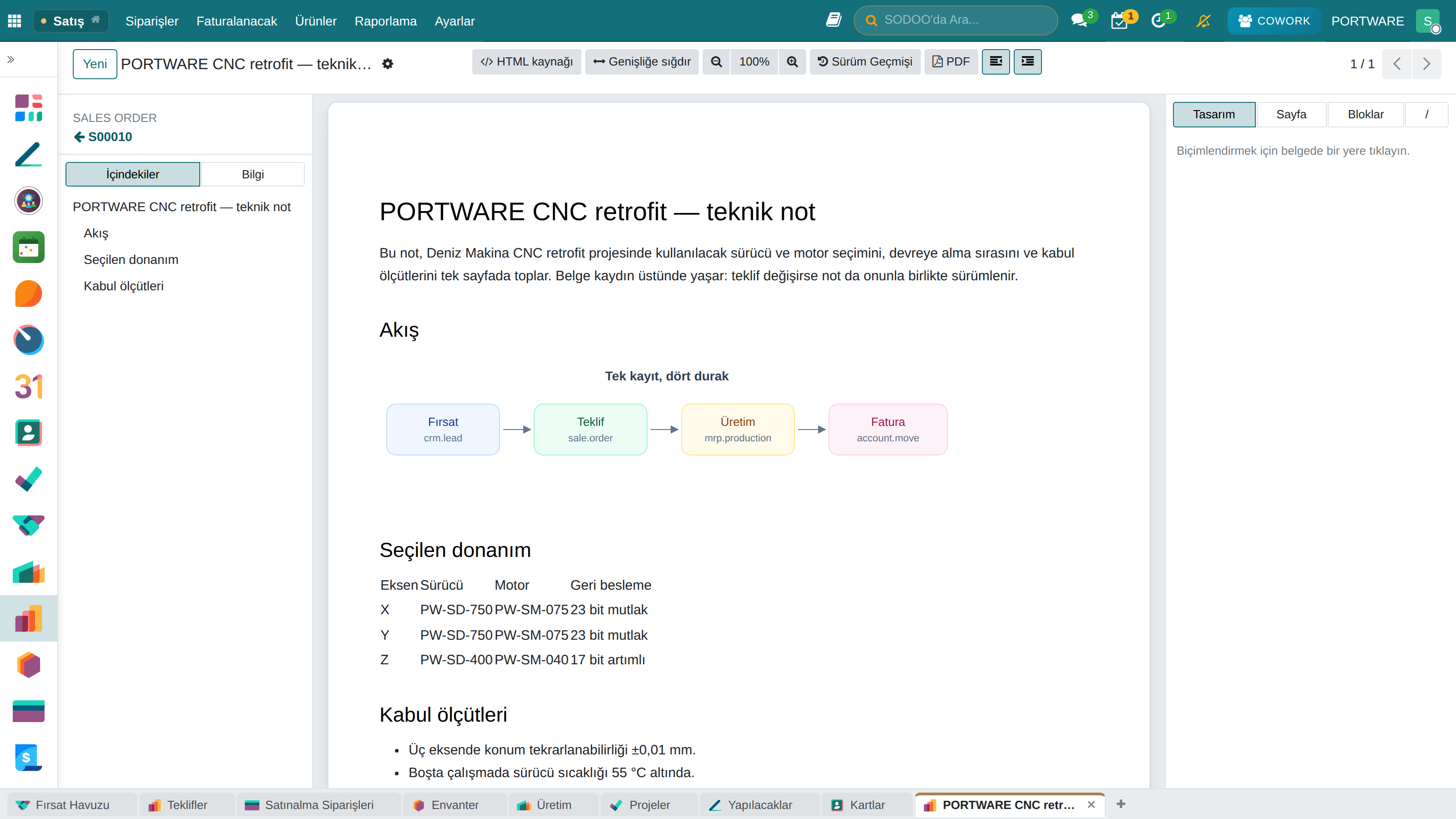
An HTML document — with page design and a table of contents.

The SODOO layer

OdooSODOO

WRITING DOCUMENTS

A rich-text field versus a SODOO document

Odoo’s HTML field is a notepad. A SODOO document is a document: it has a page, a design, versions and a downloadable form.

What you gain: You write proper, designed, downloadable documents inside the system — no need to go out to Word.

Odoo rich textSODOO document
Page designNoneBackground, margins, ink — stored as a field, so it survives a rewritten body
DiagramsNoneSODRAW — inside the document and still editable
SpreadsheetA plain tableexTable — multi-cell selection, Excel-like editing
Freehand drawingNoneThe page’s own drawing layer — 11 tools, movable and resizable
Version historyNoneEvery save is a revision, and restorable
Artificial intelligenceNoneCowork AI works on the document itself — and asks before it writes
ExportNoneDownloadable HTML and PDF, design included

The SODOO layer

OdooSODOO

ACTIVITY MANAGEMENT

The work to be done sits on the record

In Odoo a completed activity is deleted and only a message remains. SODOO writes it into a ledger.

What you gain: Who did what, when, and how long it took can still be read off the record months later.

A permanent ledgerA completed activity is not erased; the planned and the actual date are kept together.
Time spentThe time an activity took is captured — no separate timesheet to fill in.
The agendaOne always-visible surface, with reminders that need no setup.
The team viewWhat has piled up on whom, on one screen — the place to look when balancing load.
Alongside the calendarTasks, meetings and calls on one timeline, with no copy between them.
Overdue workAn overdue activity is coloured on the record and counted in the report.

SECTION 2

Commercial processes

CRM · Sales · Purchasing · Inventory

Commercial processes

CRM

Customer relationship management

What you gain: A smart CRM wired into all corporate information and operations: behind an opportunity sit stock, production capacity, credit exposure and the whole past conversation — at once.

Win back timeSell instead of hunting for information; every interaction sits on the record.
A live pictureThe funnel and every opportunity in it, with its value, on one screen.
Customer satisfactionWho called when and what was said — no promise gets lost.
Predictable revenueExpected revenue and close dates are read from the pipeline itself.

Commercial processes

CRM FUNDAMENTALS

From a lead to a loyal customer

What you gain: You can tell apart someone you have just met, business you could win, and your regular customers.

  1. 1
    LeadA person or company you have just met and not assessed yet.
  2. 2
    OpportunityBusiness you have discussed and believe you can win.
  3. 3
    CustomerA party you now do business with.

Lead → Opportunity → Customer: start with many, continue with the right ones

Commercial processes

SALES PIPELINE

How an opportunity moves

What you gain: Everyone sees on one screen which step each sale is at and what it is waiting for.

  1. 1
    New leadFirst contact, source tracking, automatic assignment rules.
  2. 2
    QualificationEstablishing the need, the budget and the authority to buy.
  3. 3
    QuotationPricing, presentation, negotiation.
  4. 4
    ClosingWon or lost, contract, handover.
A quotation — lines, totals, and the record’s conversation on the right.

Commercial processes

CRM

What you can do with it

What you gain: Everything from finding a customer to closing the sale runs from one place.

Lead managementWeb forms, email capture, automatic routing, scoring.
Opportunity trackingPipeline stages, win probability, expected revenue.
Activity planningCall notes, follow-up reminders, calendar sync.
Sales reportsFunnel analysis, conversion rates, rep performance.
SegmentationCustomer tags, target audiences, campaign groups.
IntegrationsEmail, telephony, website and social media.

Commercial processes

PURCHASING

From request to invoice

What you gain: Purchasing is not guesswork: stock rules, the production plan and the sales order all feed the same requirement.

  1. 1
    Request for quotationAsk several suppliers for prices and compare them side by side.
  2. 2
    ApprovalApproval tiers by amount, with multiple approvers.
  3. 3
    Purchase orderThe order itself: delivery dates and terms.
  4. 4
    ReceiptPartial deliveries, delay warnings, quality checks.
  5. 5
    Vendor billOrder, goods received and bill are checked against each other — no overpaying.

Commercial processes

PURCHASING

Managing the supply chain

What you gain: What was ordered, when it arrives and what is late — at a glance.
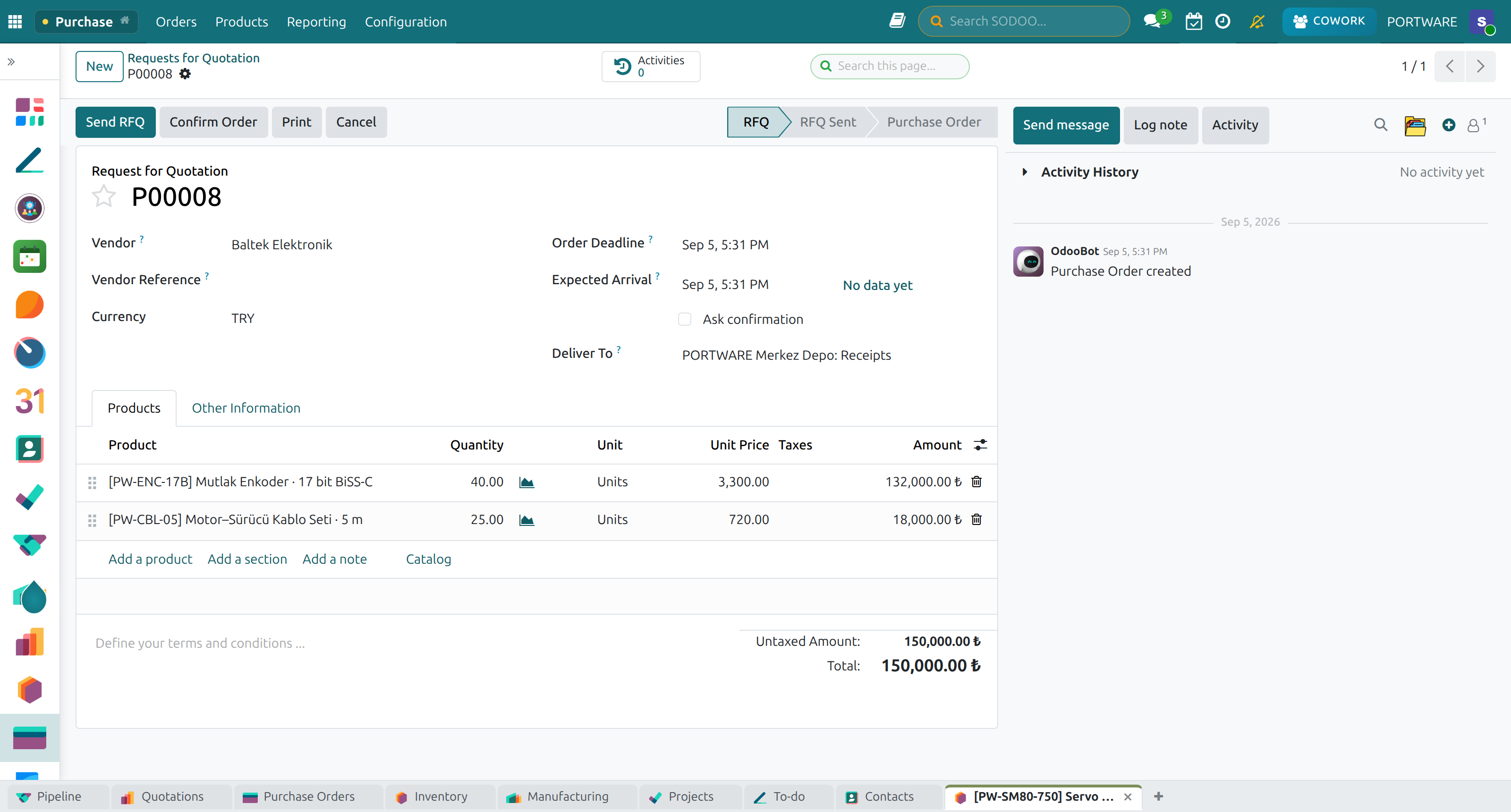
A purchase order — lines, vendor and delivery schedule.
Request for quotationSeveral suppliers, compared side by side.
Approval flowTiers by amount, with email notifications.
Delivery trackingExpected dates, delay warnings, partial receipts.
Supplier managementPerformance scores, price history, contracts.

Commercial processes

INVENTORY

The right item in the right place

The right item · in the right quantity · at the right time · in the right place.

What you gain: Stock is the single truth behind every movement from sales to production — no two numbers in two places, and no surprises on counting day.

Multiple warehousesUnlimited warehouses and locations: aisle, rack, bin.
TransfersMovement between warehouses and stock in transit.
Min/max rulesAutomatic replenishment and reorder points.
Lots and serial numbersBatch tracking, serial numbers, expiry dates.
BarcodeFast counting and picking.
ReportsStock valuation, ABC analysis, movement history.

Commercial processes

INVENTORY

The inventory screen

Receipts, deliveries, internal transfers and counts — all from one screen, each with its status.

What you gain: Today’s warehouse work is visible on one screen, with counts.
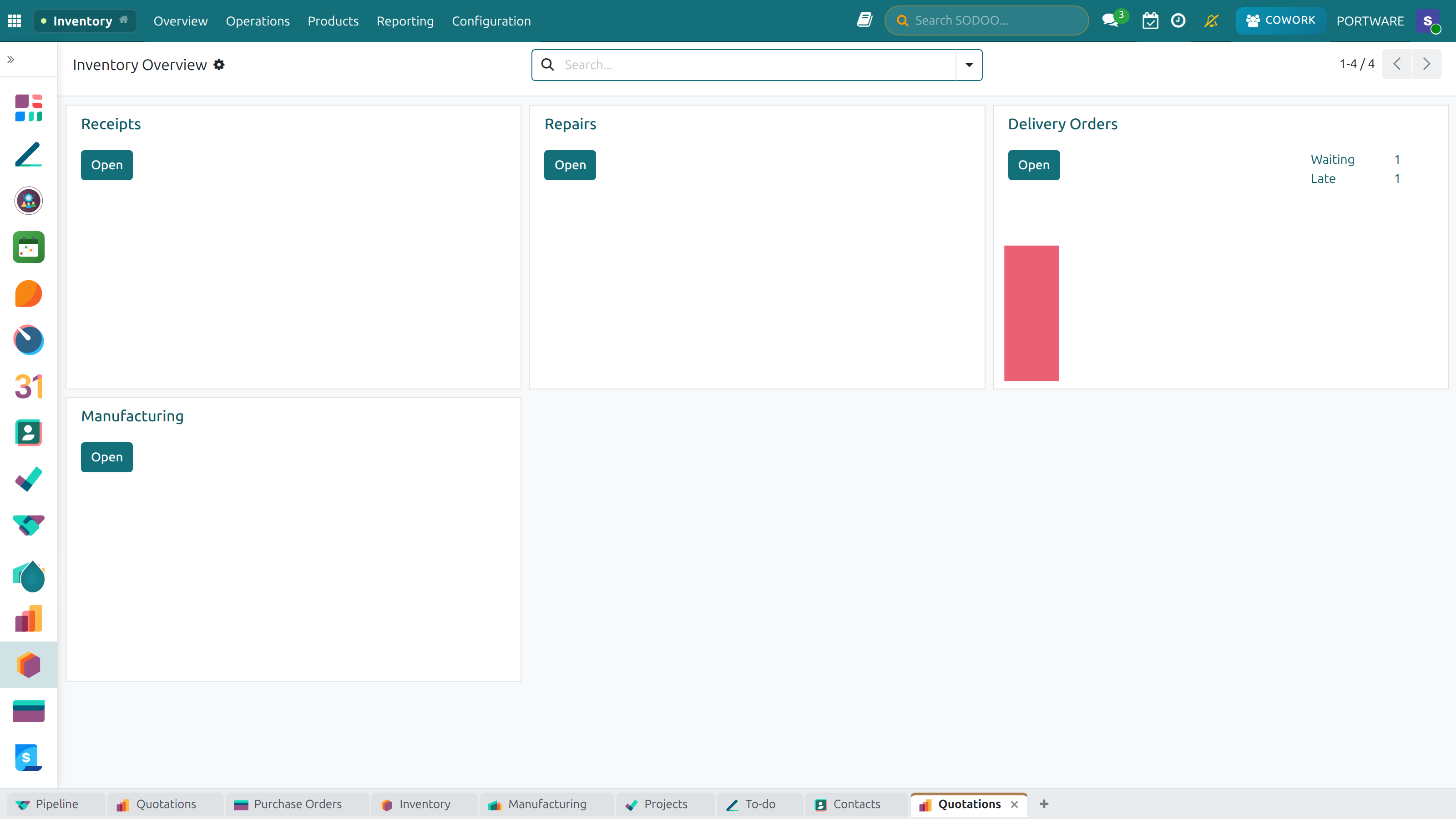
Inventory — operation types and the work waiting in each.

SECTION 3

Manufacturing

MRP · Bills of materials · Work centres · Quality

Manufacturing

MRP

Material requirements planning

It answers three questions: what to make, how much, and when.

What you gain: Production is planned on the same table as the sales forecast and real stock; a missing part becomes an order and a capacity squeeze becomes a warning.

  • Inputs
  • Sales forecast
  • Stock on hand
  • Bill of materials
  • Lead times
Outputs
  • Manufacturing orders
  • Purchase suggestions
  • Capacity plan
  • Bottleneck warnings

Manufacturing

MANUFACTURING

From the plan to the work order

What you gain: You see which job is on which machine and where it stands without asking anyone.
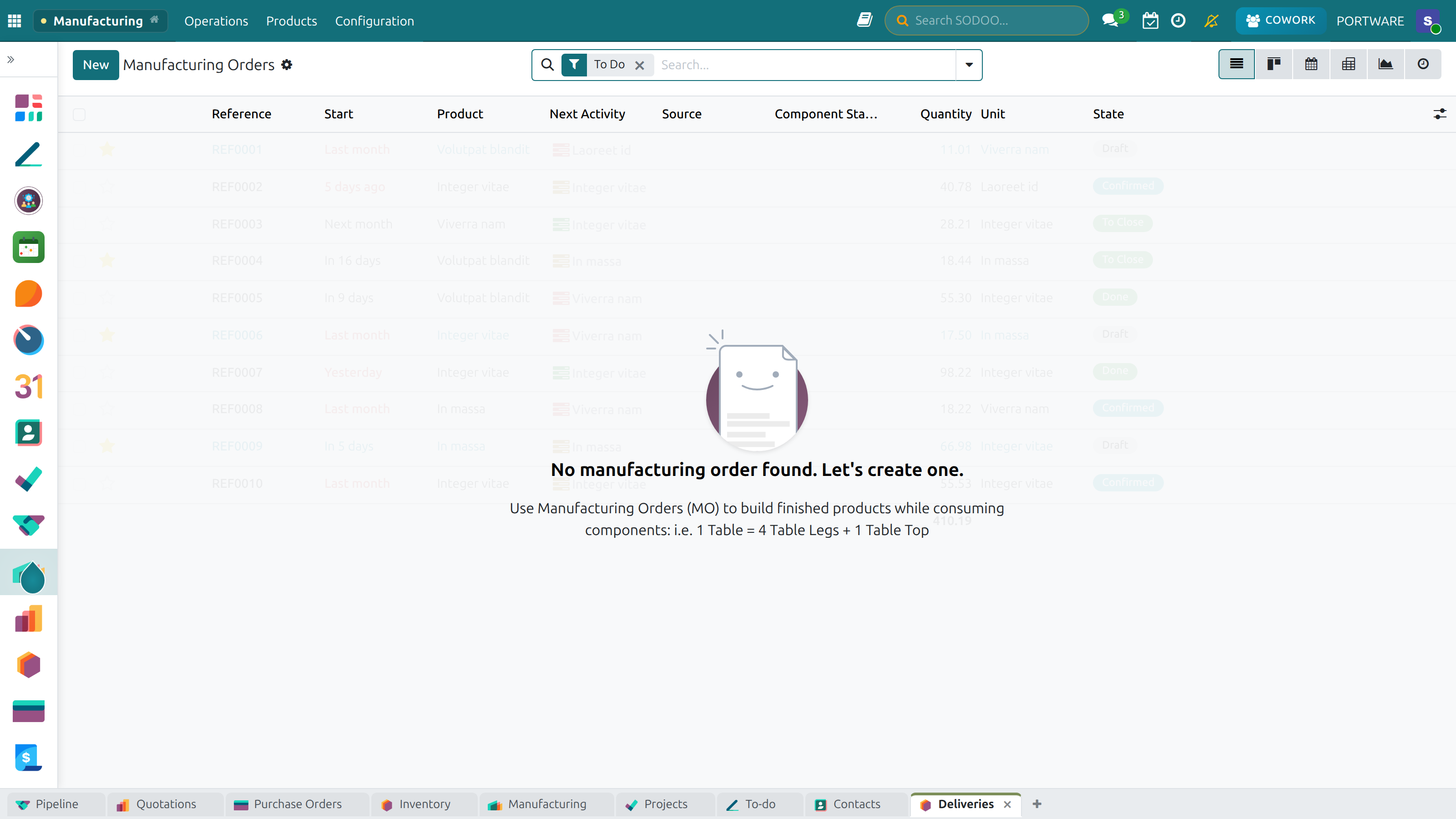
Manufacturing — orders, work centres and their states.
Demand planningForecasts, open orders, safety stock.
Capacity planningWork-centre loading, shifts, bottleneck detection.
Manufacturing ordersAutomatic work orders, prioritisation, tracking.
Purchase suggestionsFinds missing materials and asks suppliers for prices.

Manufacturing

HARDWARE AND THE FLOOR

Where the system touches the physical world

What you gain: The engineer’s drawing, the warehouse scanner and the production work order meet on the same record — one chain from design to dispatch.

Integration with CAD editorsSolidWorks, SolidEdge, Inventor, AutoCAD, FreeCAD and Draftsight — the drawing is bound to the ERP and revised from here.
2D/3D viewer in the browserSTEP, DXF, DWG and STL open from the attachment; measure and section without a CAD licence.
Barcode scannersScanner support is installed in sales and purchasing; the inventory side can be enabled the same way.
Batch conversion and syncCAD files are converted in batches and a multi-site document server is kept in sync.
Attendance devicesThe ZK biometric terminal module sits ready in the repository; once enabled, hours flow straight from the device.
External servicesThe e-invoice integrator, the ONLYOFFICE document server and a REST API — connections whose keys stay with you.

Odoo’s IoT and Shop Floor apps belong to Enterprise and do not exist in Community; SODOO does not promise them — it builds the equivalent from community modules.

Manufacturing

LICENSING

What Enterprise charges for, installed here

The applications below belong to Odoo’s commercial edition. In SODOO their equivalents are installed and maintained — the counts come from the installed-module inventory.

What you gain: Apps that cost extra licence fees elsewhere are installed here and ready to use.

Enterprise applicationIn the commercial editionIn SODOO
PLMPaidInstalled — 30 modules, with CAD integration and revisions
Field ServicePaidInstalled — 17 modules, mobile work orders and routing included
QualityPaidInstalled — control points, non-conformities, audits
PayrollPaidInstalled — calculation and accounting integration
Documents and SignPaidSODOOC + attachment folders — versioned, edited in the browser
BarcodePaidInstalled in sales and purchasing; can be enabled in inventory
IoT · Shop Floor · StudioPaidNo Community equivalent — and not promised

Manufacturing

BILL OF MATERIALS

Bill of Materials

What a product is made of, and in what order.

What you gain: A system that knows what a product is made of tells you about missing parts before production starts.

Finished product
Assembly A
Assembly B
Part 1
Part 2
Part 3
Part 4

BOM types: standard · kit · phantom · multi-level

Manufacturing

OdooSODOO

CAD

The drawing, without a CAD licence

STEP, DXF, DWG and STL files open from the record straight in the browser. Sales, purchasing and production look at the same model.

What you gain: No expensive CAD program is needed to look at a drawing; sales and the warehouse see the same model.
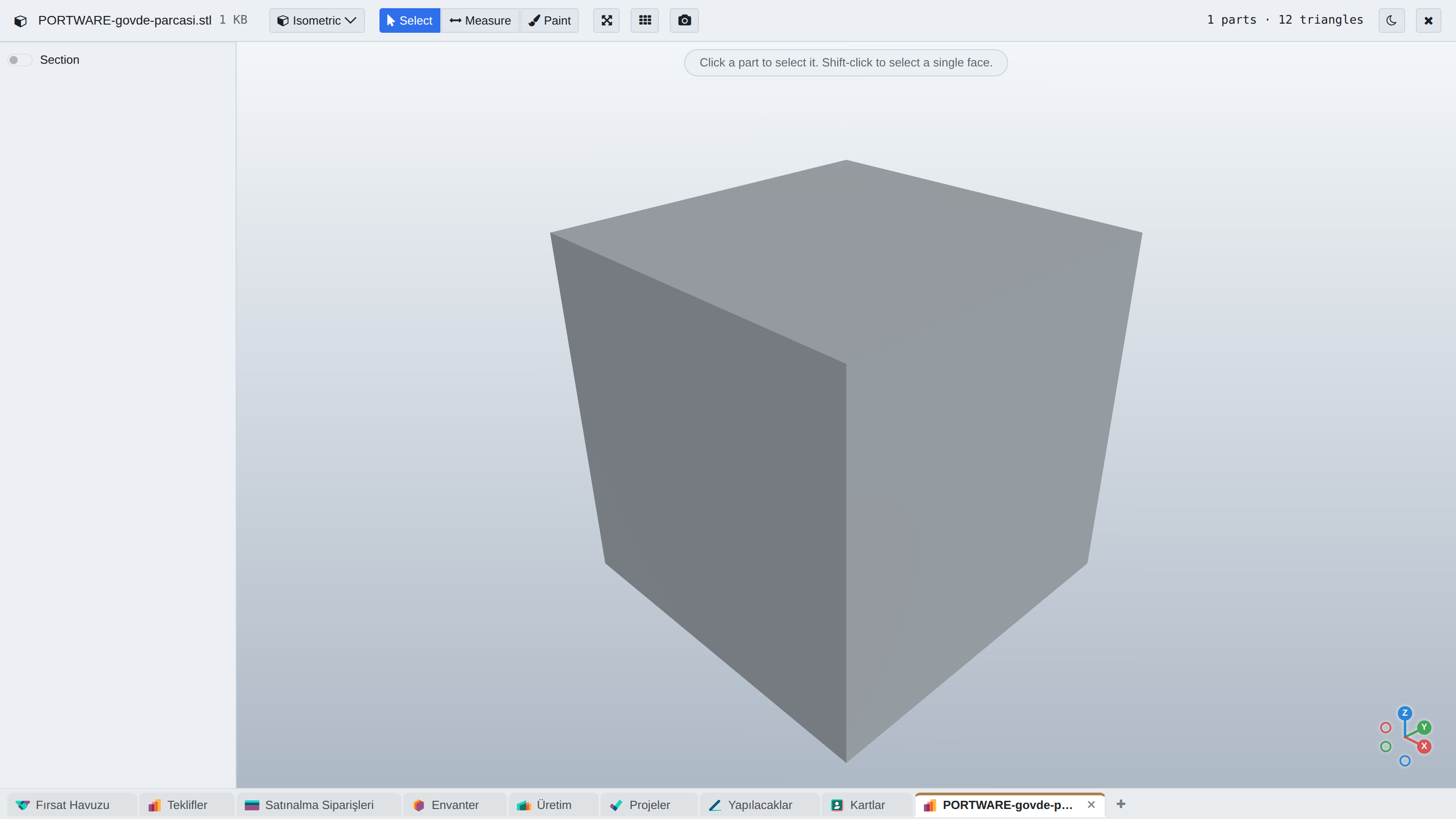
STEPDXFDWGSTL
The CAD viewer — a 3D model on the record.

Manufacturing

BILL OF MATERIALS

Managing bills of materials

What you gain: When a product changes, the wrong part is not used; it is clear which version is valid.

Standard BOMSingle or multi-level product structures.
Phantom BOMProduction without creating an intermediate product.
Kit BOMBundles, package sales, dynamic pricing.
OperationsRoutings, work centres, durations and costs.
RevisionsVersion comparison and change history.
PLM linkCAD files and engineering change orders.

Manufacturing

QUALITY

Checks, non-conformities, audits

What you gain: Quality is inside production rather than beside it: a work order does not advance past a failed check, and the non-conformity stays on the record.

Control pointsAutomatic checks at receipt, in production and before shipping.
Check typesMeasurements, qualitative values, photographic evidence.
Non-conformity (NCR)Recording, classification, decision and closure.
Corrective action (CAPA)Corrective and preventive action, root-cause analysis.
AuditsInternal and external audits, checklists, findings.
KPIsDefect rates, trends, supplier quality.

SECTION 4

Projects and service

Tasks · Time · Invoicing · Field service

Projects and service

PROJECT MANAGEMENT

The four phases of a project

What you gain: Where a project stands is known from its tasks in the system, not from guesses.

  1. 1
    PlanningDefining the project, assigning resources, setting the schedule.
  2. 2
    ExecutionAssigning tasks, tracking progress, working together.
  3. 3
    MonitoringGantt views, time tracking, reporting.
  4. 4
    CompletionDelivery, invoicing, closing review.

Projects and service

PROJECTS

From a task to an invoice

What you gain: Project hours walk into the invoice by themselves; no spreadsheet is carried by hand between effort spent and money billed.
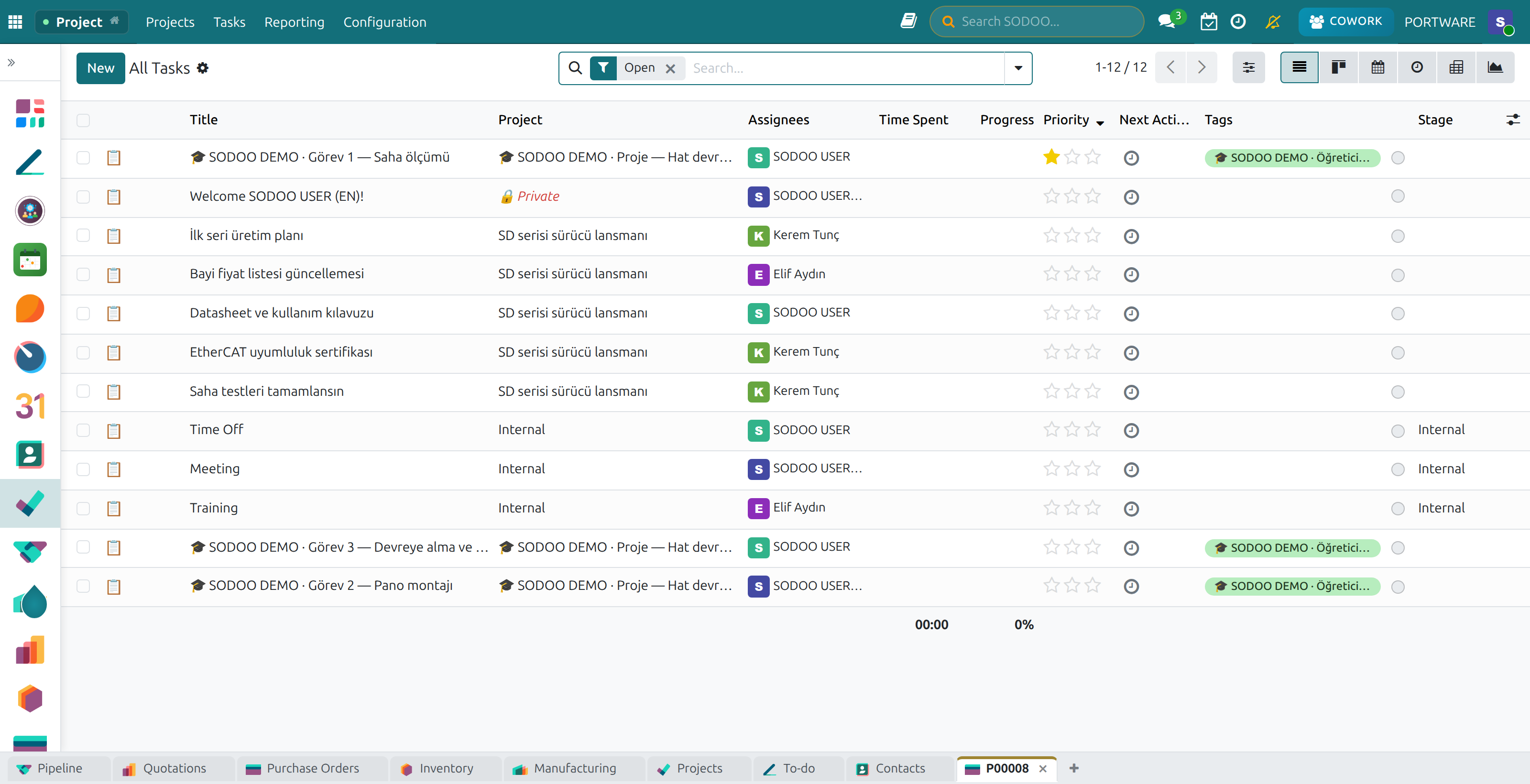
Project tasks — stages, assignments and progress.
Task managementKanban, list and calendar; sub-tasks and dependencies.
Time trackingTimesheets, billable hours, cost.
Resource planningTeam assignments, load balancing, conflict checks.
InvoicingTime-based or fixed price, tied to the contract.

Projects and service

OdooSODOO

PROJECTS · METHOD

Every project picks its own method

Scrum, Kanban, Waterfall or Stage-Gate. A project that chooses none sees no change at all — a method is a declaration, not an imposition.

What you gain: The Jira way of working, inside the ERP: sprints, releases and links — on the same data as working calendars, leave and timesheets.

SprintsWhat was promised, what is done and what is left — as charts.
Backlog boardDrag work into the coming periods.
Stage-GatePhase transitions need approval; the requester cannot approve.
Releases and componentsTarget and release dates kept apart; every component has an owner.
Typed linksRelates to, duplicates, causes — without moving the schedule.
Work item typesFrom the big goal to the small job: initiative, epic, story, task.

Projects and service

OdooSODOO

PROJECTS · SCRUM

From the backlog to the sprint

Drag a work card into a period; the totals always stay correct.

What you gain: The team plans together, by drag and drop, what it will do next.
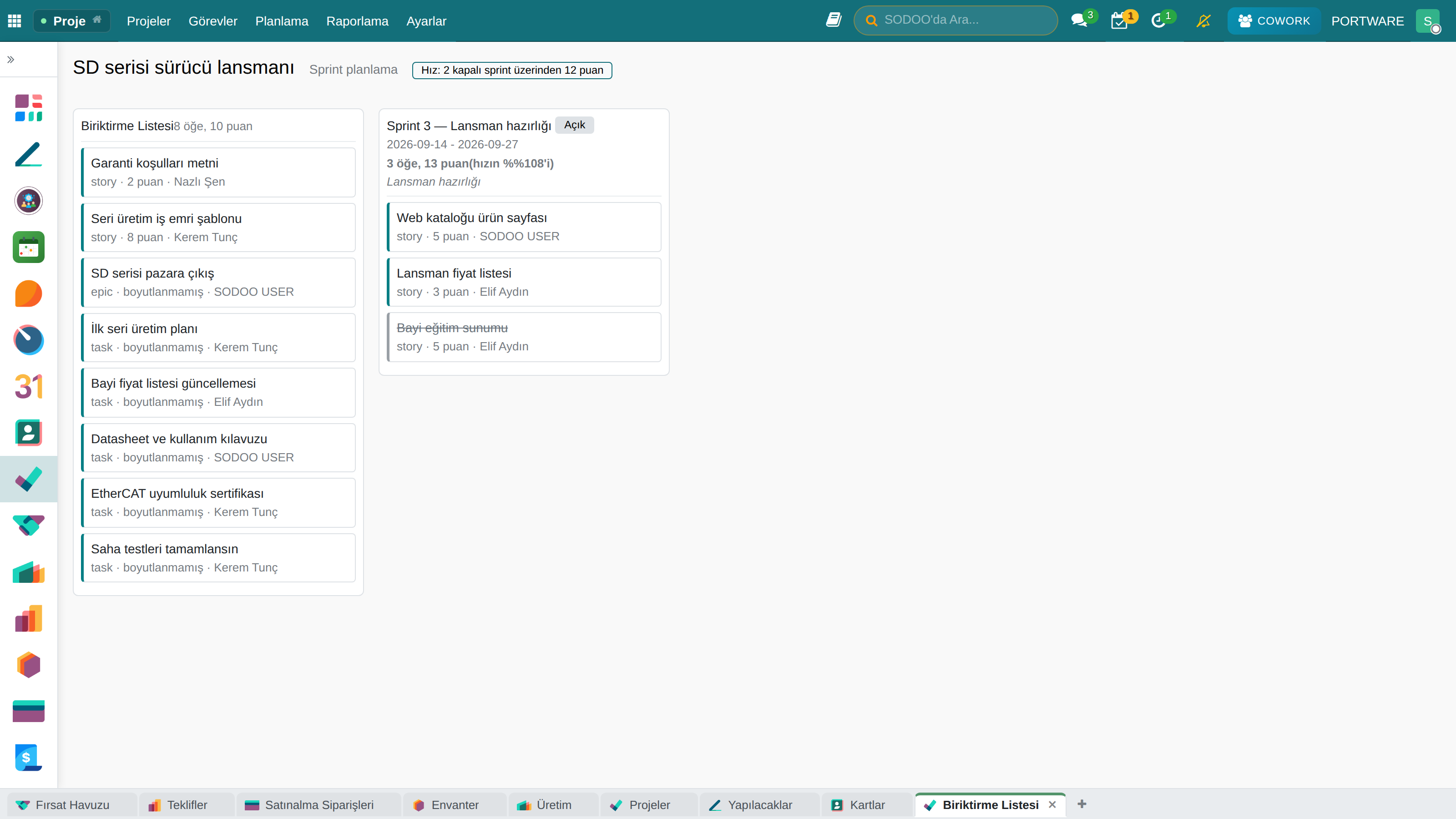
The backlog board — the SD series launch.

Projects and service

OdooSODOO

PROJECTS · PLANNING

Timeline and team workload

When work is assigned, the person's load for that week is in view. The Gantt view Community lacks was added as a real view type.

What you gain: The decision stays human — but it is made with the numbers in view. The warning never blocks an assignment.

TimelineSearch, filters, grouping; task and sub-task hierarchy.
Fits the working calendarWork dropped on a Friday lands on Monday, not the weekend.
Team WorkloadTasks, meetings, leave and public holidays, each shown apart.
Uncounted work is shownTasks without a window or hours are counted and named.
Project HealthOverdue work, the next milestone, remaining hours.
People AnalysisWho carries what — a pivot by assignee.

Projects and service

OdooSODOO

PROJECTS · PLANNING

The timeline

Each bar runs from a job’s start to its end; a job whose dates were estimated is hatched.

What you gain: When each job starts and ends, and what overlaps, is visible on one strip.
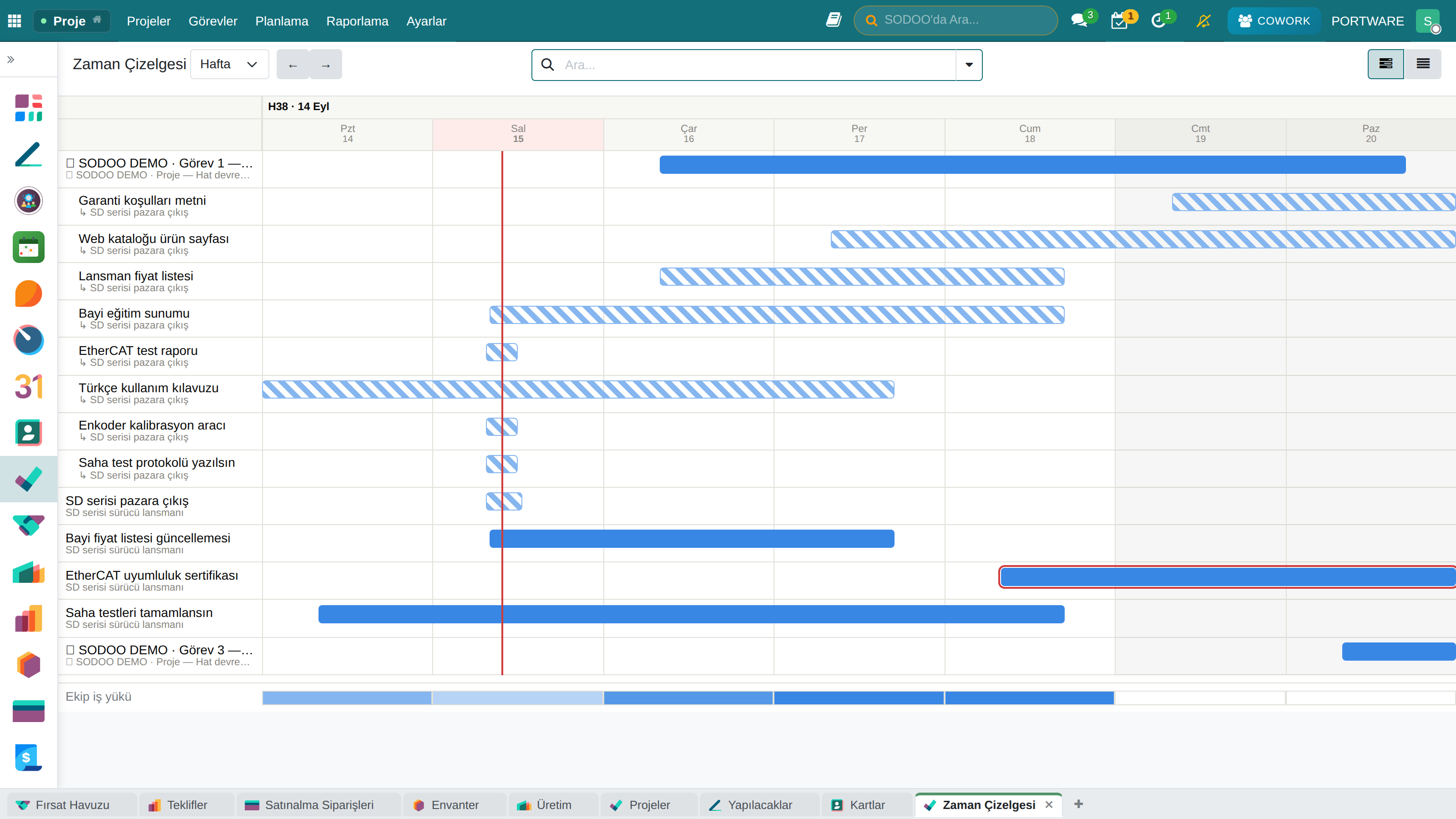
The timeline — week scale.

Projects and service

OdooSODOO

PROJECTS · CAPACITY

Team workload

Who is how full in which week — tasks, meetings, leave and holidays shown apart.

What you gain: You see how busy each person is before you overload anyone.
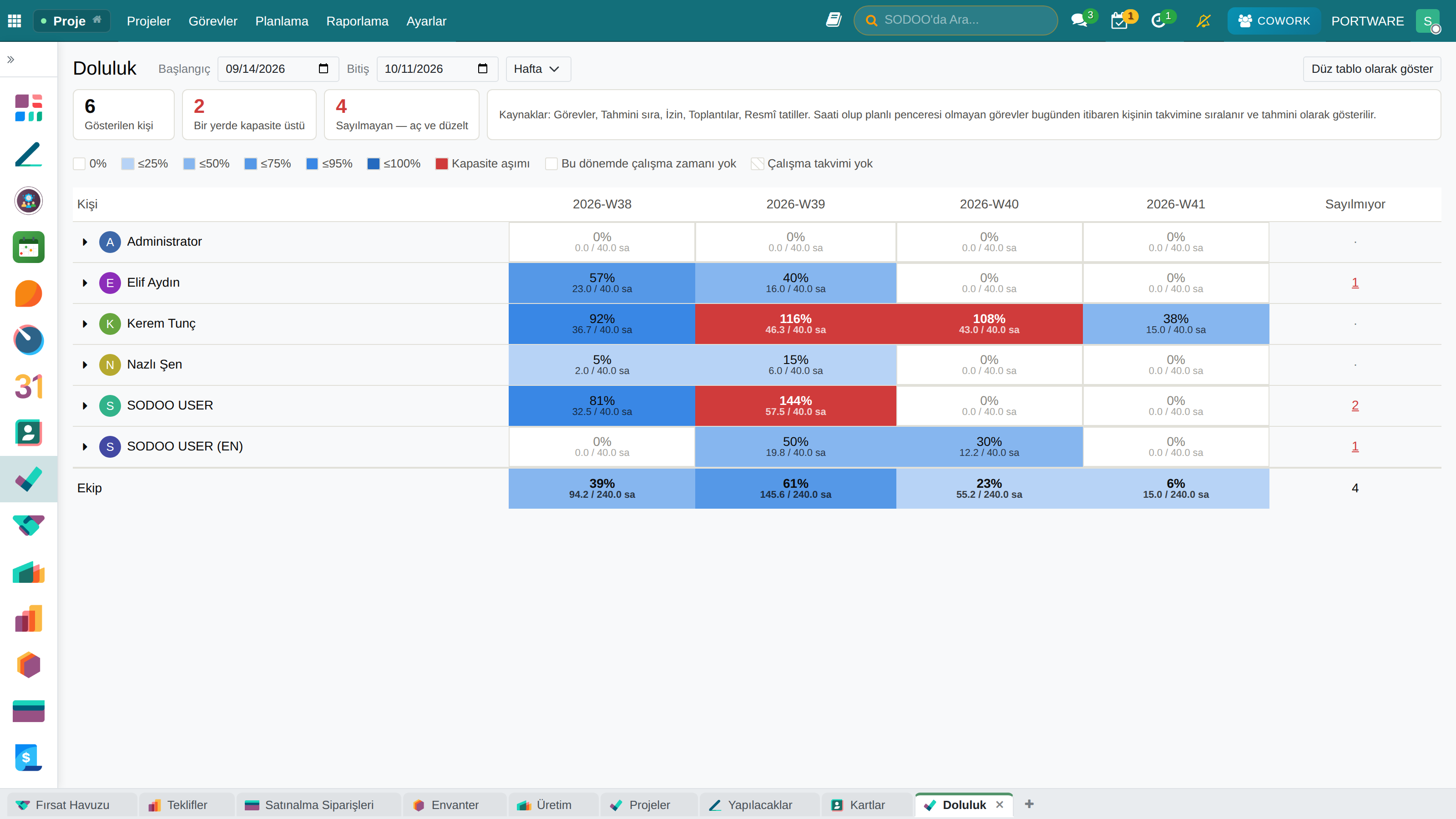
Team Workload — a four-week view.

Projects and service

MAINTENANCE

Equipment and field service

Three kinds of maintenance in one ledger: preventive, corrective and predictive.

What you gain: Maintenance accumulates on the equipment’s own history: faults, spare parts and cost all on the same asset record.

Preventive maintenanceScheduled periodic service and checklists.
Corrective maintenanceFault reports, prioritisation, repair.
PredictiveEarly warnings from sensor and usage data.
Equipment recordsAsset details, specifications, warranty tracking.
Work ordersAssignment, spare parts, duration and cost.
MobileWork orders, photos and signatures in the field.

SECTION 5

Finance and people

Accounting · Budgets and KPIs · OKR · e-Invoicing · Human resources

Finance and people

ACCOUNTING

Double-entry accounting

What you gain: Accounting is not a ledger typed up afterwards but the output of the work itself: the delivery produces the invoice and the invoice produces the entry.
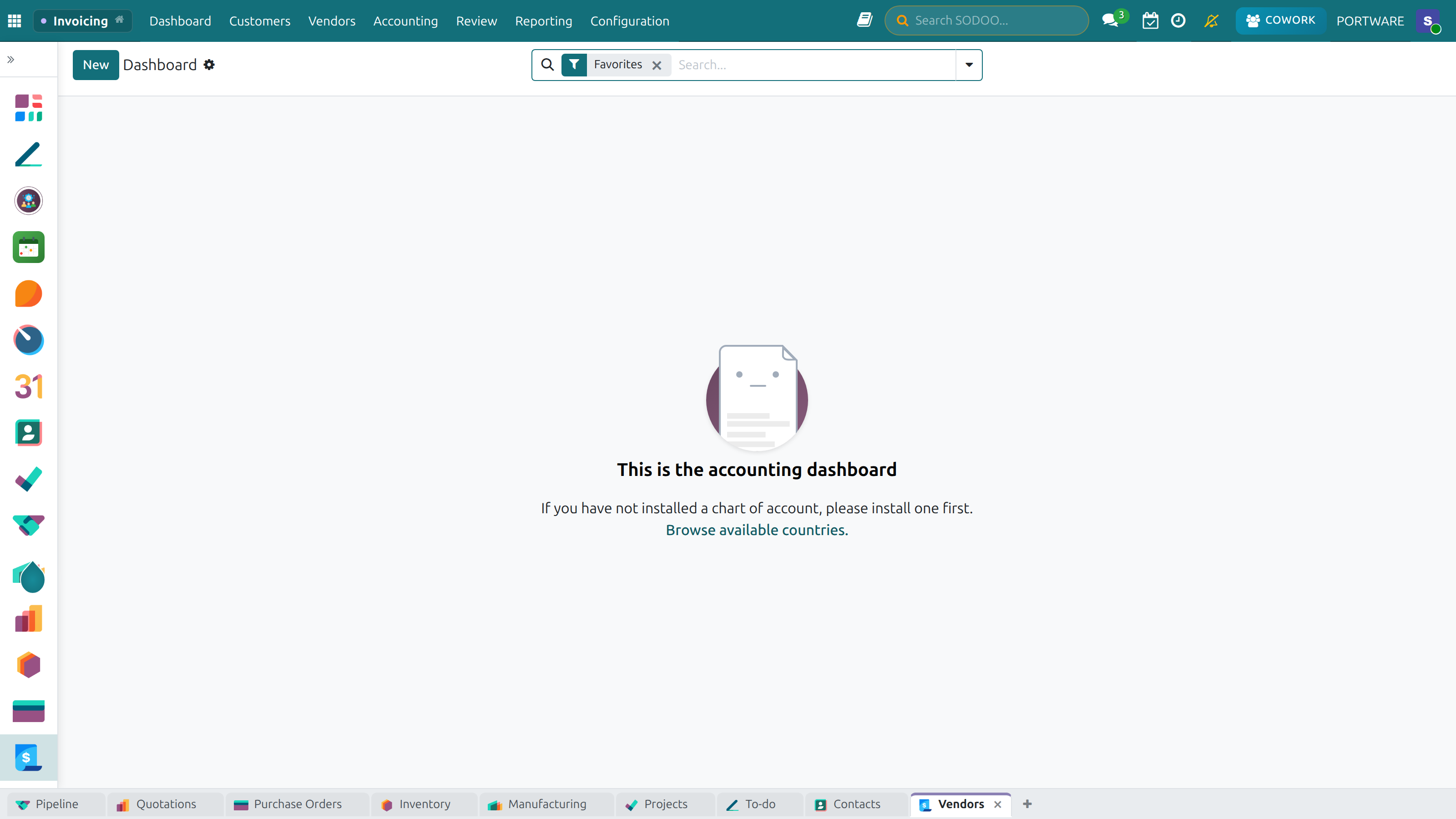
Accounting — invoices, payments and bank reconciliation.
Chart of accountsThe Turkish uniform chart of accounts, multi-company, customisable.
Invoice managementCustomer and vendor invoices, credit notes, e-invoicing.
PaymentsReceipts, payments, cheques and notes, bank reconciliation.
ReportingBalance sheet, income statement, trial balance, ageing.

Finance and people

OdooSODOO

FINANCE · PERFORMANCE

One number, one definition

Accounting answers “what happened?”; Finance answers “what should have happened, what will, and what do we do?”

What you gain: “Net sales” on the scorecard, the income statement and the budget are the same number. Meetings end in decisions, not arguments about figures.

Shared definitionsHow 65 figures are computed is defined once, for everyone.
Scorecard28 indicators in 6 categories; trend, target and status.
Financial statementsBalance sheet, income, cash flow, ratios — with a budget column.
See behind the numberClick a figure and the entries behind it open.
Undefined is not zeroAn unmeasured ratio shows a dash, never a fake zero.
Readiness screenSays what works and what is waiting for a decision.

Finance and people

OdooSODOO

FINANCE · SCORECARD

The scorecard: health on one screen

Every indicator with its value, twelve-month trend, target and where it is computed from.

What you gain: How the company is doing on one page: you can tell what is going well and what needs attention by its colour.
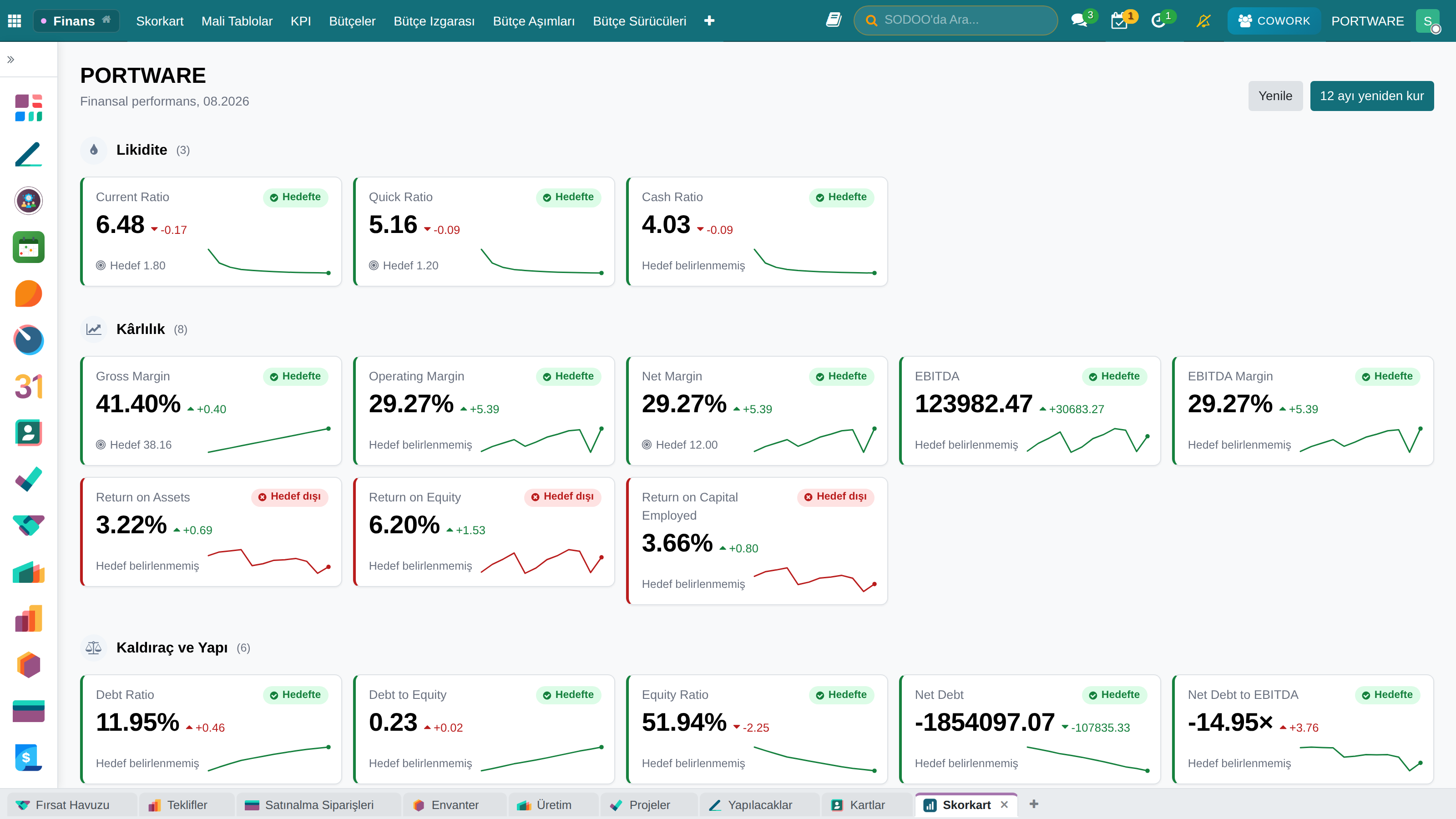
The scorecard — PORTWARE demo data.

Finance and people

FINANCE · BUDGET

Plan → control → analysis

A budget is not a forecast but an agreement — and it can stop a purchase.

What you gain: The system warns you before spending goes over budget — and can stop it if you want.

  1. 1
    PlanPlan income and costs month by month, and try different scenarios.
  2. 2
    Drive itUnits × price, heads × rate — “what if we sell 20% less?” is one cell.
  3. 3
    ApproveAn approved budget is read-only; a change is a new revision.
  4. 4
    ControlIf the budget would be exceeded, it warns or stops the order, bill or expense as it is entered.
  5. 5
    AnalysePlan versus actual, commitments and a 13-week cash projection.

Finance and people

OdooSODOO

FINANCE · BUDGET

The budget grid

Income and cost lines in rows, months in columns. Plan, actual and “what if?” scenarios in the same table.

What you gain: Plan and actual side by side; you see month by month where the gap comes from.
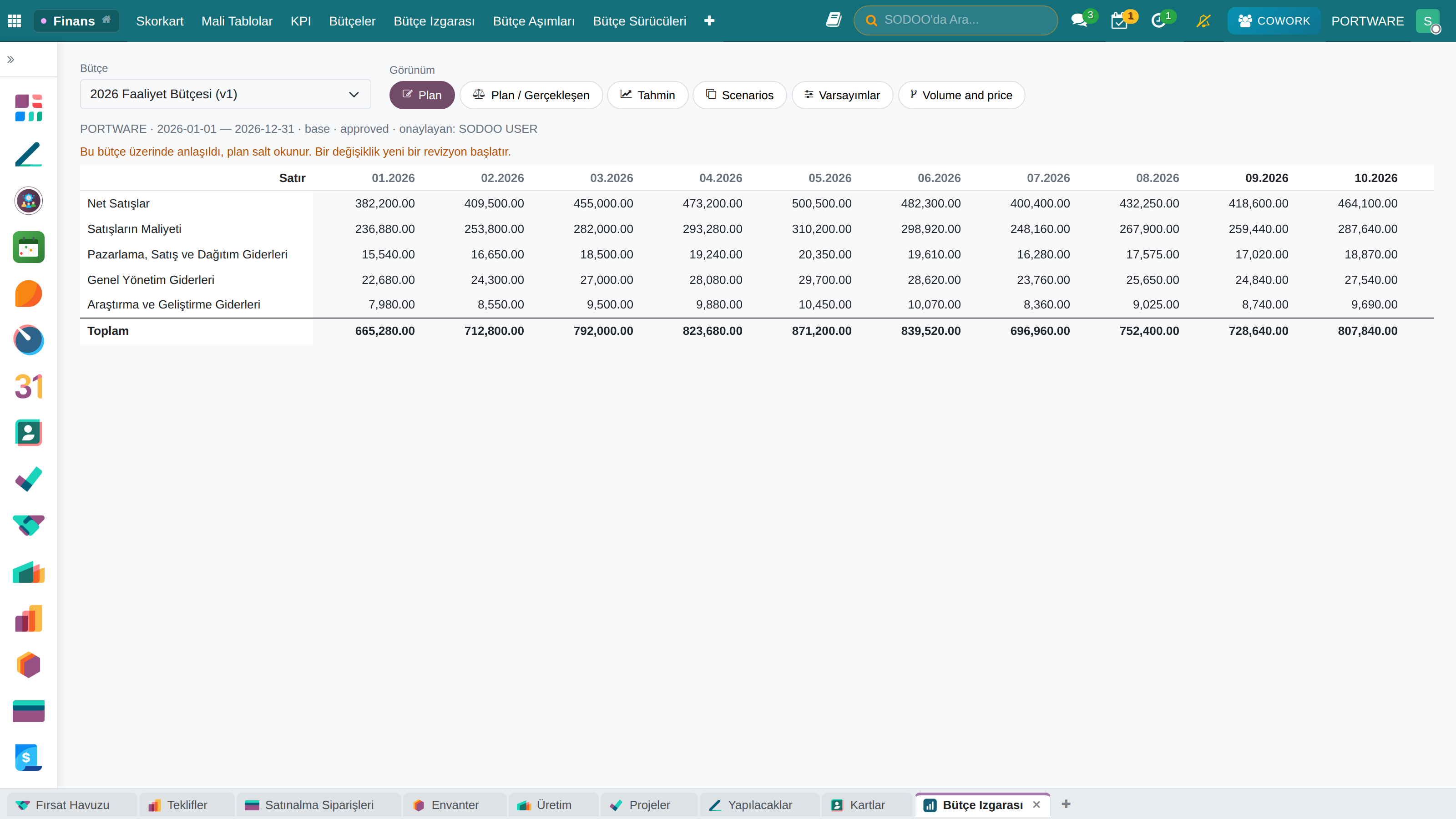
The budget grid — the approved 2026 base budget.

Finance and people

OdooSODOO

FINANCE · GOALS

From the goal to the number: OKR

Open to every employee — the financial statements are not. A key result can set the scorecard's target.

What you gain: Everyone knows which company goal their own goal serves.

Objective and key resultCompany, team and individual levels, aligned.
Scorecard KPIThe value is read from the scorecard, not typed in.
Publish the targetIt becomes the indicator's threshold for the cycle.
Progress is computedWorked out automatically from the key results.
Confidence is writtenOn track / At risk / Off track — the only early warning.
Close and scoreA closed cycle never reopens; history is evidence.

Finance and people

OdooSODOO

FINANCE · OKR

Alignment: who serves what

The bar shows how far along a goal is; the badge shows how confident the team is of reaching it.

What you gain: Which goals are on track and which are at risk shows up early.
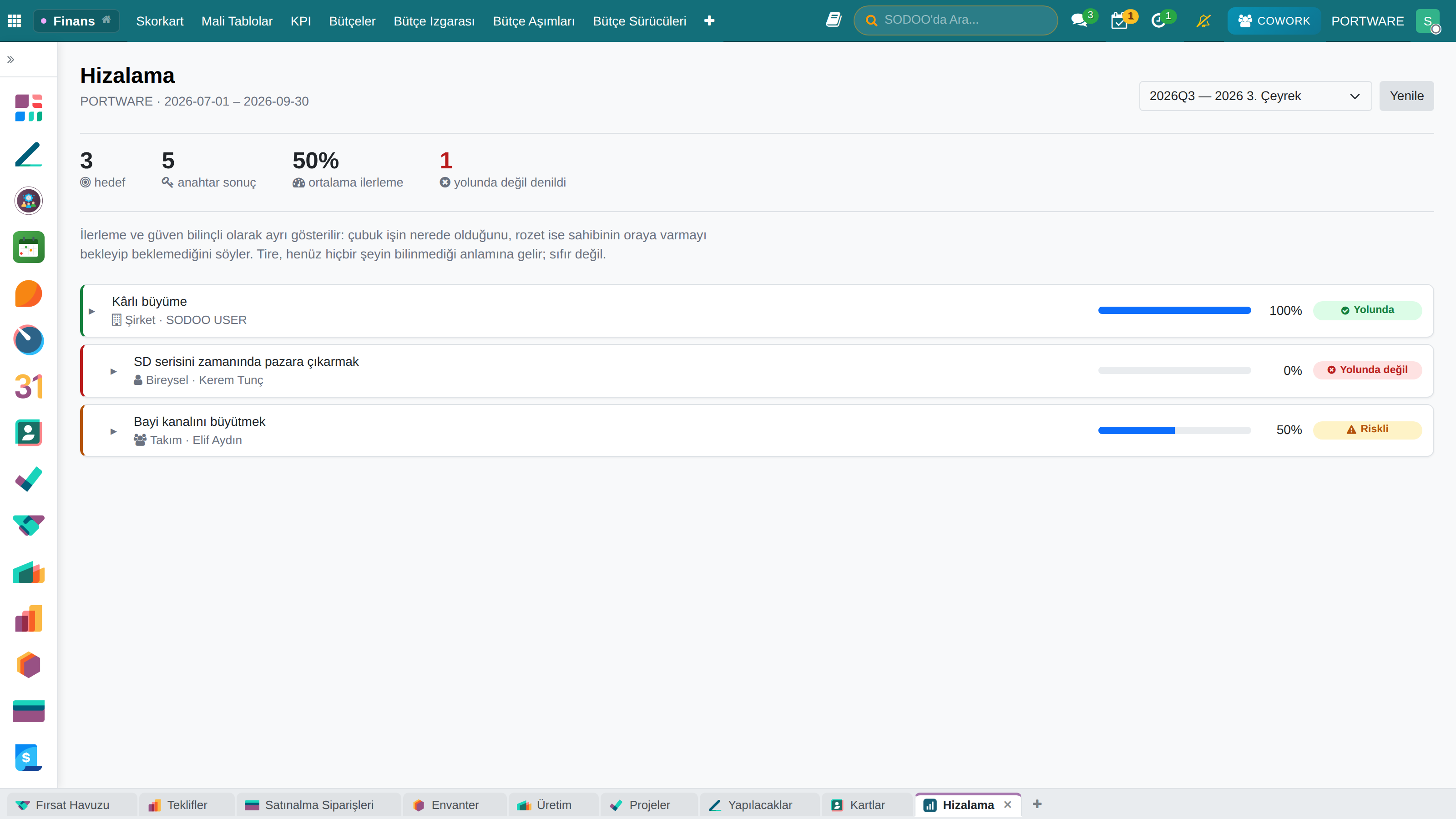
OKR › Alignment — Q3 2026.

Finance and people

TÜRKİYE e-INVOICING

Turkish localisation

The real cost of running a foreign ERP in Türkiye is usually not the licence — it is the missing localisation.

What you gain: e-Invoicing is not an add-on bolted on later: it lives where the invoice is born, and goes to the tax authority from there.

e-InvoiceApproved sending and receiving, scenario handling, integrator connectivity.
e-ArchiveConsumer invoices, digital archiving, PDF generation.
e-WaybillElectronic dispatch notes and chained deliveries.
e-ReconciliationAccount reconciliation and statutory BA/BS filings.

Uniform chart of accounts · tax offices · Turkish banks · withholding rules

Finance and people

HUMAN RESOURCES

The employee lifecycle

What you gain: One employee record from hiring to payroll: leave, hours and cost all accumulate on the same person.

RecruitmentJob posts, candidate tracking, interview scheduling, offers.
Employee recordsPersonal details, contracts, the organisation chart.
Time offAnnual leave, personal and sick leave, all self-service.
AttendanceHours, absences and shifts.
PayrollSalary calculation, deductions, payslips.
HR dashboardHeadcount, turnover, leave and cost metrics.

SECTION 6

Sales channels

Web · E-commerce · Marketing · Point of sale

Sales channels

WEB & E-COMMERCE

Your digital storefront

A drag-and-drop site builder and an online shop — the catalogue is fed by the ERP, with no second copy of the data.

What you gain: The site is fed by the ERP itself: stock, price and product information change in one place and appear in the storefront at once.

  • Drag-and-drop editor
  • Ready-made themes
  • SEO tooling
  • Multiple languages
  • Blog management
  • Form builder
E-commerce
  • Product catalogue
  • Cart and checkout
  • Shipping integration
  • Customer accounts
  • Order history
  • Live chat

Sales channels

MARKETING

Campaigns and automation

What you gain: Marketing runs from the CRM’s own database: a person the campaign brings in drops straight into the sales pipeline.

Email marketingBulk sending, templates, A/B tests, open rates.
SMSBulk SMS, message templates, campaign analysis.
Social mediaPost scheduling across platforms, with analytics.
SegmentationTarget audiences and dynamic lists.
AutomationTrigger-based flows and drip campaigns.
MeasurementConversion tracking and campaign profitability.

Sales channels

POINT OF SALE

Retail and restaurants

What you gain: The till is not cut off from stock and accounting: a sale drops stock at once and the receipt becomes an e-archive invoice.

Touch interfaceFast product search, barcodes, category browsing.
Payment methodsCash, card, mobile and split payments.
Receipts and invoicesAutomatic receipts, e-archive invoices, refunds.
Floor planVisual layout, reservations, merging tables.
MenuCategories, modifiers, price lists.
Kitchen displayOrders queue on the kitchen screen with preparation times.

Real-time stock sync · offline operation · shift and till closing

SECTION 7

Governance and decisions

Reporting · Permissions · Deployment · Roadmap

Governance and decisions

OdooSODOO

TRAINING

It ships with its own handbook

User training is not a PDF attachment: it is a book opened from inside the system that knows the section for every screen.

What you gain: A stuck user opens the explanation for the screen they are on with one click — less training effort.

39 chaptersFrom day one to development — finance and project training included.
This screen's chapterThe help button opens the page for the screen you are on.
Concept lessonsBudget and project management — independent of the product.
Real screensTaken from a demo company, carrying no personal data.
Full-text searchCtrl K across guides, the handbook and module pages.
Two languagesTurkish and English guides and presentation.

Governance and decisions

REPORTING

Data for decisions

Every screen carries its own report; there is no separate business-intelligence system to buy.

What you gain: A report comes from the record itself rather than a separate system — you can click through the number you see down to the rows behind it.

DashboardsKPI cards, real time, customisable.
Pivot analysisTurn data by rows and columns; click a number to see the detail.
Standard reportsPredefined, exportable to PDF and Excel.
Scheduled reportsDistributed periodically by email.
Saved filtersPersonal and shared views.
Analysis with CoworkHave it read the table, summarise it, and explain the outlier.

Governance and decisions

PERMISSIONS AND SECURITY

Who sees what

Access control is not just hiding a screen: records are protected at the rule level, and every change leaves a trace.

What you gain: Everyone sees only what their job needs, and who changed what is always known.

Roles and groupsUsers join groups and groups imply one another; access is inherited rather than copied.
Record rulesOn the same screen different users see different rows — by company, team or ownership.
Multi-companyCompanies keep separate books, share common records, and are consolidated in reporting.
Audit trailWho changed what and when — in the record’s chatter, and not erasable.

Governance and decisions

DEPLOYMENT AND OPERATIONS

Where it runs and how it is kept

What you gain: The system and the data stay under your control, and upgrades do not stop your work.

HostingOn your own server or in the cloud; the data and the backups stay with you.
DatabasePostgreSQL. The schema is open — you can query it directly.
Backup and recoveryDaily backups including the filestore; recovery is verified by rehearsal.
UpgradesVersioned per module; a change runs on a copy first and only then reaches production.

Localised deployment, training and support are provided by SMB TECHNICS.

Governance and decisions

MEASUREMENT

Not a claim — a count

These are not marketing figures: they are counted by the documentation tooling as it scans the installed system, and they are recomputed every time the docs are built.

What you gain: The figures are not marketing promises; they are counted from the system itself.

180documented modules
315data models
235web routes
6.457automated tests

Governance and decisions

ROADMAP

How a rollout starts

An ERP is not switched on all at once. The order starts with the process that hurts most, and every step is left working on its own.

What you gain: You do not change everything at once: you start with the process that hurts most and move step by step.

  1. 1
    DiscoveryMapping current processes, agreeing priorities and scope.
  2. 2
    Setup and dataChart of accounts, products, partners and opening balances.
  3. 3
    PilotOne process goes live on real data and is measured.
  4. 4
    RolloutThe remaining modules in sequence, each with training and a checklist.
  5. 5
    OperationsSupport, upgrades and improvement — the system is not frozen, it keeps evolving.

Thank you

For your questions:

info@smbtechnics.com

SODOO v19.0 · SMB TECHNICS (A-GRUP)

TR 1 / 1

Click a slide to go there · press Esc to close